
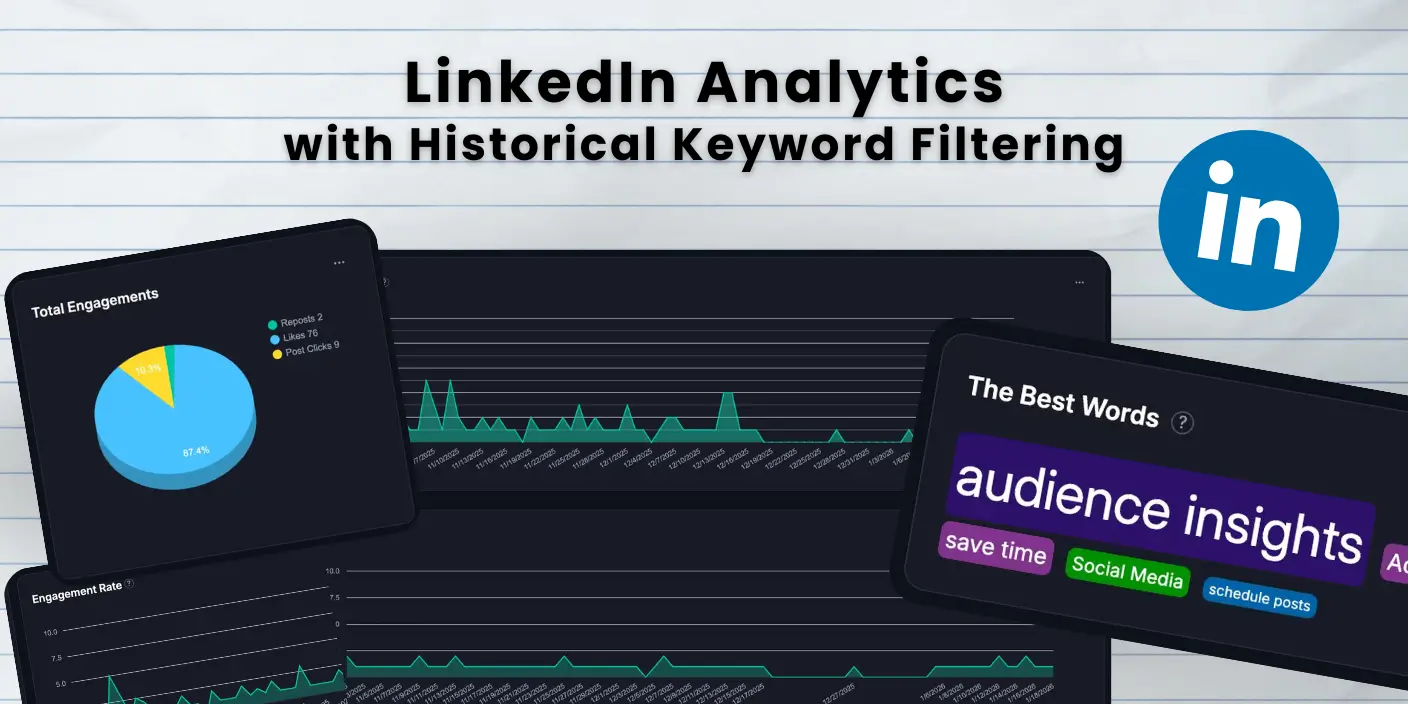
LinkedIn analytics help you understand what content works on LinkedIn, but you can check LinkedIn analytics, schedule posts to LinkedIn, and measure multi-platform performance all from within Fedica. More people are using LinkedIn recently, and most people are often on multiple platforms too. This means managing LinkedIn analytics separately from your other platforms creates unnecessary complexity. LinkedIn is always a huge opportunity because everybody needs it. Everybody has an account, and keeping it consistent is a great way to become a thought leader in your own niche.
Instead of switching between multiple tools, you can access LinkedIn analytics, Twitter analytics, Instagram, Facebook, Mastodon, TikTok, Threads analytics, and Pixelfed analytics all from Fedica. Each platform has its own page, so you can see what resonates on LinkedIn versus other platforms, schedule content efficiently, and make data-driven decisions without juggling separate tools.
Key Takeaways
- Check LinkedIn Company Page analytics, schedule posts, and measure multi-platform performance all from within Fedica. Each platform has its own page, so you can access all your platforms without switching between multiple tools.
- Compare LinkedIn performance to other platforms in Fedica by switching between platform analytics pages to see what content works where and make smarter strategy decisions.
- Get free LinkedIn post scheduling with advanced tools including content pipelines, media library, and cross-platform customization with no monthly fees.
- Access advanced LinkedIn analytics features beyond native tools: see follower count, engagement overview with charts, top posts breakdown, top topics showing which topics get the most engagement, and filter by historical time frame, content pipeline queue, keywords, engagements, and sentiment.
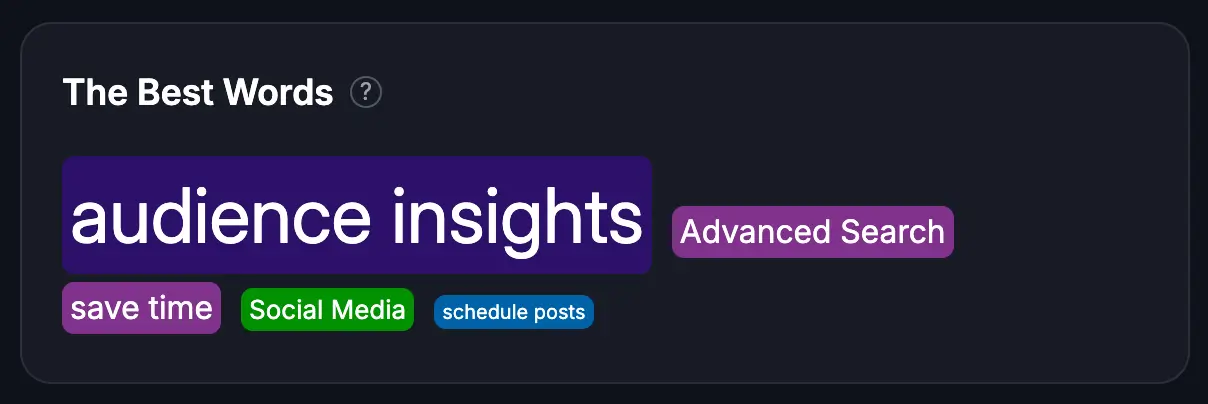
- The Best Words top topics showing which topics get the most engagement, giving you a clear view of the best topics to post about more.
- Combine analytics with scheduling in one platform to schedule LinkedIn posts and track their performance without switching between separate tools.
Table of Contents
- How to View LinkedIn Company Page Analytics Insights
- Why You Need Advanced LinkedIn Analytics Insights
- How to Access LinkedIn Analytics Alongside Other Platforms
- How to Track LinkedIn Performance Over Time
- What is the Best Way to Measure LinkedIn?
- How to Schedule LinkedIn Posts with Free Advanced Tools
- LinkedIn Analytics Summary: Key Insights and Action Items
How to View LinkedIn Company Page Analytics Insights
You can view LinkedIn insights through native LinkedIn Analytics. For Company Pages, go to your Page admin view and click Analytics in the left menu. For Personal Profiles, click the Me icon, then View Profile, and scroll to the Analytics section.
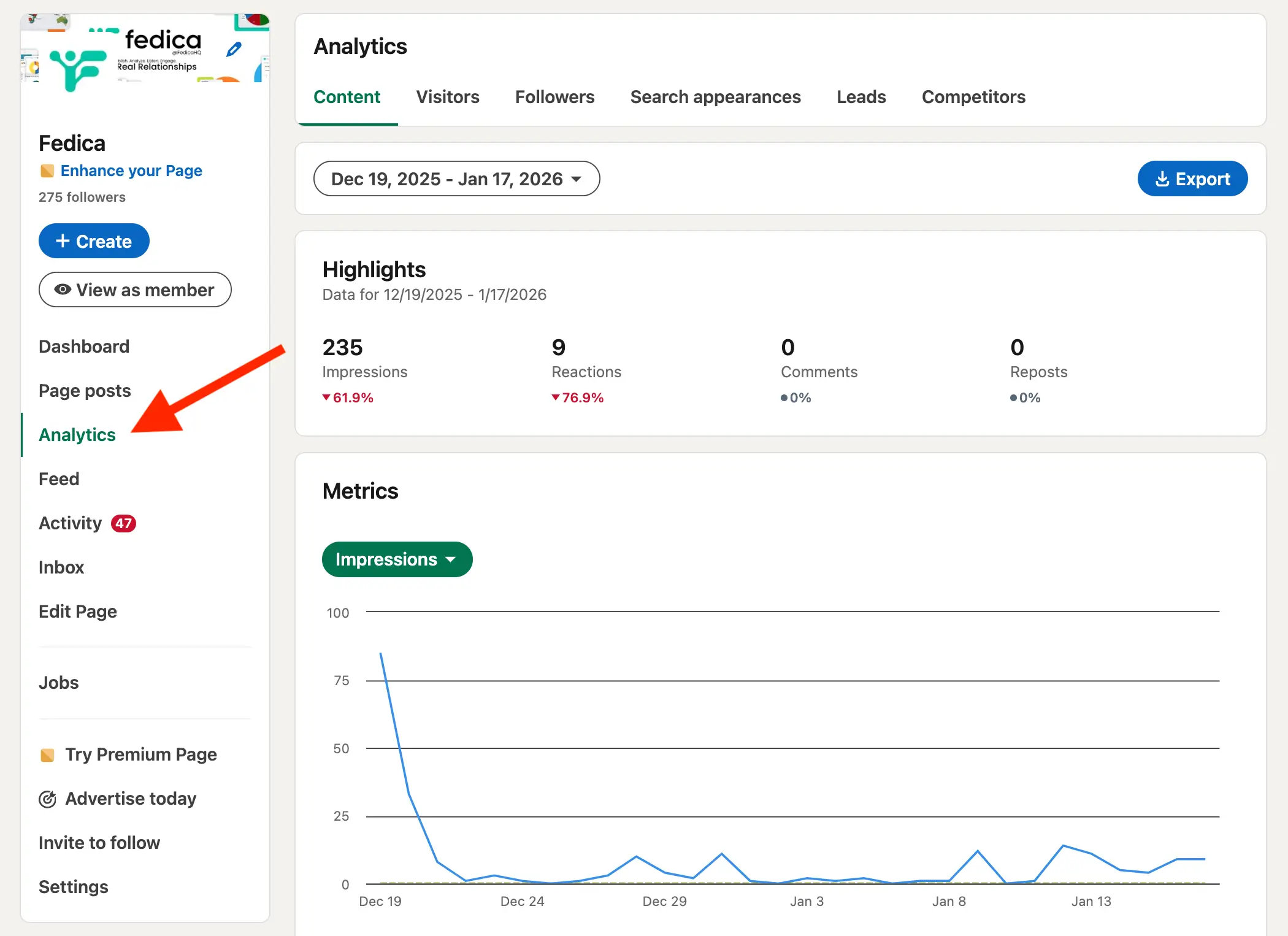
For Company Pages, you’ll see sections for:
- Content
- Visitors
- Followers
- Search Appearances
- Competitors
For Personal Profiles, you can see post impressions and total followers.
Third-party tools like Fedica provide enhanced LinkedIn insights:
- Historical data for any time frame
- Filter by content pipeline queue, keyword in posts, engagements, and sentiment
- Sort all posts ascending or descending by any engagement metric
See how LinkedIn performance fits into your overall social media strategy by accessing your LinkedIn analytics page alongside your other platform pages. This cross-platform analytics approach helps you understand how LinkedIn contributes to your overall social media goals compared to your other active platforms.
Pro tip: Use Fedica to access your LinkedIn analytics page and compare it to your other platform pages. Check The Best Words top topics to see which topics drive the most engagement on LinkedIn versus other networks, then optimize your content strategy accordingly.
LinkedIn Analytics Dashboard: Complete Overview and Key Features
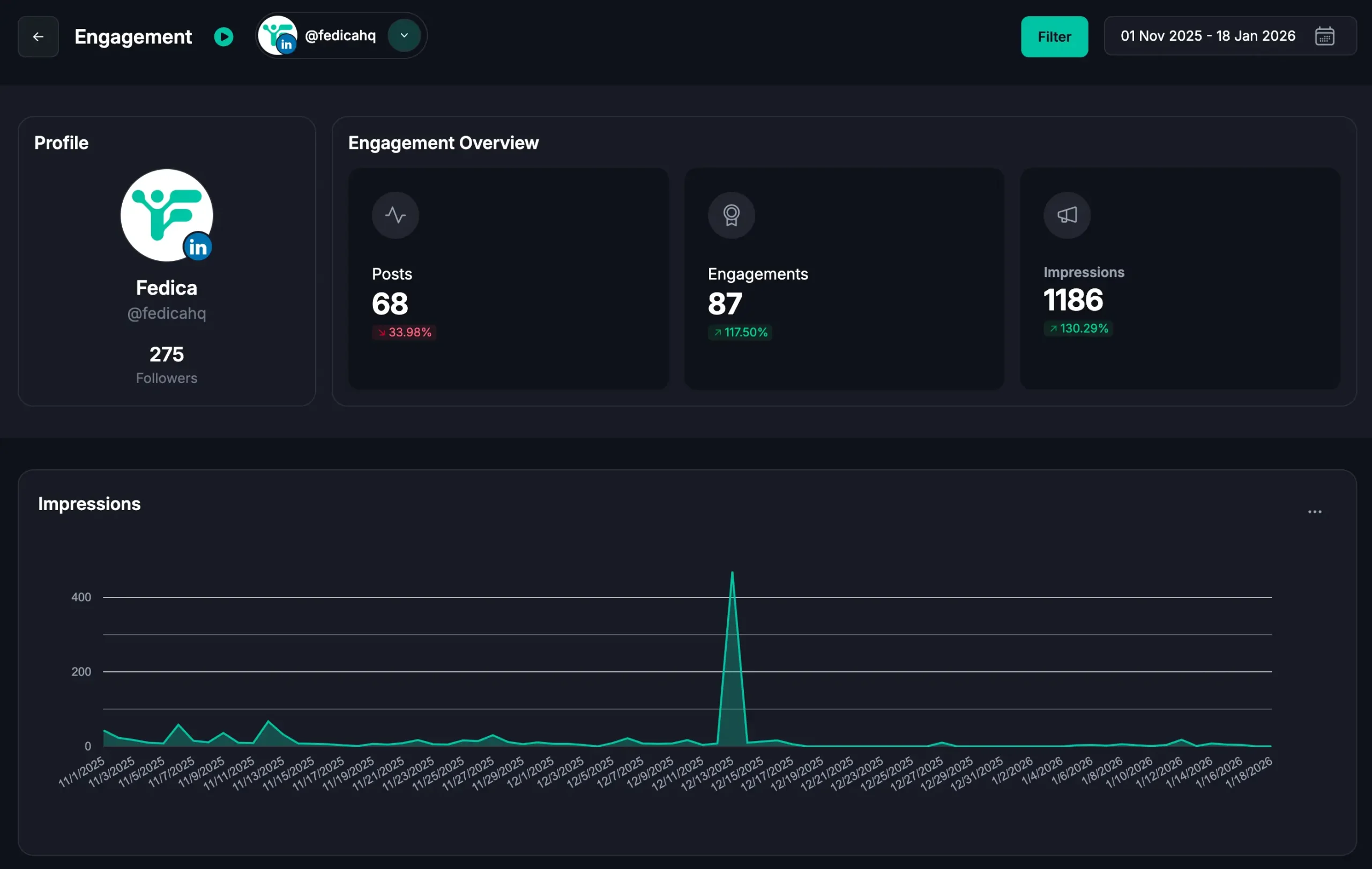
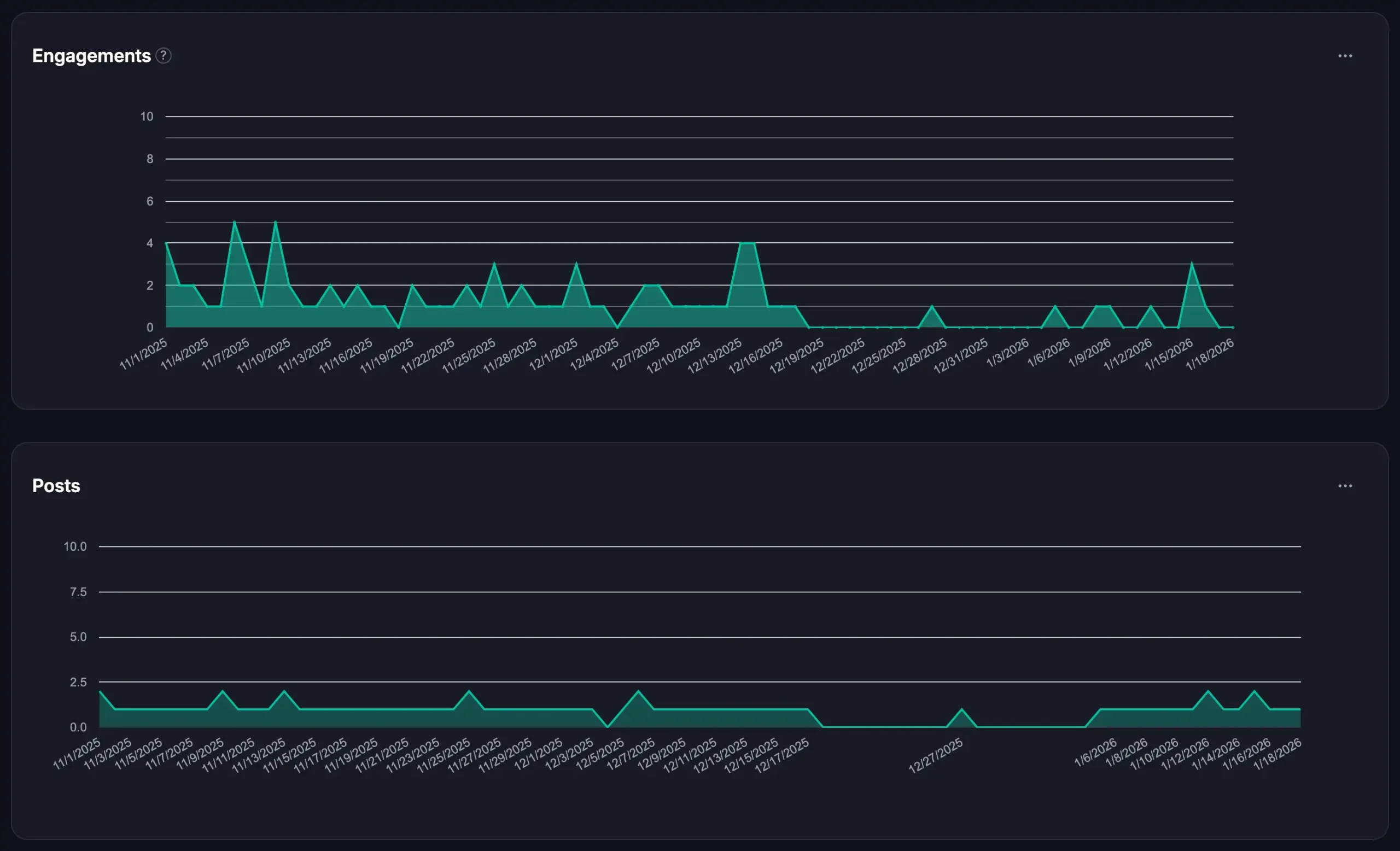
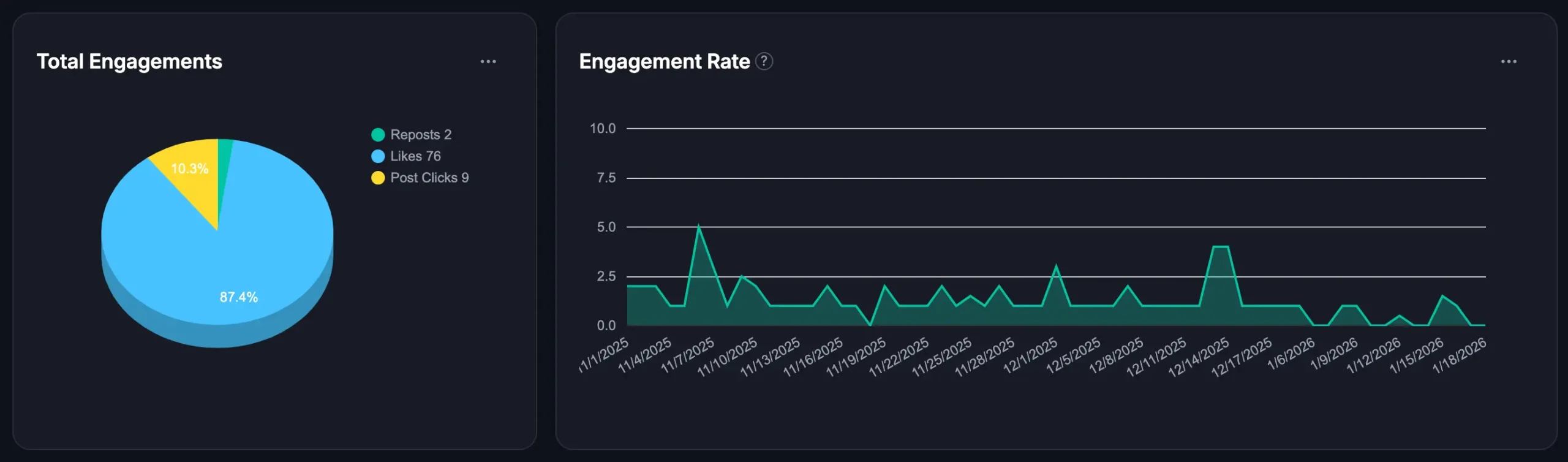
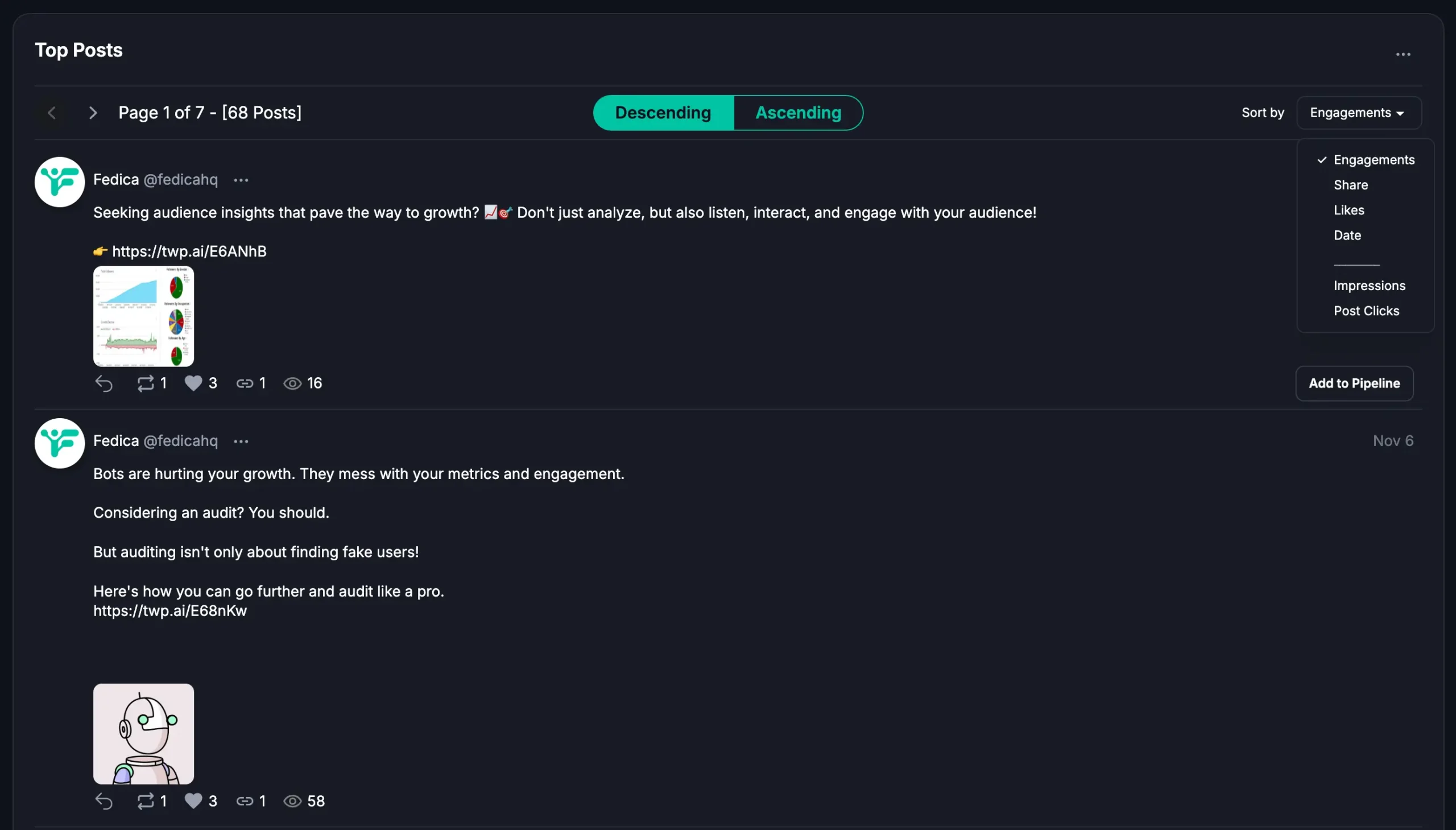

Fedica’s LinkedIn analytics page shows you comprehensive engagement data:
- Follower count
- Engagement overview including post count, engagements count, and impressions count
- Impressions line charts
- Engagements line charts
- Post line charts
- Total engagements pie chart breakdown showing likes, post clicks, and more
- Engagement rate line chart
- Top posts breakdown showing replies, reposts, likes, link clicks, and impressions count for each post
- Sortable posts ascending or descending by any engagement metric
You can filter all your Company Page’s analytics by:
- Historical time frame (any time frame)
- The Best Words top topics showing which topics get the most engagement
- Content pipeline queue
- Keyword in posts
- Engagements
- Sentiment
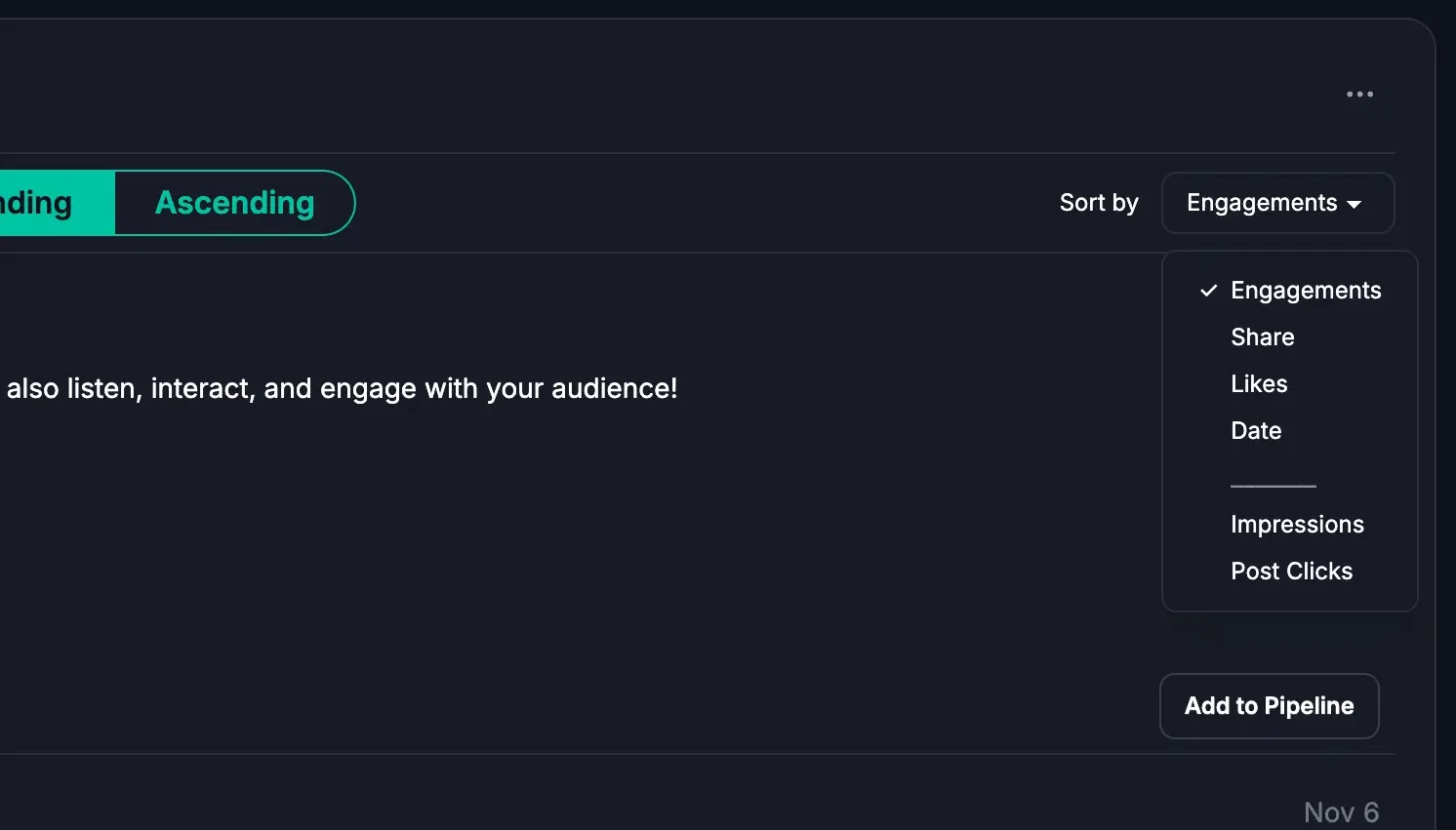
This helps you find exactly what you’re looking for and understand what resonates with your LinkedIn audience. When you need to present this data to stakeholders or track performance over time, Fedica’s social media reporting features help you compile LinkedIn analytics into comprehensive reports alongside your other platform metrics.
The real advantage comes from being able to compare different platform analytics in Fedica. Fedica provides separate analytics pages for each platform. You can switch between your LinkedIn analytics page and your Twitter, Instagram, or other platform pages to see what your community likes on LinkedIn versus what works on other platforms. This helps you understand platform differences. When you track cross-platform analytics, you can tailor your content strategy accordingly with data-driven insights by comparing performance across your platform pages.
Why You Need Advanced LinkedIn Analytics Insights
You need advanced LinkedIn analytics insights to get a clearer picture of your professional online presence. Combine LinkedIn analytics with data from other platforms, especially when managing multiple social media accounts. Most people are on multiple platforms. Managing each platform’s analytics separately means you’re working with fragmented data that doesn’t tell the full story.
When you’re evaluating social media manager tools, look for ones that unify your analytics across platforms rather than forcing you to check each one separately. Everyone has a LinkedIn account. Keeping your LinkedIn presence consistent is a great way to become a thought leader in your own niche. But you need the right analytics to understand what’s working.
Native LinkedIn analytics only show you what’s happening on LinkedIn. They don’t help you compare LinkedIn performance to other platforms. When you check LinkedIn analytics separately from your other platforms, you’re missing the bigger picture. You can’t easily make strategy decisions that consider all your platforms together.
Fedica provides separate analytics pages for LinkedIn, Twitter, Instagram, Facebook, Mastodon, TikTok, Threads, and Pixelfed. Instead of switching between multiple tools, you can access all your platform analytics from one place.
Switch between platform pages to see what content works where. You can compare different platform analytics in Fedica and make strategy decisions based on complete data by switching between your platform pages.
Track Analytics on LinkedIn and other platforms
from one scheduling and management tool.
How to Access LinkedIn Analytics Alongside Other Platforms
Fedica provides separate analytics pages for each platform. You can switch between analytics pages for LinkedIn, Twitter, Facebook, Instagram, Mastodon, TikTok, Threads, and Pixelfed with a single click. Each platform has its own page, so you can compare different platform analytics in Fedica by switching between pages to spot trends and understand what works on each platform. Make smarter strategy decisions because you can access all your platform data from one place.
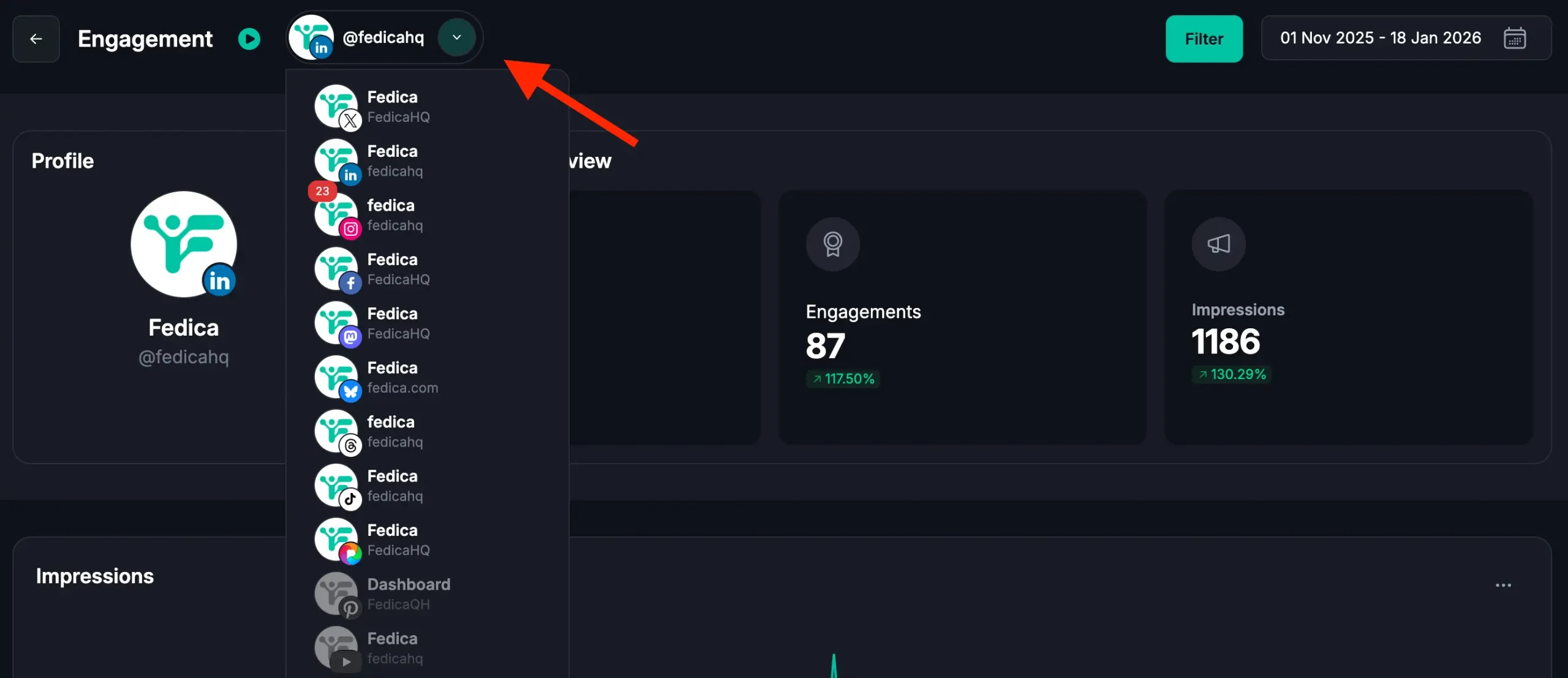
All your platform analytics are accessible from one place. You get multi-platform data access without juggling multiple tools or tabs. Real-time updates keep you informed across all platforms. You save costs by using one tool instead of paying for multiple platform-specific services. This unified approach of combining analytics, scheduling, and reporting in one platform is why Fedica ranks among the best social media manager tools for agencies and businesses managing multiple platforms.
Fedica also provides scheduling alongside analytics. You can analyze LinkedIn performance on the LinkedIn analytics page and schedule posts to LinkedIn and other platforms from the scheduling interface. Advanced scheduling features include:
- Precision timing
- Smart content pipelines
- Cross-platform customization
- Engagement boosters
- RSS feed automation for multiple platforms
You can do all of this without switching between separate tools.
Filter LinkedIn analytics by keyword.
How to Track LinkedIn Performance Over Time
Fedica’s LinkedIn analytics page helps you track performance over time with historical data for any time frame. You can see impressions line charts, engagements line charts, and post line charts to track trends over time. The engagement rate line chart shows how your engagement performance changes over time. Filter by historical time frame to analyze specific periods.
The top posts breakdown shows replies, reposts, likes, link clicks, and impressions count for each post. Sort posts ascending or descending by any engagement metric to identify your best and worst performing content. This helps you understand what content drives engagement versus what gets less interaction.
The Best Words top topics feature shows you which topics get the most engagement, giving you a clear view of the best topics to post about more. This helps you focus your content strategy on what actually resonates with your LinkedIn audience
Use the filtering options to dig deeper into your data:
- Filter by content pipeline queue to see how scheduled content performs
- Filter by keyword in posts to find content about specific topics
- Filter by engagements or sentiment to understand what resonates with your LinkedIn audience
What is the Best Way to Measure LinkedIn?
The best way to measure LinkedIn is by combining native LinkedIn metrics with advanced measurement tools. Native metrics include engagement rate, follower growth, and content performance. Advanced tools like Fedica provide deeper insights than native tools through comprehensive analytics and filtering.
Fedica helps you measure LinkedIn effectively by showing:
- Follower count
- Engagement overview with post count, engagements count, and impressions count
- Impressions line charts
- Engagements line charts
- Post line charts
- Total engagements pie chart breakdown
- Engagement rate line charts
- Top posts breakdown showing replies, reposts, likes, link clicks, and impressions count for each post
- The Best Words top topics showing which topics get the most engagement
- Sort posts by any engagement metric to identify your best performers
Use filtering to measure specific aspects of your LinkedIn performance:
- Filter by historical time frame to track trends over time
- Filter by keyword in posts to measure content about specific topics
- Filter by engagements or sentiment to understand what resonates
Plus, you can compare LinkedIn metrics to your other platforms in Fedica by switching between platform pages to understand what’s working best overall.
How to Schedule LinkedIn Posts with Free Advanced Tools
Fedica’s LinkedIn scheduling tools eliminate manual posting while maximizing reach. You get free LinkedIn post scheduling with advanced tools included:
- Posts calendar showing all your scheduled content in one view
- Time-specific scheduling down to the exact second for optimal timing
- Content pipelines that organize and automate your content workflow
- Media library that stores your images and videos for easy access
- Upload text and images to drafts or directly to your content calendar for streamlined content creation
You can schedule LinkedIn posts alongside Twitter, Instagram, Facebook, Mastodon, TikTok, Threads, and Pixelfed posts from the same interface. Customize messages for each platform while scheduling them together. Add alt-text support for accessibility.
This free scheduling combined with LinkedIn analytics means you can schedule LinkedIn posts and track their performance on the LinkedIn analytics page without paying monthly fees or switching between separate tools. Everything works together in one platform, making LinkedIn management simpler and more efficient.
Filter LinkedIn analytics by keyword,
schedule across platforms.
LinkedIn Analytics Summary: Key Insights and Action Items
Fedica gives you comprehensive LinkedIn analytics on the LinkedIn analytics page, plus access to analytics for all your other platforms. More people are using LinkedIn recently. Most people manage multiple platforms. Having all your platform analytics accessible from one place eliminates the complexity of juggling separate tools. It provides analytics alongside smart scheduling. You can schedule LinkedIn posts and track their performance on the LinkedIn analytics page without switching tools.
The LinkedIn analytics page shows you:
- Follower count
- Engagement overview with charts
- Top posts breakdown with sortable metrics
- Filtering by historical time frame, content pipeline queue, keywords, engagements, and sentiment
This multi-platform approach helps you see what works where by switching between platform pages and make smarter decisions about where to focus your efforts. Advanced scheduling features include:
- Content pipelines
- Media libraries
- Time-specific scheduling
Everything works together in one platform.
You can track performance over time using historical data for any time frame, identify trends through line charts, and plan content strategically based on actual engagement data from your top posts breakdown. The Best Words top topics feature gives you a clear view of which topics get the most engagement, so you know exactly what to post about more to maximize your LinkedIn performance
Frequently Asked Questions
How do I see LinkedIn Analytics?
For Company Pages, go to your Page admin view and click Analytics in the left menu. For Personal Profiles, click the Me icon at the top of your LinkedIn homepage, then View Profile, and scroll to the Analytics section. Native LinkedIn analytics show basic metrics, but third-party tools like Fedica provide enhanced LinkedIn insights with the ability to compare different platform analytics in Fedica, historical data, and advanced filtering capabilities.
What is the LinkedIn Analytics?
LinkedIn Analytics measures your page’s impact by tracking:
- Impressions
- Followers
- Clicks
- Shares
- Comments
- And more
It provides data to inform your content strategies and understand what content engages your audience. Native LinkedIn analytics are limited to LinkedIn only, but tools like Fedica extend LinkedIn analytics with advanced filtering and the ability to access analytics for all your social platforms from one place.
Where is the Analytics tab on LinkedIn?
For Company Pages, the Analytics tab is in the left menu of your Page admin view. For Personal Profiles, analytics appear in the Analytics section when you view your profile. The location varies depending on whether you’re using a Company Page or Personal Profile, and mobile access is more limited than desktop. Fedica provides separate analytics pages for each platform that work consistently across devices, so you can access LinkedIn analytics and your other platform analytics from one place.
Is LinkedIn Analytics free?
Native LinkedIn analytics are free for both Company Pages and Personal Profiles. However, they’re limited to LinkedIn only and don’t let you compare different platform analytics. Third-party tools like Fedica offer free LinkedIn analytics with enhanced features including:
- Follower count
- Engagement overview with charts
- Top posts breakdown
- The Best Words top topics showing which topics get the most engagement
- Historical data for any time frame
- Filtering by content pipeline queue, keywords in posts, engagements, and sentiment
- Free LinkedIn post scheduling
You can access LinkedIn analytics and all your other platform analytics from one place.
How to Access LinkedIn Analytics Insights?
Access LinkedIn insights through native LinkedIn Analytics by going to your Page admin view (for Company Pages) or your profile (for Personal Profiles). Native tools show basic metrics, but third-party tools like Fedica provide enhanced LinkedIn insights including:
- Follower count
- Engagement overview with charts
- Top posts breakdown
- The Best Words top topics showing which topics get the most engagement
- Historical data for any time frame
- Filtering by content pipeline queue, keywords in posts, engagements, and sentiment
How to Get LinkedIn Analytics Data for Analysis?
You can export basic LinkedIn data from native analytics, but it’s limited to LinkedIn only and doesn’t let you compare different platform analytics. Fedica provides comprehensive LinkedIn data for analysis including:
- Follower count
- Engagement overview with post count, engagements count, and impressions count
- Impressions line charts
- Engagements line charts
- Post line charts
- Total engagements pie chart breakdown
- Engagement rate line charts
- Top posts breakdown showing replies, reposts, likes, link clicks, and impressions count
- The Best Words top topics showing which topics get the most engagement, giving you a clear view of the best topics to post about more
- Filter by historical time frame, content pipeline queue, keyword in posts, engagements, and sentiment
- Sort all posts ascending or descending by any engagement metric
Where is Analytics and Tools on LinkedIn?
Analytics and Tools are located in different places depending on your account type. For Company Pages, go to your Page admin view and click Analytics in the left menu. For Personal Profiles, analytics appear in the Analytics section when viewing your profile. Native tools are limited to LinkedIn, but Fedica provides separate analytics pages for each platform, including LinkedIn, Twitter, Instagram, Facebook, and more, all accessible from one place.
Is 1000 views on LinkedIn good?
Whether 1000 views on LinkedIn is good depends on your audience size, industry, and goals. For a small account, 1000 views might be excellent, while for a large company page, it might be below average. The key is tracking trends over time and comparing performance across platforms. Fedica helps you understand if 1000 views is good by letting you compare LinkedIn performance to your other platforms in Fedica and tracking growth patterns over time.