
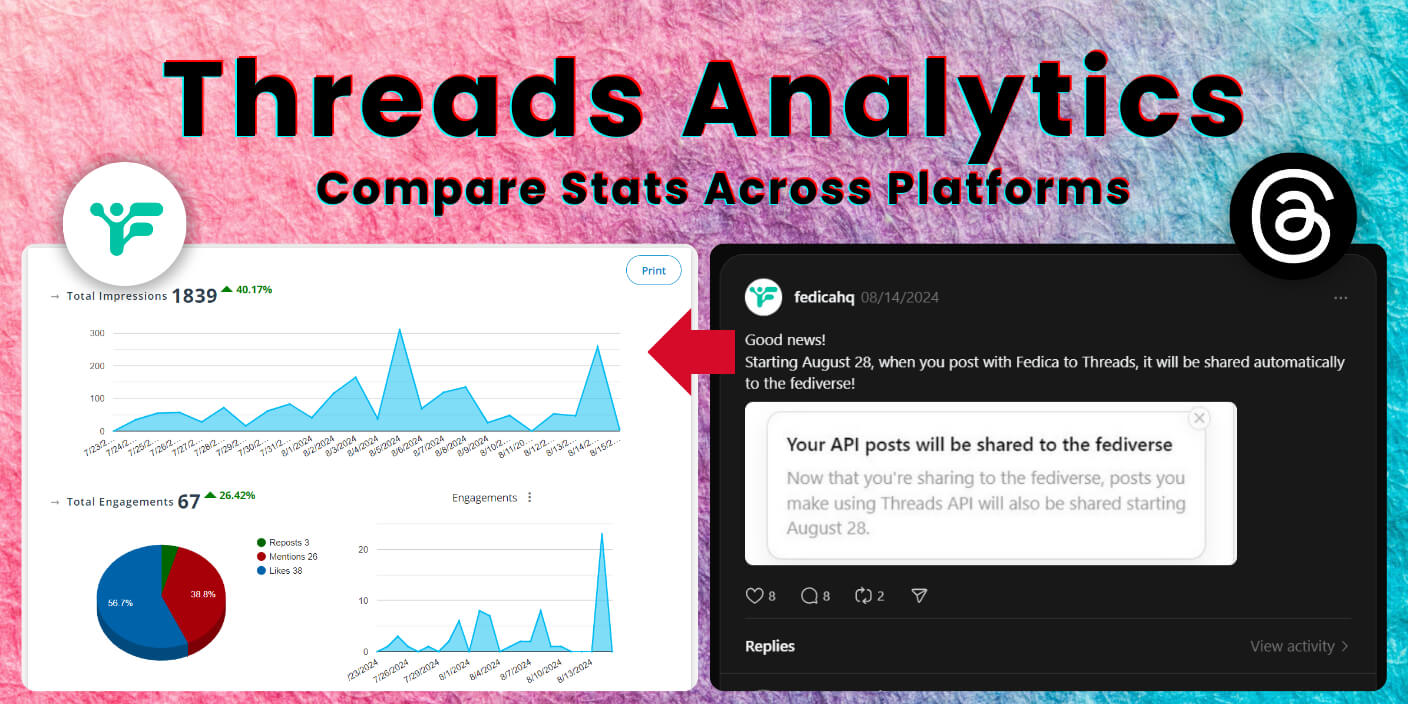
With more users using Threads actively, analytics insights will help you grow faster with a complete view of your metrics across Threads analytics, X analytics, Instagram analytics and more.
Why You Need Advanced Social Media Insights in Threads Analytics:
Get a clearer picture of your online presence by combining Threads analytics with data from other platforms, especially when you crosspost Instagram and Threads content.
Threads Analytics Dashboard: Complete Overview and Key Features
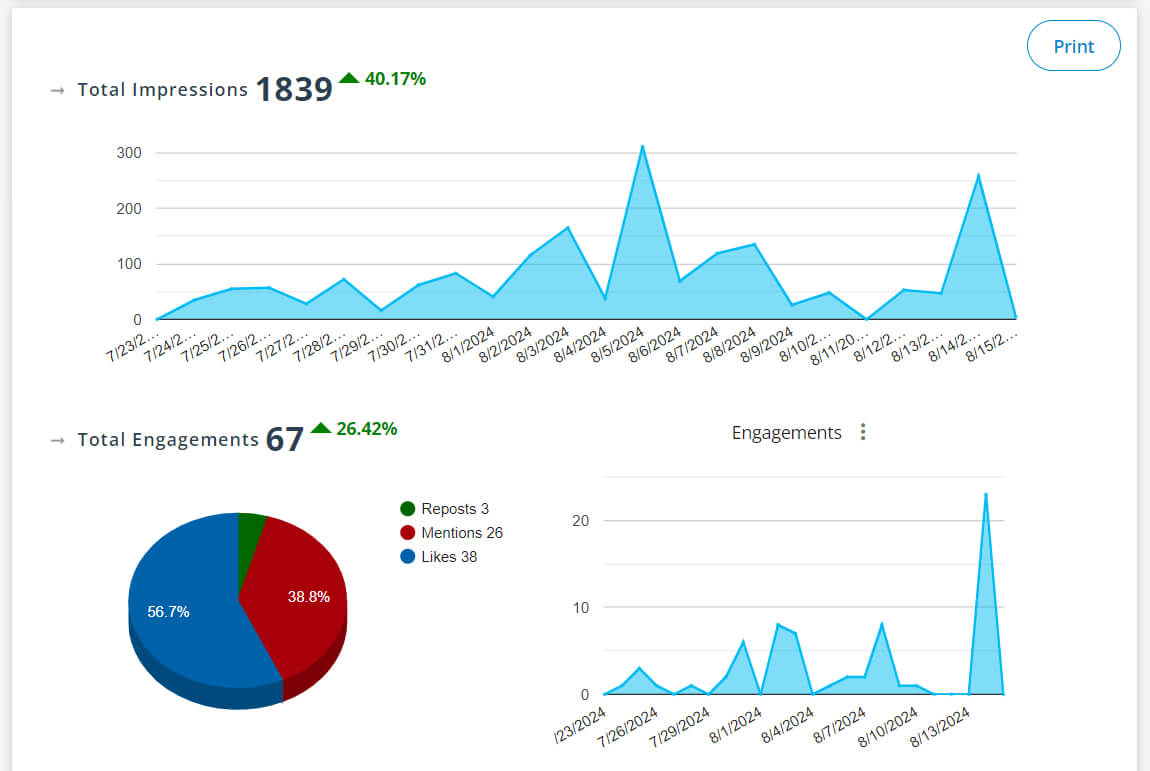
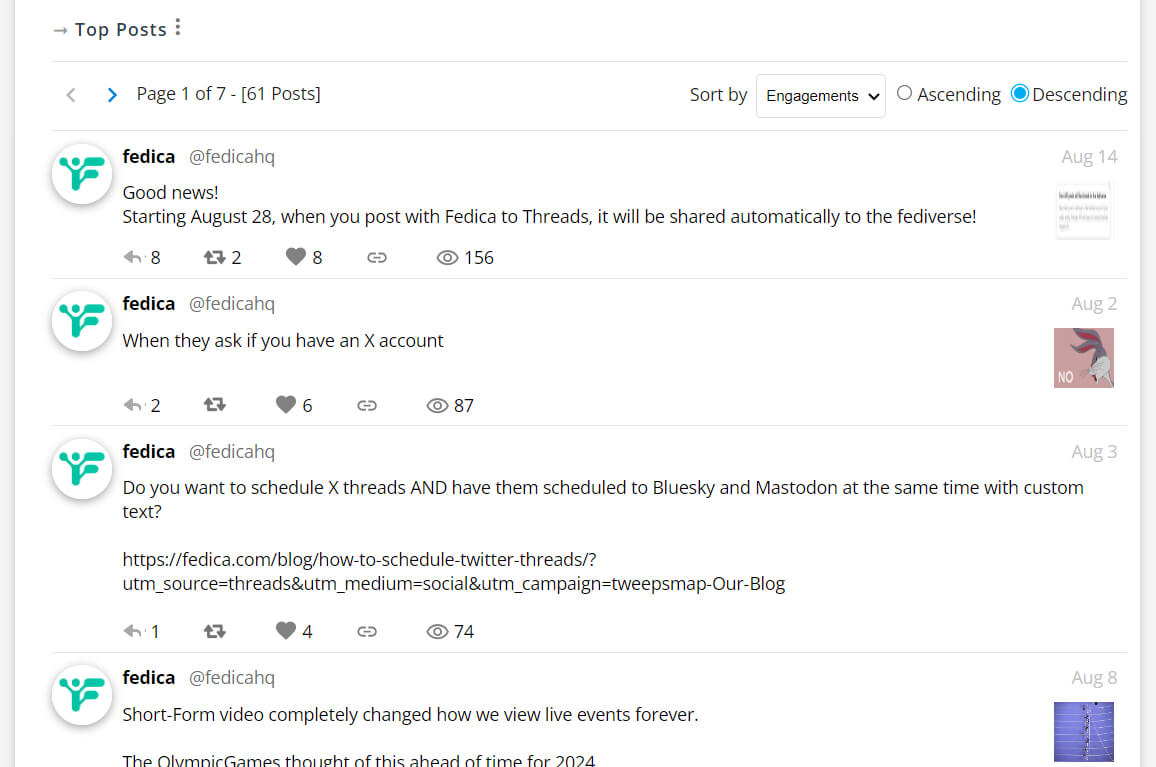

How do you know if your content is taking advantage of the traction while the platform is still growing? Fedica’s advanced analytics dashboard shows you exactly that and more.
A complete Threads analytics overview helps you:
- Check your impressions and engagement charts
- See the percentage increase or decrease in your metrics
- Filter content by keywords, metrics, and sentiment to identify your top-performing content
- Sort content by performance metrics to spot patterns
- Discover top topics showing your most engaged words that drive the highest engagement
- Analyze your best and worst posts by engagement metrics to understand what resonates
Looking at Threads analytics in isolation doesn’t give you the full picture. Comparing your Threads performance with your other social media accounts shows you what your community likes and if there are differences across platforms.
How to View Thread Insights?
Access Threads insights through multiple methods depending on your account type and needs:
Native Threads Insights Access:
- Mobile: Tap profile picture → chart icon (top right) → view overall performance and demographics
- Desktop: Visit threads.net → profile → click “Insights” button under profile picture
- Individual Posts: Tap any post → select “View activity” for specific metrics
Account Requirements:
- Business Accounts: Full analytics available immediately
- Personal Accounts: Analytics unlock after reaching 100 followers
- Data Range: View insights for 7, 14, 30, or 90 days
Enhanced Insights with Third-Party Tools:
- Fedica: Advanced analytics including follower mapping, keyword analysis, and cross-platform comparison
- Historical Data: Access longer-term trends and patterns
- Custom Reports: Generate branded reports with your company logo
- Team Collaboration: Share insights easily with team members
Pro Tips:
- Check insights regularly to identify posting patterns
- Use demographic data to tailor content for your audience
- Monitor engagement trends to optimize posting times
- Track follower growth to measure long-term success
Cross-Platform Analytics: Facebook, Instagram, and Threads Integration
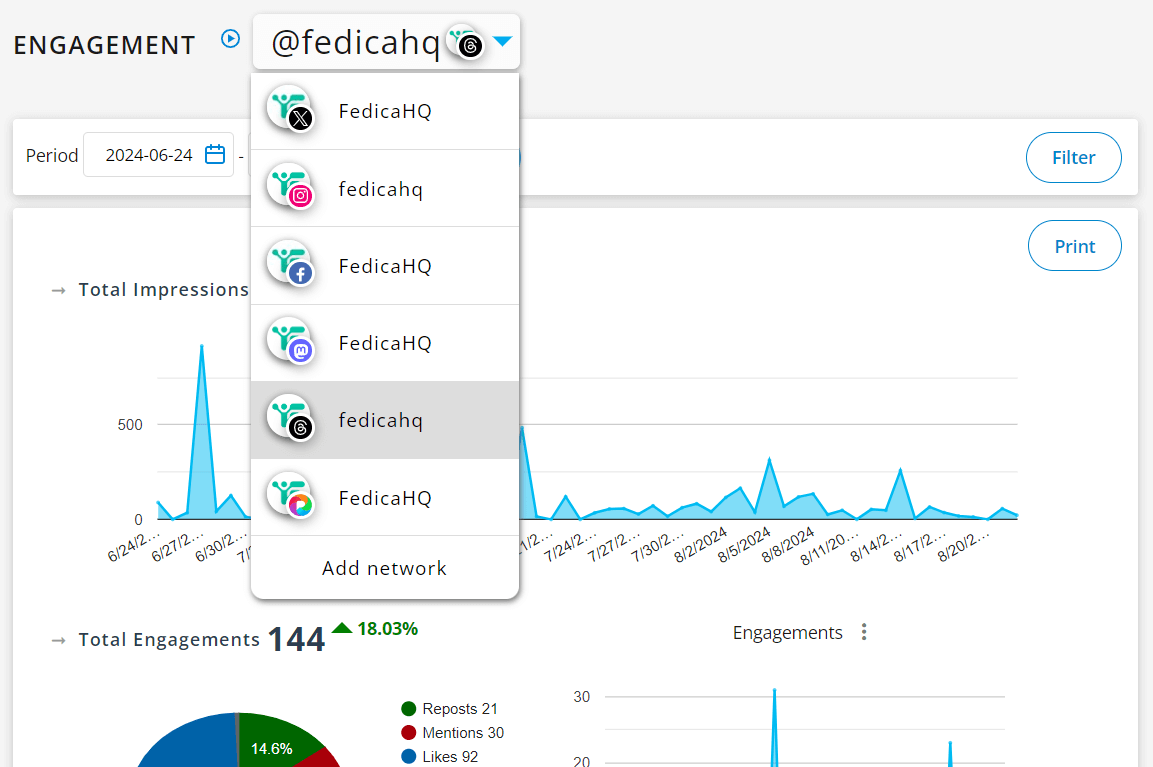
Imagine being able to switch between analytics pages for Twitter, Facebook, Instagram, Mastodon, TikTok, Threads, and Pixelfed all in one place. That’s exactly what you can do with Fedica.
Multi-Platform Analytics for Social Media Management
Navigating different social media platforms can be a hassle. Fedica’s platform allows you to flip between Facebook, Instagram, and Threads analytics in one interface. Fedica goes further with advanced scheduling and content strategy tools.
Analytics Benefits:
- Multi-Platform Data Access
Switch between Facebook, Instagram, and Threads analytics in one interface. Save time and avoid missing key insights, all with easy export options. - Streamlined Reporting
Generate reports from multiple platforms in one interface. Create insights quickly and focus on what matters.
- Spot Trends Fast
Compare metrics across platforms. Identify trends, understand what works, and refine your strategy.
- Smarter Strategy
Access all your platform data in one interface for smarter decisions. Pinpoint which content performs best and adjust your strategy.
- Real-Time Updates
Track engagement as it happens and respond to trends instantly.
- Better Team Collaboration
Keep your team on the same page. Share insights easily and align with client goals with social media team roles.
- Savings in Bulk
Cut costs and simplify your tech stack with one interface for all your analytics needs.
Advanced Scheduling Benefits:
- Precision Timing
Schedule posts down to the second across all platforms, ensuring optimal reach. - Smart Content Pipelines
Split content across different time zones to post when each audience is most active worldwide. - Cross-Platform Customization
Tailor messages for each platform in one post while maintaining your brand voice. - Engagement Boosters
Create and schedule Threads polls, use Topics tags without cluttering your posts with hashtags, and add alt-text for accessibility.
Threads Analytics Mapping to Track Followers and Performance Over Time
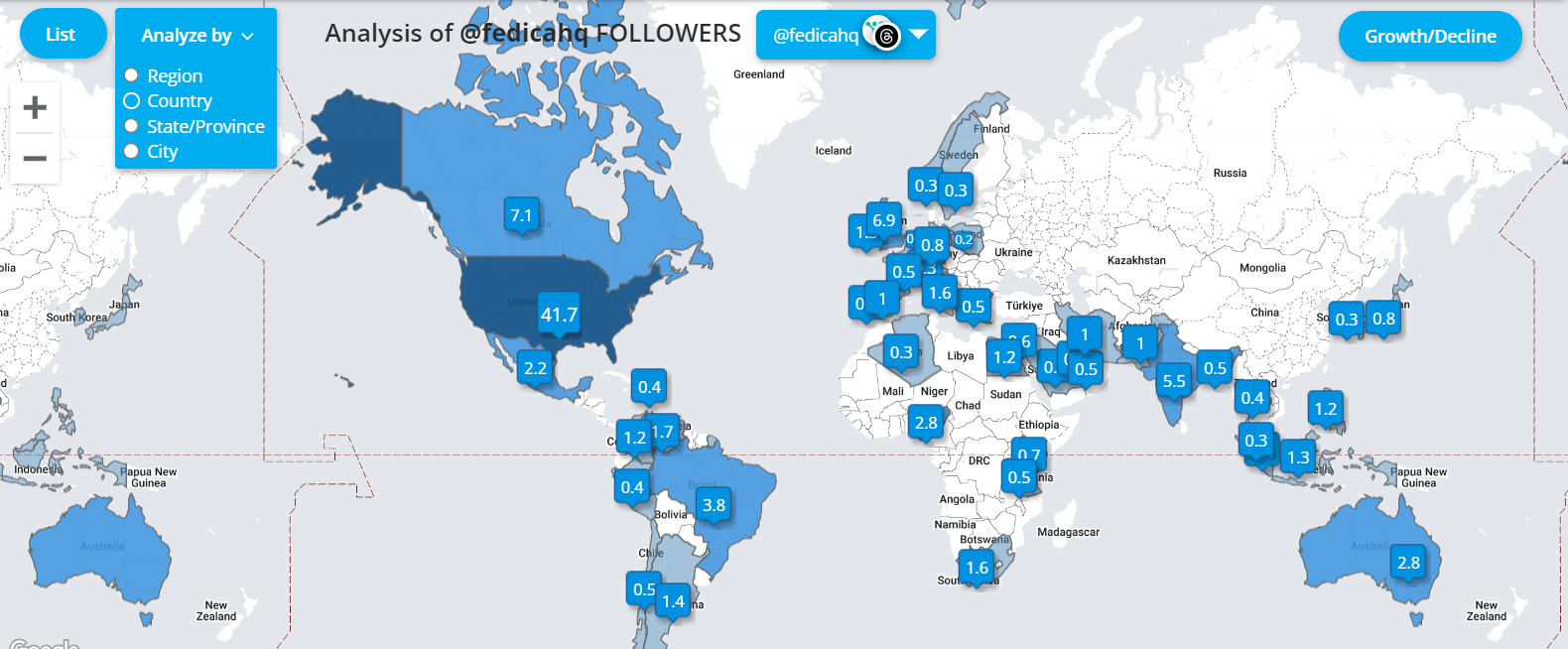
Fedica’s advanced community analysis tools help you:
- Map Followers Globally: See where your followers are located with region-specific analysis down to city level on an interactive map.
- Analyze Demographics: Break down by age, gender, and location with deep insights into follower demographics.
- Track Regional Growth: Monitor follower changes by location to identify emerging markets.
- Keyword Analysis: Track popular keywords and audience interests to understand what drives engagement.
- Engagement Patterns: Identify optimal content and timing strategies based on your audience behavior.
- Post Performance Correlation: Track how your posts correlate with follower growth patterns.
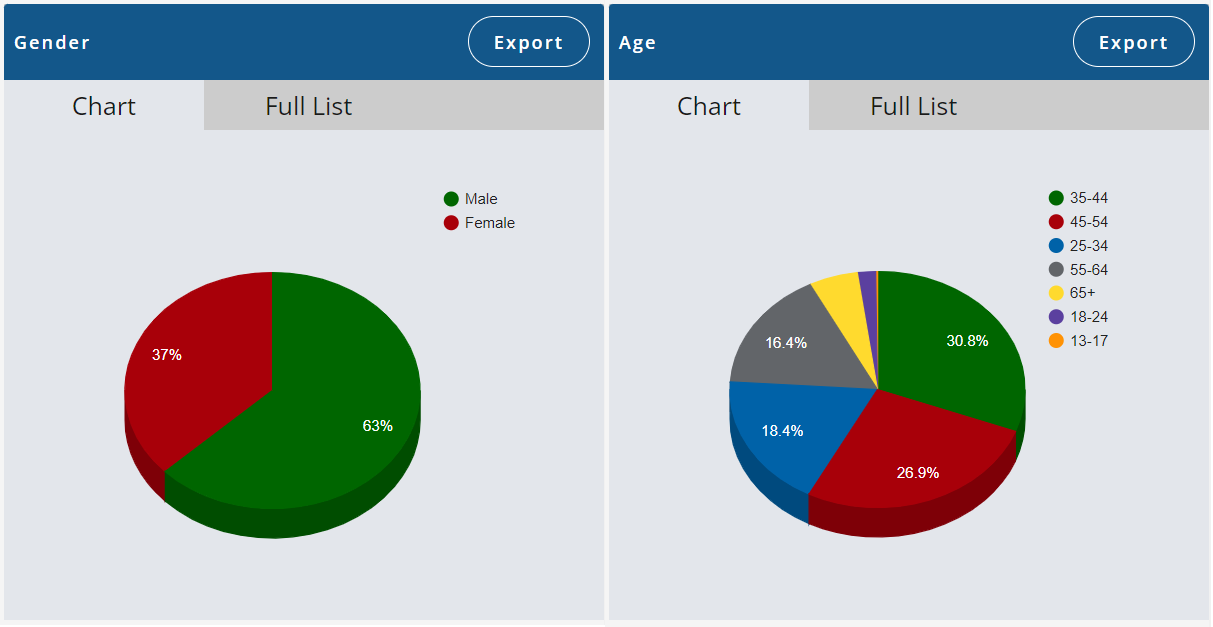
Strategic Advantages:
- Message Resonance Analysis: Identify content that connects with your audience across different regions
- Targeted Content Creation: Create content for specific regions or demographics with confidence
- Event Planning: Plan events in areas with a strong following based on real data
- Market Expansion: Identify potential new markets or audience segments before competitors
- Strategic Content Planning: Use insights for long-term success planning and cross-network consistency
Having all this data is great, but it’s what you do with it that counts. With Fedica’s comprehensive tools, you can:
Analytics & Reporting:
- Create custom charts and download reports with your company logo
- Dig into the numbers to improve your social media strategy
- Focus on highest-performing content types for engagement maximization
Content Strategy & Optimization:
- Use demographics insights to target content based on audience data
- Maintain cross-network consistency while tailoring messages for each platform
- Leverage your “Best Words” analysis to create content that resonates
Scheduling & Publishing:
- Organize threaded posts and customize messages across networks
- Automate posts across multiple platforms using RSS feeds
- Upload text/images to drafts or directly to your content calendar
- Create and schedule polls for audience engagement across supporting platforms
Remember, the goal of getting more data is to use it to grow your online presence with confidence. Schedule your Threads posts for free, and don’t forget you also get an Instagram Free Post Scheduler and can schedule to all other platforms at no cost.
What is the Best Way to Measure Threads?
The best way to measure Threads performance combines native analytics with strategic tracking:
Native Threads Metrics:
- Engagement Rate: Calculate (likes + replies + reposts) ÷ views × 100
- Follower Growth: Track weekly/monthly follower increases
- Content Performance: Compare views and interactions across different post types
- Audience Demographics: Monitor age, gender, and location data for targeting
Advanced Measurement Tools:
- Third-Party Analytics: Use platforms like Fedica for deeper insights including keyword analysis and cross-platform comparison
- UTM Tracking: Add UTM parameters to links to track referral traffic from Threads to your website
- Content Testing: A/B test different posting times, formats, and content styles
- Competitive Analysis: Monitor public Threads accounts in your niche for benchmarking
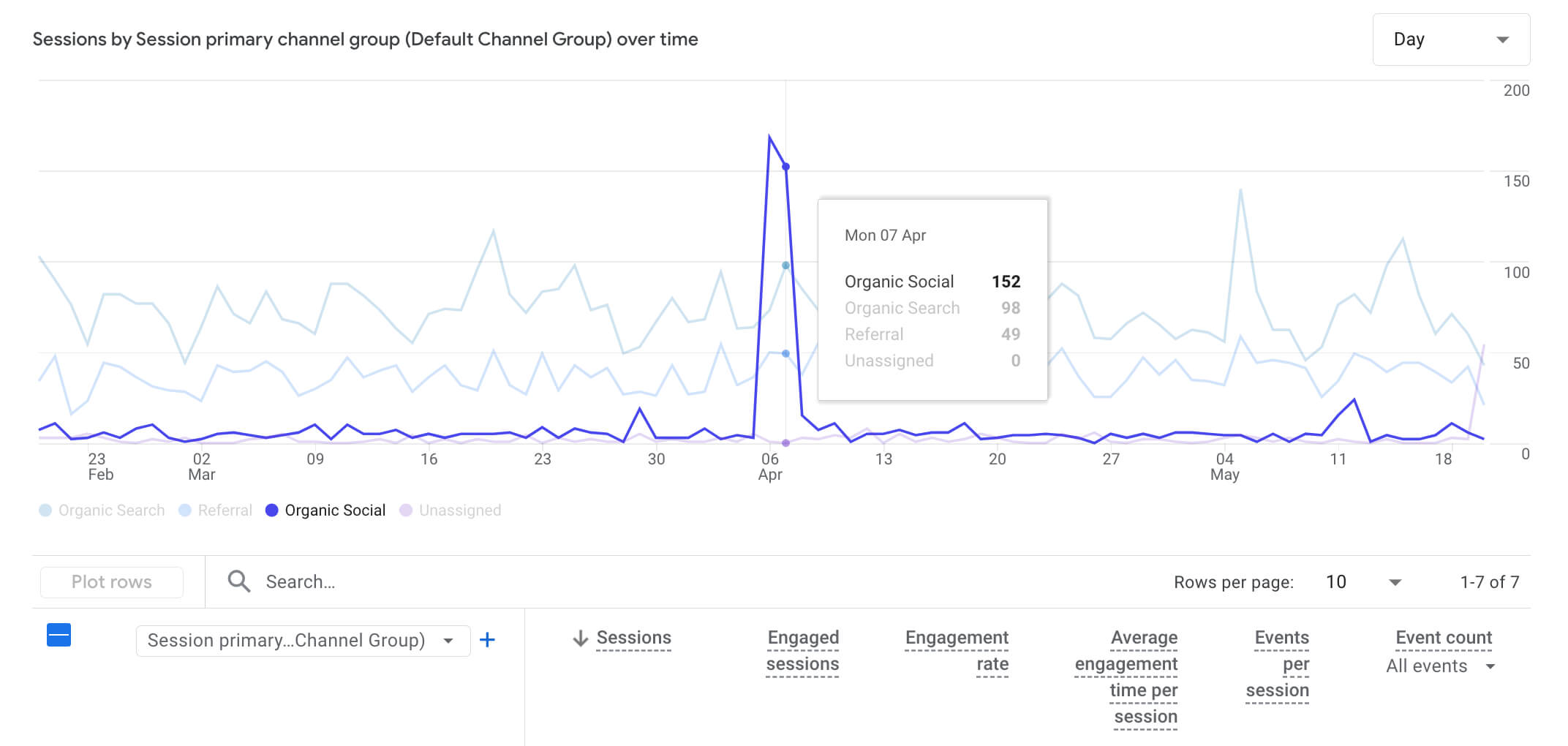
Key Performance Indicators:
- Focus on engagement quality over vanity metrics
- Track conversation starters (posts that generate replies)
- Monitor reach and impressions for content visibility
- Measure click-through rates on shared links
Free Threads Post Scheduling with Advanced Tools
Fedica’s Threads scheduling tools eliminate the hard work of manual posting while maximizing your reach:
Smart Scheduling Features:
- Posts Calendar: Organize threaded posts and customize messages across networks in one place
- Time-Specific Scheduling: Schedule posts down to the second for precise timing
- Content Pipelines: Split content across different time zones to post when each audience is most active worldwide
- Media Library: Upload text/images to drafts or directly to your calendar for streamlined content creation
Advanced Publishing Options:
- Cross-Platform Scheduling: Automate posts across multiple platforms using RSS feeds
- Threads Topics Tag: Write topics on Threads posts without cluttering your content with hashtags
- Customized Cross-Posting: Tailor messages for each platform while maintaining your brand voice
- Threads Polls: Create and schedule polls for audience engagement across supporting platforms
- Alt-Text Support: Add alternative text descriptions to images for accessibility
No More Hard Work.
Fedica handles the technical complexity so you can focus on creating content that grows your Threads presence with confidence.
Threads Analytics Summary: Key Insights and Action Items
Comprehensive Analytics
Understanding your Threads analytics, along with data from your other social media platforms, gives you a complete view of your online performance from keyword analysis to follower demographics and engagement patterns.
Strategic Growth
Using Fedica’s unified platform saves time, helps you make informed decisions, and lets you create content that resonates with your audience through advanced features like “Best Words” analysis and message resonance tracking.
Effortless Execution
Whether you’re a social media pro or just getting started, Fedica’s smart scheduling, content pipelines, and cross-platform automation eliminate the hard work while maximizing your Threads growth potential.
Data-Driven Confidence
With region-specific follower mapping, post performance correlation tracking, and strategic content planning tools, you can build a stronger, more engaged online community with confidence in your strategy.
Frequently Asked Questions About Threads Analytics
Can you get analytics on Threads?
Yes you can with Threads’ basic post insights. For deeper analytics on all your content, you’ll need to connect your Threads account to Fedica for an advanced analytics dashboard beyond the basic insights. With Fedica, you can:
- Map your community across the world with region-specific analysis down to city level
- Analyze top topics and identify what resonates best through keyword analysis and “Best Words” tracking
- Filter and sort your content’s analytics by keywords, metrics, and sentiment to see which posts generate the most engagement
- Track engagement patterns and post performance correlation with follower growth
- Monitor regional growth and identify emerging markets
- Group content by keyword and performance metrics to spot engagement patterns
How is Threads doing 2025?
Threads continues to grow steadily in 2025, building on its strong foundation from Meta. The platform has seen consistent user engagement and has introduced several key features including native analytics for business accounts (launched October 2024). While specific user count data varies, Threads remains a significant player in the social media landscape, particularly for text-based conversations and community building.
What are the metrics in Threads?
Threads provides several key metrics through its native analytics:
- Views: Number of times your posts have been viewed
- Interactions: Total likes, replies, reposts, and quotes
- Follower Growth: Track follower count changes over time
- Audience Demographics: Age, gender, and location data
- Engagement Rate: Overall engagement performance
Access Requirements:
- Business accounts: Full analytics available immediately
- Personal accounts: Analytics unlock after reaching 100 followers
Time Ranges Available:
- 7, 14, 30, or 90 days of historical data
- Real-time engagement tracking
Can you check your activity on Threads?
Yes, you can check your activity on Threads through several methods:
Native Threads Activity:
- Mobile App: Tap your profile picture, then the chart icon at the top right to view overall performance and audience demographics
- Desktop: Log in at threads.net, go to your profile, click the “Insights” button under your profile picture
- Individual Posts: Tap any post and select “View activity” to see views, likes, reposts, and quotes
Third-Party Tools:
- Platforms like Fedica offer comprehensive analytics beyond native insights
- Advanced features include keyword analysis, follower mapping, and cross-platform comparison
- UTM parameters help track referral traffic from Threads to your website
How do Threads decide what to show you?
Threads uses Meta’s algorithm to determine content visibility, though specific ranking factors aren’t publicly detailed. Based on Meta’s approach across platforms, Threads likely considers:
Key Ranking Factors:
- Engagement: Posts with higher likes, replies, and reposts get more visibility
- Recency: Fresh content typically appears higher in feeds
- User Relationships: Content from accounts you interact with frequently
- Content Type: Different formats (text, images, videos) may have varying reach
- Account Activity: Regular posting and engagement can boost visibility
What are the metrics in Threads?
- Threads focuses on text-based conversations, so engaging text content performs well
- Cross-platform integration with Instagram may influence content discovery
- Community building and authentic engagement are prioritized over viral content
How do Threads decide what to show you?
- Post consistently and engage with your community
- Focus on meaningful conversations rather than just broadcasting
- Use various content formats to test what resonates
- Respond to comments and engage with others’ content
Can you see insights on Threads?
Threads does offer built-in insights for each post. All you need to do is click on the post in Threads to view its performance. Here’s how on desktop:
- Log in to your Threads account at threads.net
- Click on your profile on the left side of the screen
- Select the Insights button under your profile picture
These insights include views, total interactions (likes, replies, reposts), and follower data such as growth and demographics. Keep in mind that native Threads insights currently only show data from the last 90 days.
Where do you see your Threads analytics?
You can check your Threads analytics in several ways:
- In the Threads mobile app:
- Tap a post and select “View activity” to see views, likes, reposts, and quotes
- Tap your profile picture, then the chart icon at the top right to view your overall post performance and audience demographics
- On desktop:
- Log in to your account at threads.net
- Go to your profile
- Click the Insights button under your profile picture
- Using third-party tools:
- Platforms like Fedica offer more advanced analytics for Threads, letting you compare metrics across platforms
Why use Threads instead of Instagram?
Threads focuses on text-based conversations, while Instagram emphasizes visuals like images and videos. Some of the benefits of using Threads include:
- A cleaner, less cluttered interface
- A design geared toward quick, direct conversations with your Instagram followers
- Easy navigation for sharing brief thoughts and updates
- A different style of community building, centered on text-based engagement