HeyOrca alternative for teams focused on X: keep the collaboration experience your clients like, while adding direct X depth with Fedica.
Most teams evaluating this switch care about the same things: easy approvals, low-friction client collaboration, fast execution, and clear reporting. Fedica keeps those priorities in place while adding stronger X workflows through pipelines, X format scheduling (threads/polls/replies/reposts), analytics segmentation, and listening alerts. DataReportal estimates X ads reached 586 million users in January 2025, so it is still practical to serve clients with X needs.
Key Takeaways
- If X is core, Fedica adds needed depth: pipelines + X format scheduling with time zone/persona control. Pew Research found about 21% of U.S. adults use X.
- Keep approvals tight with role-based approvals and internal comments so drafts do not publish by accident.
- Keep reporting credible with UTM/click logging plus segmentation so teams can clearly show what worked.
- Use X listening reports and alerts to shorten the gap between audience feedback and your next post.
HeyOrca Alternative in 2026: Need to Publish to X?
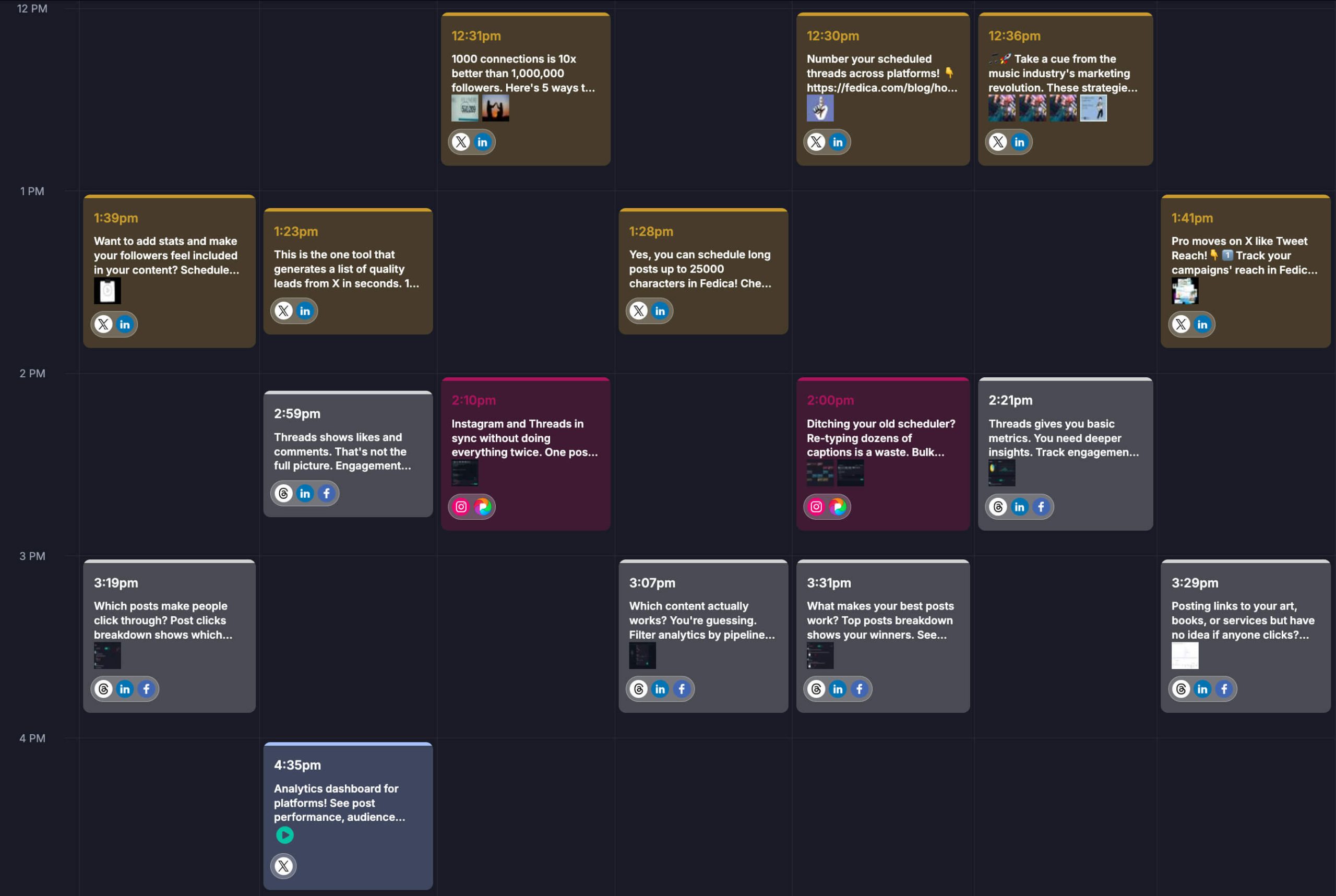
If X is one of your primary channels, the HeyOrca alternative for teams is Fedica. You can queue X-friendly formats with content pipeline queues, time zone/persona targeting, and auto-pilot scheduling down to specific times. Then you review performance metrics and audience response right away, and use X listening alerts to validate ideas before the next post. Start small with one campaign pipeline, then expand once the loop is working for your team.
You get a publish workflow built for X. You can schedule threads and polls. You can also schedule replies and reposts.
Fedica uses pipelines with time zone and platform targeting. It also supports auto-pilot scheduling down to specific times.
Then you can check analytics and audience response right away. If you expand beyond X, you can manage those networks in the same workflow, because Fedica is one of the best social media management tools.
How Easy Is It to Join Fedica? Bulk Uploads, Media Library, and Tagging
Switching tools only feels hard when you have to rebuild weeks of content by hand. Fedica is built so teams can land with real work already in motion. You can bulk upload posts into drafts and pipelines instead of copying line by line from a spreadsheet or another calendar. That means your X threads, campaign batches, and multi-network queues can show up in Fedica quickly, so you spend the first days on workflow and timing instead of data entry.
Your creative does not get lost in chat threads, either. A media library keeps images and video in one place, and tagging helps you find the right asset for the right pipeline (brand vs product vs event, client A vs client B, or whatever labels match how your team thinks). When reviewers and schedulers share the same tagged library, you cut “which file was the final?” back-and-forth and keep posts consistent across networks.
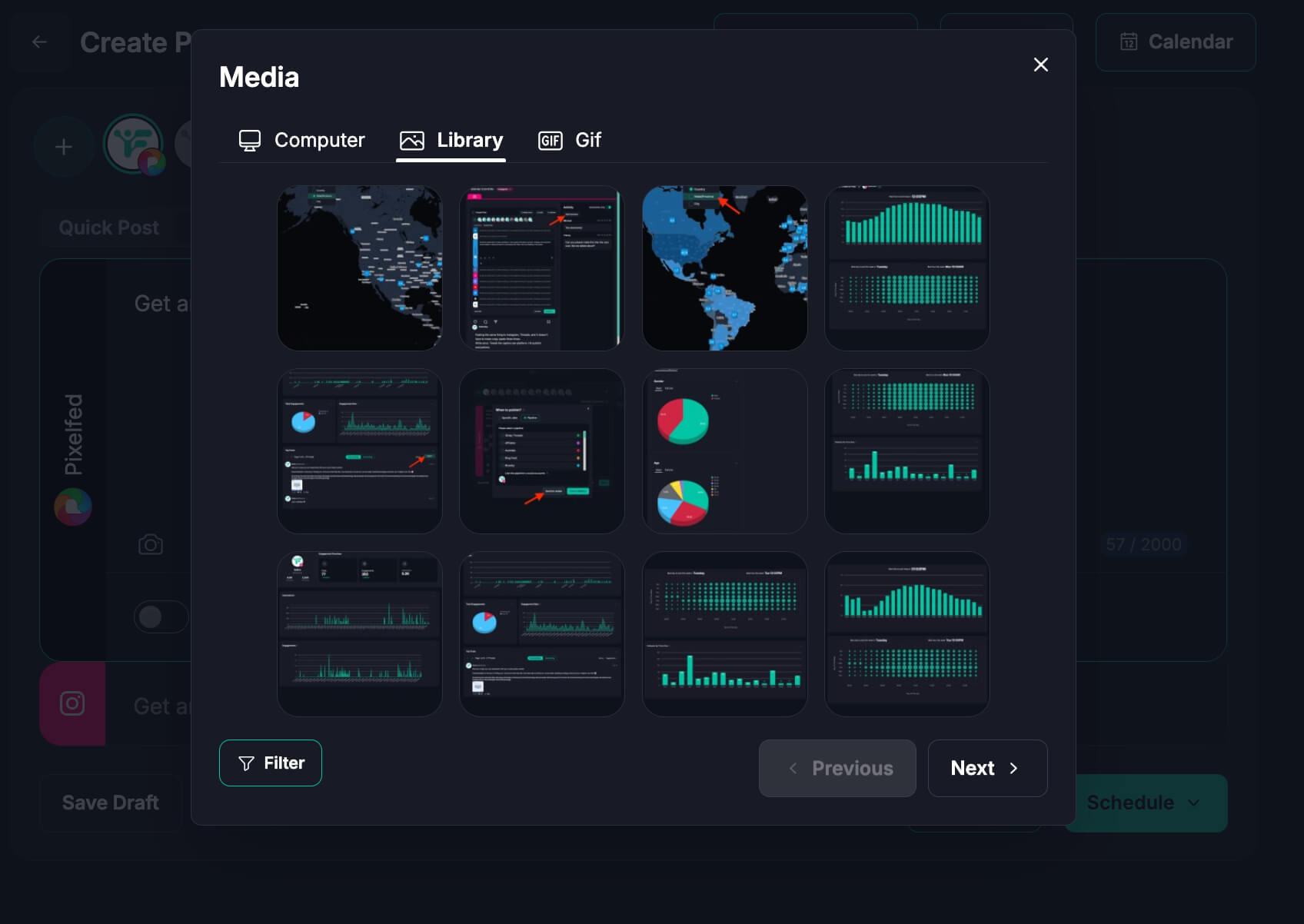
- Bulk uploading
Bring many posts into drafts and pipelines at once so onboarding does not stall on manual re-entry. - Media library + tags
Store approved creative centrally and pull it into new posts without hunting through folders or DMs. - Content Pipeline Queues stay intact
Once content is in, you can apply persona/time-zone rules and approvals on top of what you imported instead of rebuilding structure from scratch.
That combination makes Fedica easy to start so you feel closer to moving your real operation than starting an empty calendar.
Fedica vs HeyOrca: Which Alternative Is Better for X and Multi-Network Growth?
Fedica is the better HeyOrca alternative for X-first teams because it shortens the time between publishing and action. HeyOrca is mostly strong on planning and approvals, while Fedica connects your publishing pipelines to analytics and X listening data. That means you can see which topics resonate, segment engagement in a way that matches your content structure, and use hashtag/keyword reporting plus alerts to tune what you publish next. When feedback arrives quickly, it is easier to iterate without changing tools every week.
Teams can keep client-friendly collaboration workflows while adding direct X capabilities that reduce workarounds and tool switching.
On the publishing side, Fedica’s pipelines and scheduling help you queue the right formats (including X workflows like threads/polls-style scheduling and reply/repost scheduling) without losing timing control. On the analytics side, you get an engagement dashboard that shows who engages and what topics resonate, plus content segmentation tied back to the pipeline structure you planned.
If your plan depends on audience reaction, use X listening reports.
Fedica’s hashtag/keyword reporting shows who is talking, what gets reposted, and what the engagement sentiment looks like. It also includes brand affinity and reach distribution, plus a map you can drill down to city level.
Fedica can also measure post reach across posts, replies, and reposts. Alerts can send an interactive brief on an hourly-to-daily cadence.
- Best fit for approvals-first teams only
HeyOrca-style workflows, when collaboration is the only priority and X depth is secondary. - Best fit for teams that need collaboration plus direct X depth
Fedica. - Best fit when client trust and reporting proof both matter
Fedica, because publish, analytics, listening, and tracking stay connected.
What HeyOrca Users Usually Care About (and How Fedica Covers It)
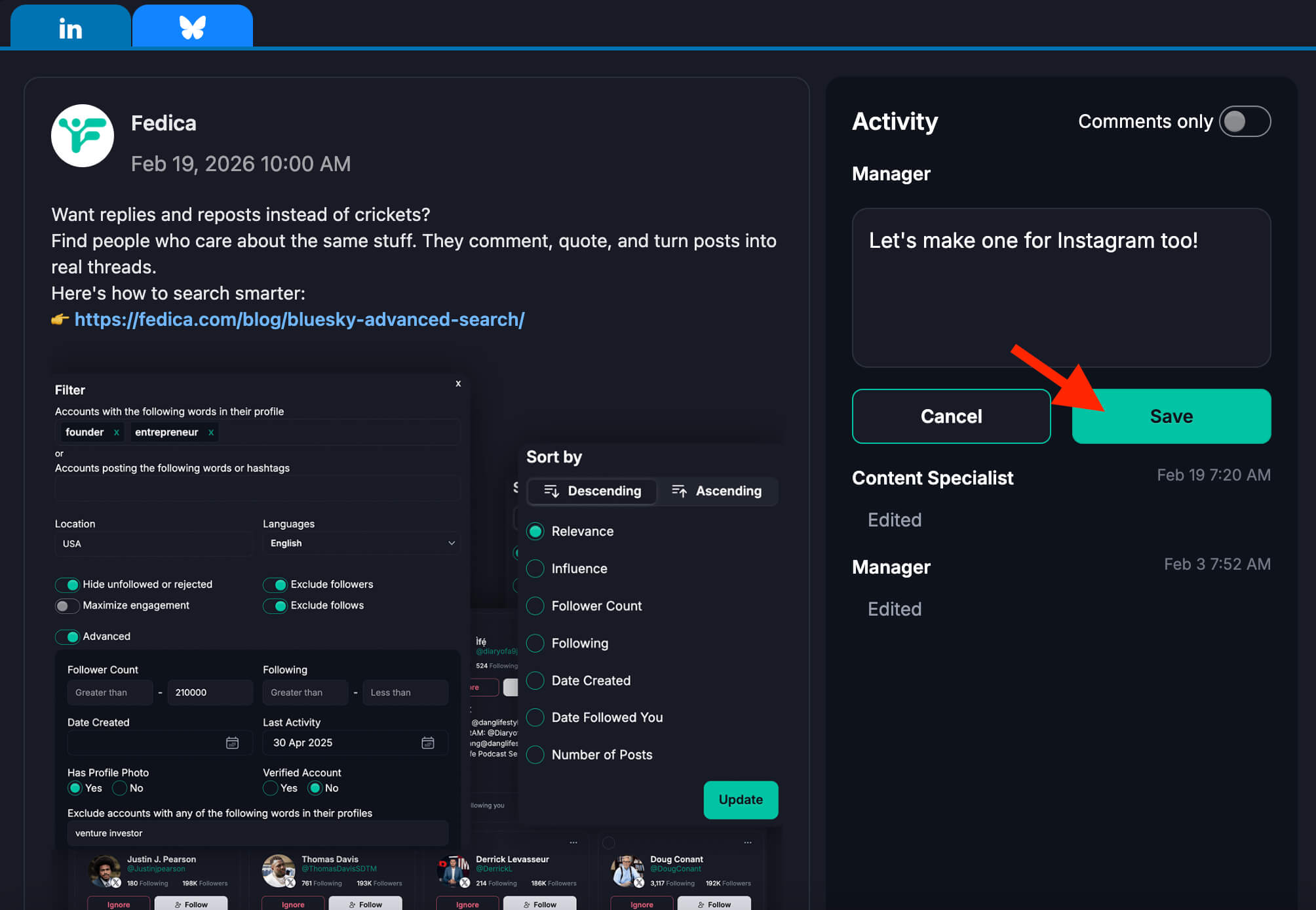
- Easy client approvals
Fedica supports role-based approvals and in-workflow feedback. Design “profiles” that you share with clients to keep control over your calendar. - Collaboration at scale
Teams can run structured pipelines with clearer role handoffs. - Client trust and professionalism
UTM and click data tied to reporting make outcomes easier to explain. - Speed and efficiency
Bulk uploading, reusable pipelines, and scheduling controls reduce manual rework. - Community-led strategy
X listening and alerts help teams respond to real audience reactions, not guesses.
These priorities align with why many teams choose HeyOrca. Simple collaboration, client trust, and clearer proof of value. Fedica adds deeper direct X publishing and research for teams that need it.
Make Sure Your Analytics Are Actually Useful
Analytics should guide your next post. Track topic and format performance, pause weak content, and double down on what works for specific audience segments.
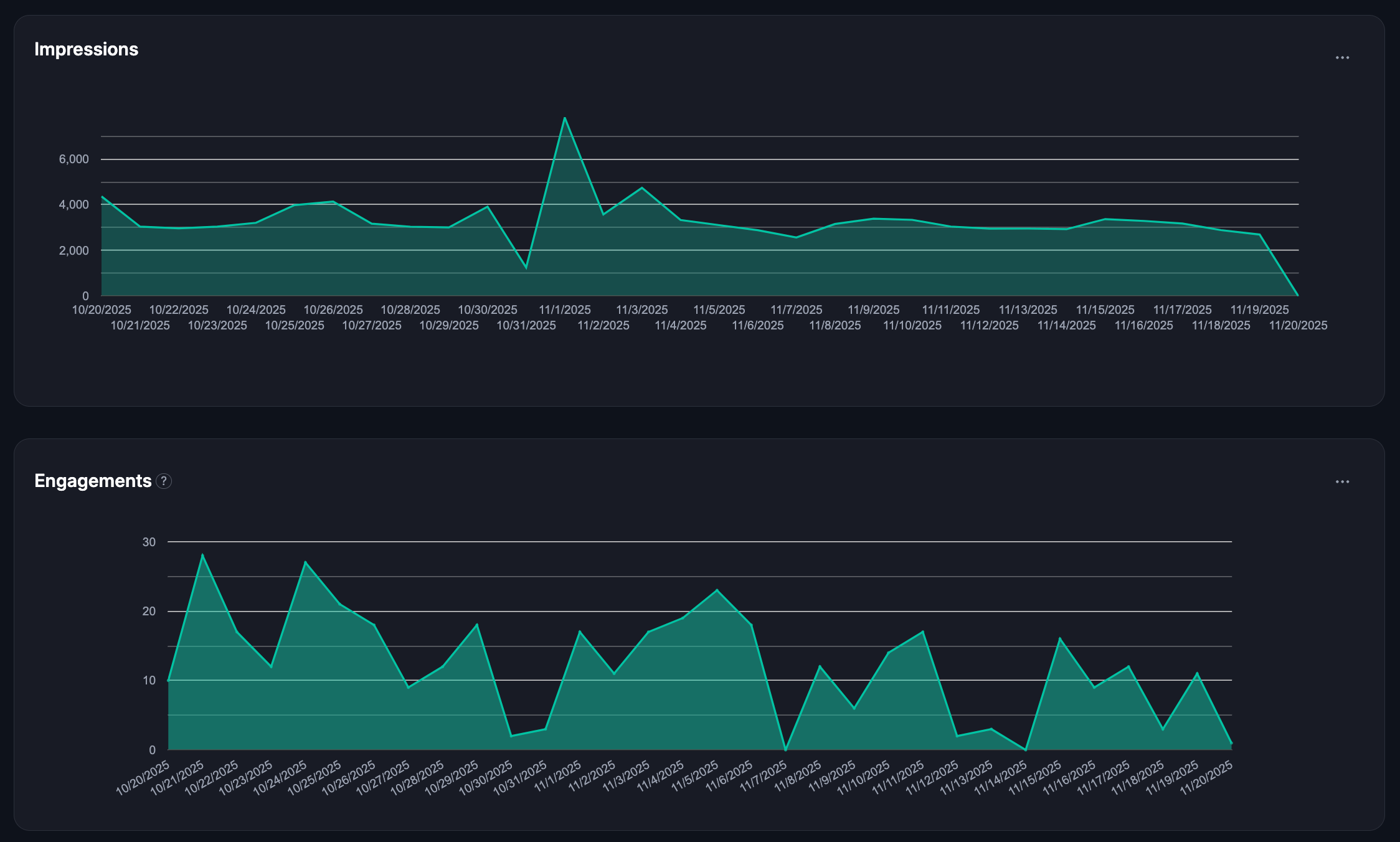
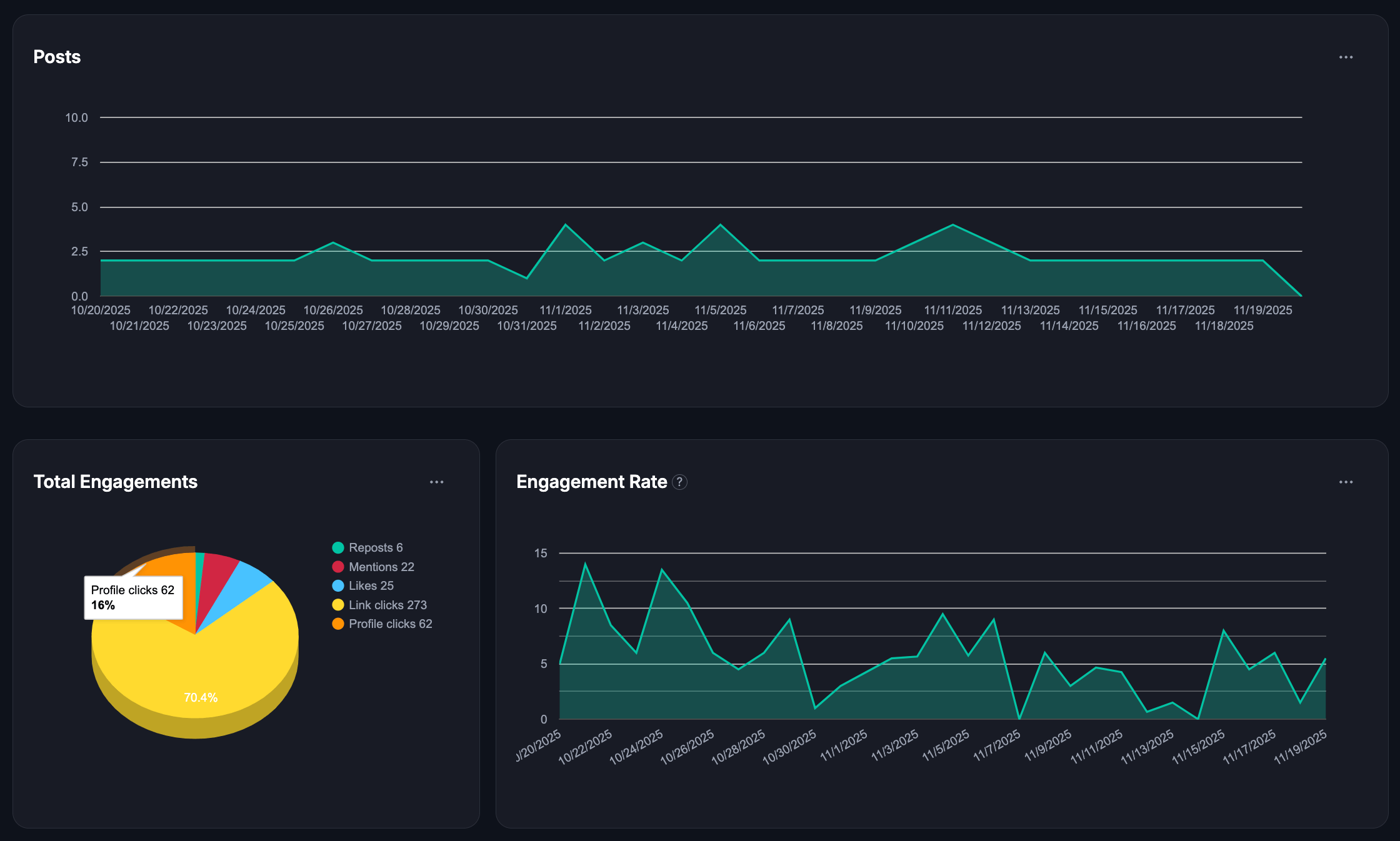

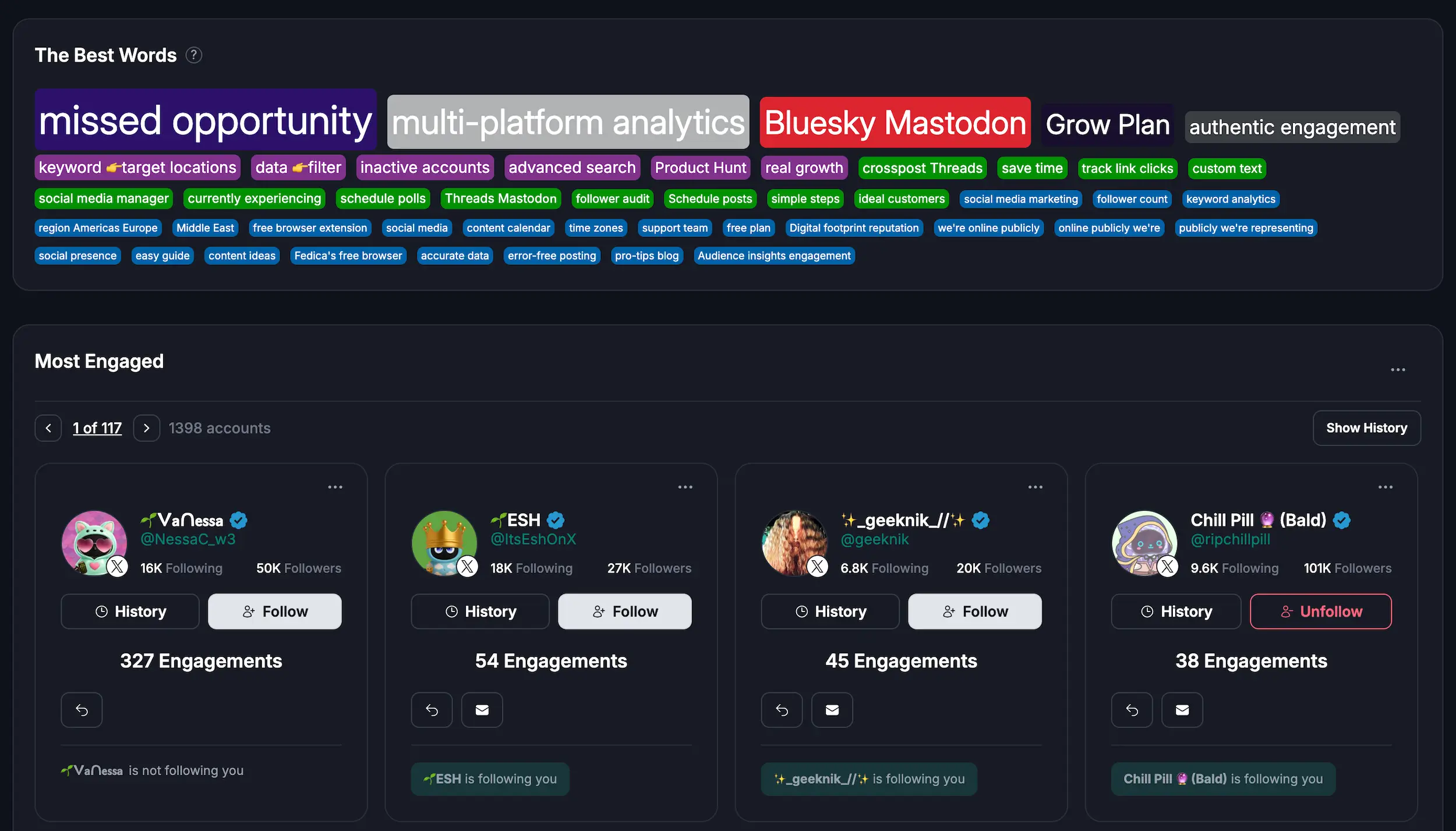
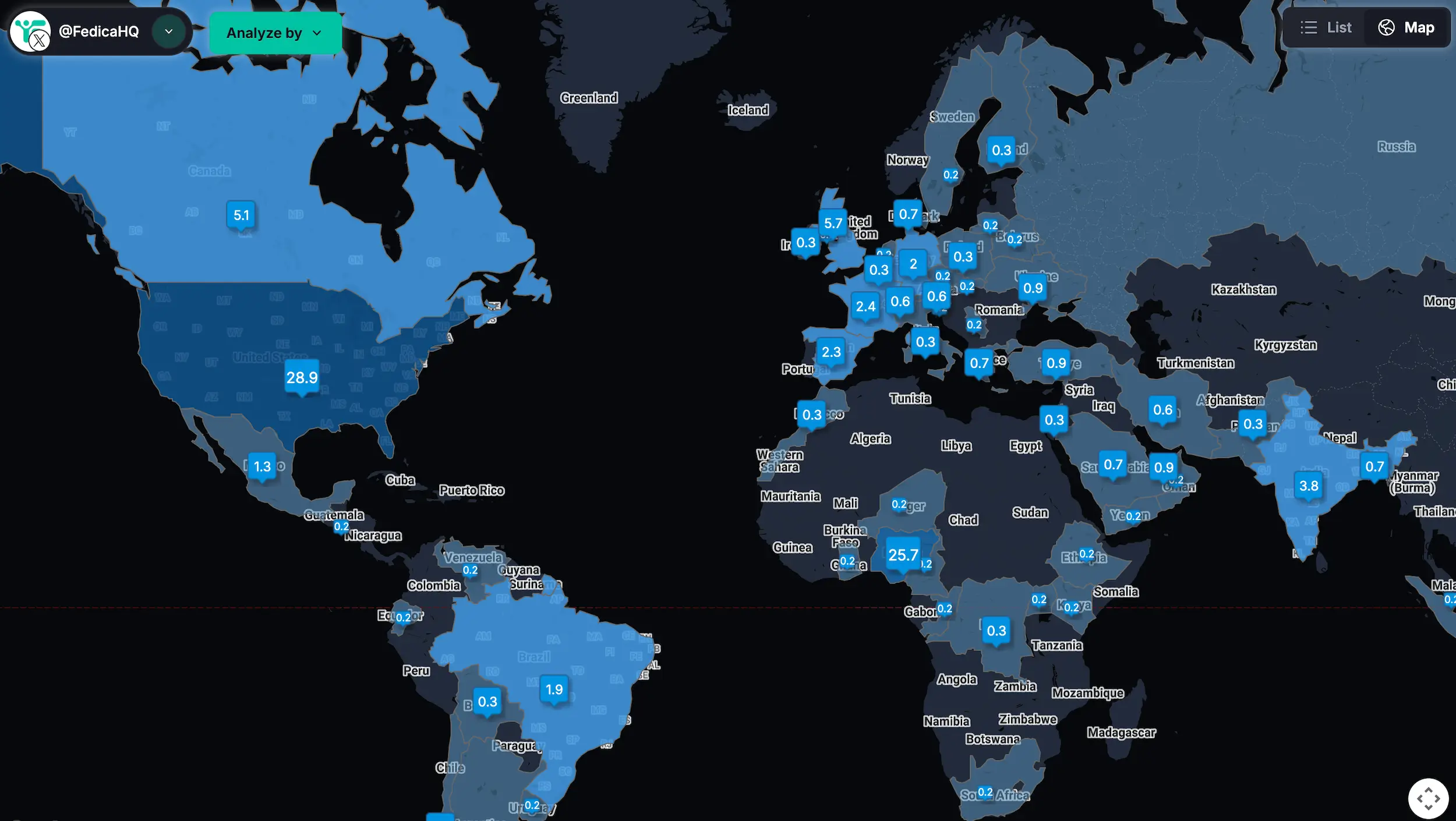
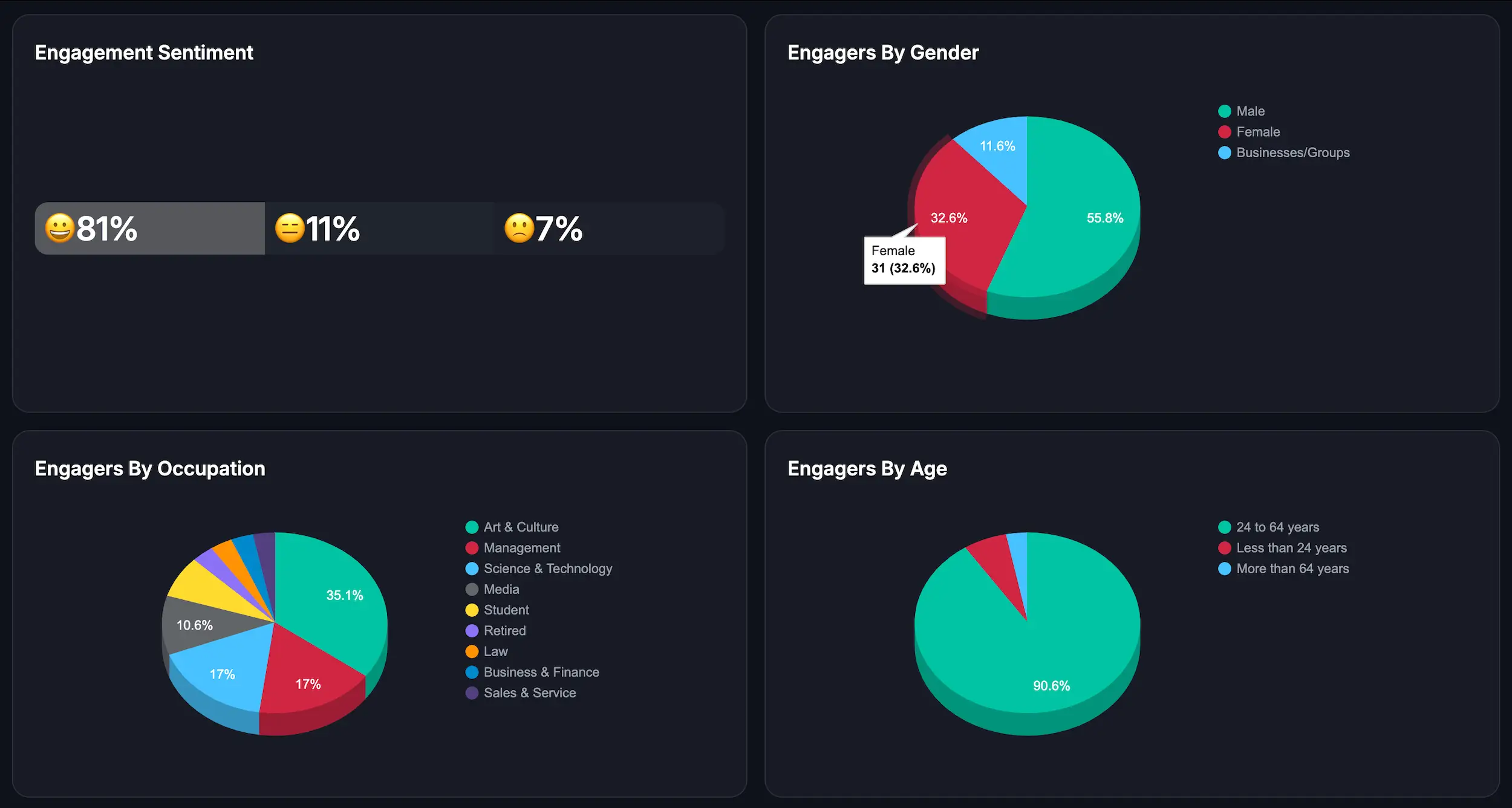
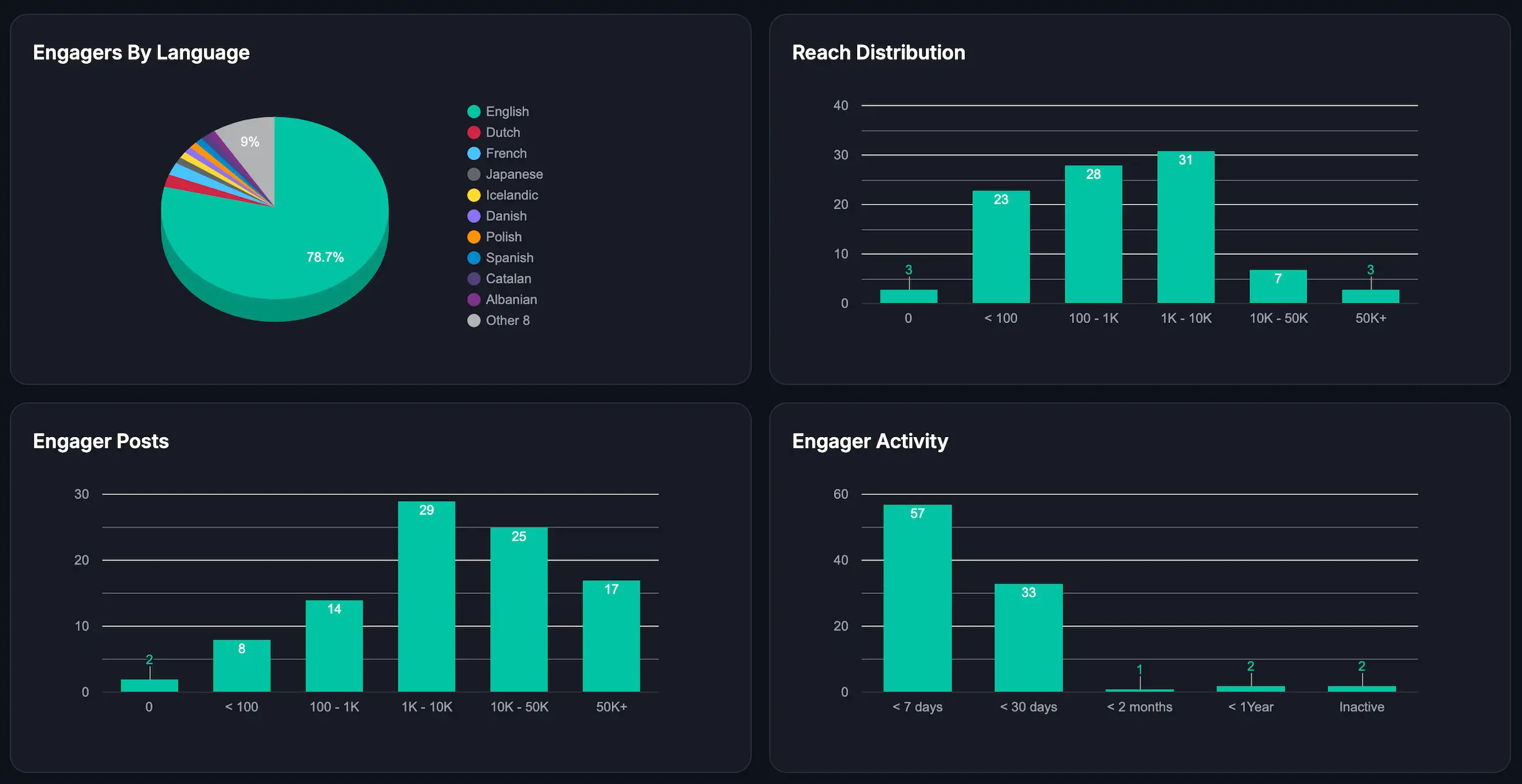
Fedica provides engagement reporting with segmentation and lets you filter by pipeline and content type, and see all people + demographics from who engaged which helps justify ROI for clients.
Use audience and follower data to refine targeting by demographic filters and historical trends.
You can also track follower growth and decline by city, then use that data for targeting and influencer research.
On X, this helps connect results to audience interests and sentiment with less guesswork.
Check Listening and Research (Because Ideas Should Not Be Assumptions)
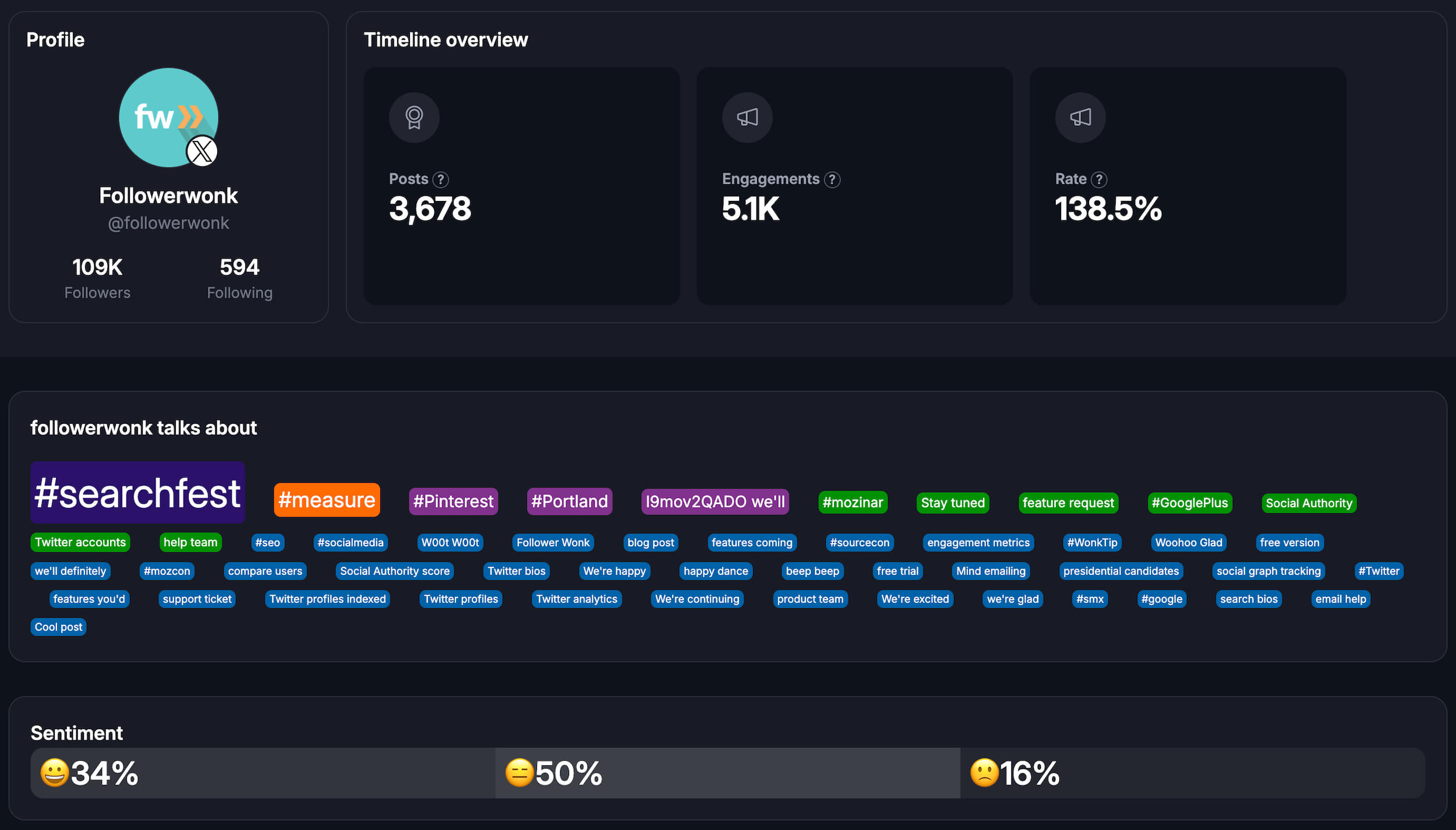
Use listening and research to validate content angles before you schedule.
Fedica’s X research includes hashtag and keyword reporting, repost patterns, recurring advocates, sentiment, brand affinity, and reach distribution.
Location data is available through an interactive map with city-level drilldowns.
It also breaks down reach across posts, replies, and reposts with sentiment and demographic context.
Alerts can monitor mentions and competitors and send email briefs on an hourly, daily, or weekly cadence.
Validate Approvals and Roles (So You Don’t Lose Momentum)
Set clear permissions so everyone knows who can edit, who approves, and when posts can publish.
In Fedica, content creator submissions can require publishing-role approval. Pending posts stay blocked until approval, and reviewers can leave comments directly in the workflow.
The practical test is simple: can your team move from draft to approved post without extra workarounds?
Make Link Tracking Tie Back to Your Content
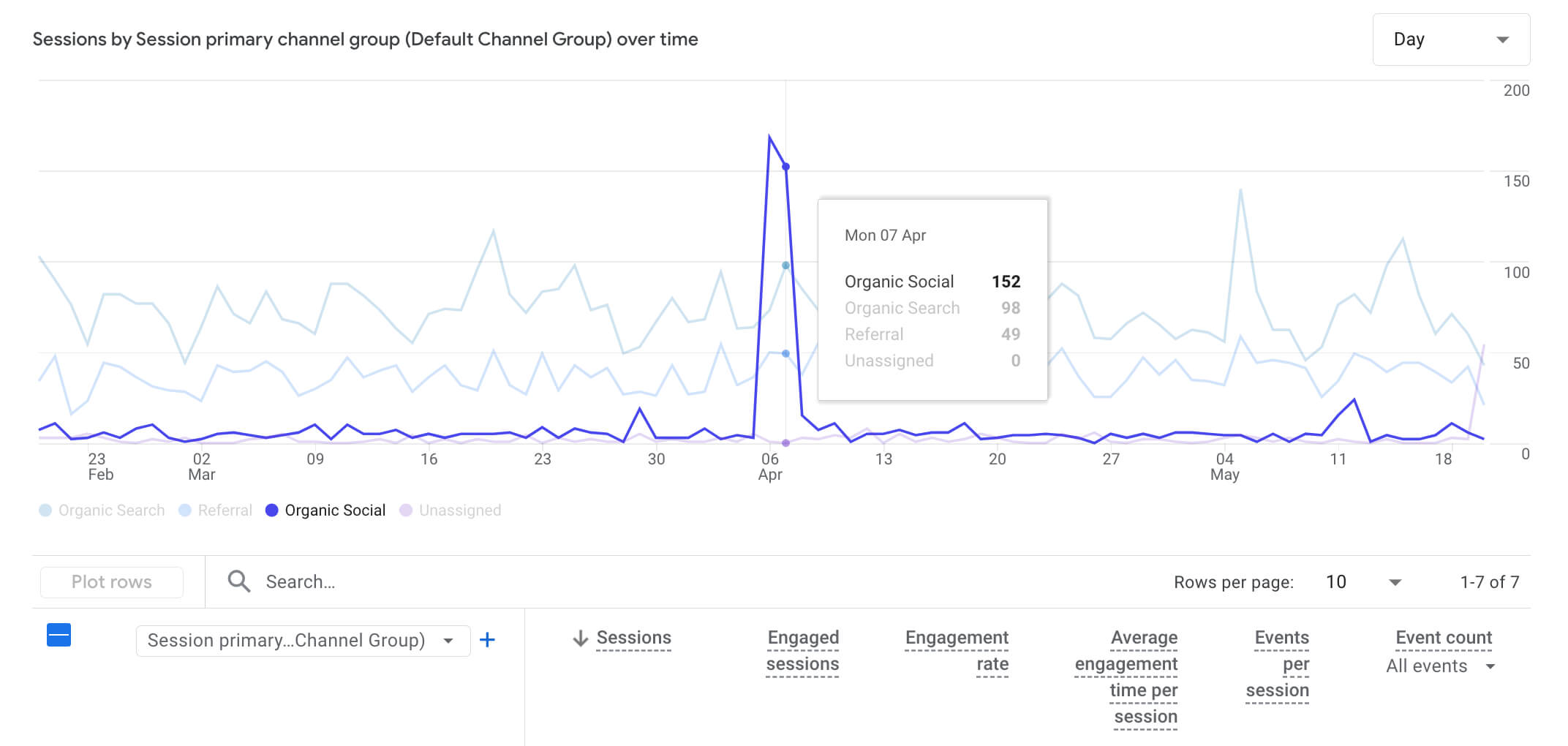
Set up link tracking early so click data maps back to the exact post and pipeline.
Fedica includes pipeline-level link shorteners, automatic UTM on scheduled and queued links, and click logging in the dashboard.
You can filter results by platform and pipeline, then repeat what performs well.
How Is Fedica Better Than HeyOrca for Publishing on X and Beyond?
Fedica stands out because it treats publishing as an analytics-backed workflow. With pipelines and smarter scheduling, you can queue X formats like threads and polls while keeping control across other platforms. You can also bulk upload into drafts and pipelines when multiple campaigns run at once. The result is less rework and a tighter “publish then learn” loop across X and your other priority networks.
Fedica uses pipelines and smarter scheduling so you can queue the right formats (including X workflows like threads and polls), keep time zone control, and even use “auto-pilot” style scheduling down to specific times. It also supports bulk uploading into drafts/content pipelines, which matters when you are juggling more than one campaign.
Then when you expand beyond X, you still keep the same general planning flow, so your team is not constantly recreating the process in a second tool.
How Does Fedica Compare to HeyOrca for Analytics When X Is Central?
Fedica wins on analytics when you care about learning from X. You get engagement metrics and audience data that tie back to how you planned content in your calendar or just by filtering for keywords. Fedica’s analytics combine an engagement dashboard with segmentation, so you can see which topics and personas drive results. That makes it easier to decide what to repeat, stop, and target next.
You get an engagement dashboard with filterable results plus segmentation. That lets you break performance down by pipeline and content type. You can also see which content connects with which personas.
On X, you can dig into who is behind your engagements with demographic filters. You can also use an interactive map to see where people are active and how activity shifts across time zones.
When Is HeyOrca Still the Better Choice?
HeyOrca is a strong choice when the primary need is approvals and editorial workflow. Teams that need deeper X engagement metrics, segmentation, and research alerts tied to publishing generally get a faster loop in Fedica.
For calendar and approval-only workflows, HeyOrca remains a practical option, including awaiting-approval states and shareable review links.
For publish-to-insight execution on X, Fedica provides a smoother workflow and supports expansion to Bluesky, Threads, Mastodon, Pixelfed, and PeerTube.
Best HeyOrca Alternatives by Use Case (Pick Your Bottleneck)
The best fit depends on your bottleneck.
If approvals and editorial workflow slow you down, use a workflow-first calendar experience.
If X-first publishing is your growth engine, use scheduling plus analytics and listening so you can learn from what you post.
If your team needs broader governance-style reporting, pick the option that makes that reporting simple for your workflow.
If X is your growth hub, Fedica is the stronger option because it connects scheduling to engagement analytics and segmentation. If the main pain is approvals-heavy planning, a HeyOrca-style workflow can still fit. Teams needing broader governance reporting may prefer enterprise suites.
Best HeyOrca Alternative for X-First Growth
Fedica is a strong fit when X drives growth and teams need segmentation, influencer discovery, and actionable insights. The publish-analysis loop keeps context from one post cycle to the next.
Best HeyOrca Alternative for Bluesky, Threads, Mastodon, Pixelfed, or PeerTube
Choose Fedica when those networks are on your roadmap and you want them in the same operational layer as your mainstream channels instead of separate side experiments.
Best HeyOrca Alternative for Collaboration-Heavy Planning
If team process is the main bottleneck and deeper X research is not a current priority, then a planning-first tool can still be fine.
Best HeyOrca Alternative for Broad Stack Needs
Some teams prefer enterprise-style reporting and governance patterns. If your team needs that emphasis more than it needs X-first analytics and listening, then an enterprise platform may fit better.
How Do You Make the Final HeyOrca Alternative Decision?
Choose based on the workflow loop your team needs. If X drives growth, use a platform that connects publishing to analytics, segmentation, and listening reports. If expansion includes Bluesky, Threads, Mastodon, Pixelfed, or PeerTube, the same scheduling and research loop should carry over cleanly.
Frequently Asked Questions
These FAQs cover common decision points for X teams: workflow, analytics, listening alerts, approvals, and tracking.
What is a good HeyOrca alternative for teams that post on X?
Teams posting heavily on X and running a publish + measure + learn loop generally fit Fedica well. Pipelines and X-friendly scheduling formats connect directly to engagement metrics and audience response in the same workflow.
How does Fedica help with X analytics and audience insights?
Fedica’s engagement dashboard shows who engages and what topics resonate, with filterable analytics and segmentation tied to your pipeline planning. For X specifically, you can also use follower data, including demographic filters, to refine which personas you are posting for.
What X workflows can Fedica schedule (threads, polls, replies, reposts)?
Fedica is built to schedule X workflows like threads and polls, plus scheduling for replies and repost-style posting. With pipelines, you also get time zone/persona targeting and more controlled scheduling for when your audience is actually active.
Does Fedica replace separate listening and hashtag research for X?
It can, especially for X. Fedica’s X hashtag/keyword reporting helps you see who is talking, where posts are being reposted, key advocates/influencers, engagement sentiment, and brand affinity, plus an interactive map you can drill down to city level. Post alerts can also automate monitoring and send an “interactive brief” on an hourly-to-daily cadence.
How do approvals and roles work in Fedica?
Fedica uses roles/permissions so content created by the content creator role requires approval from the publishing role. Pending posts can be held back until approved, and reviewers can leave feedback via internal comments inside the calendar workflow.
Does HeyOrca let clients approve posts without logging in?
Yes, HeyOrca supports an awaiting approval approach where clients/stakeholders can approve or reject based on the setup. It also offers shareable calendar links so stakeholders can review and leave feedback without needing to log in.
How does link tracking and UTM work when switching from HeyOrca to Fedica?
You want tracking that stays tied to what you planned in each pipeline. Fedica hides messy tracking parameters using its built-in link shortener inside pipelines, automatically applies UTM to scheduled/queued links, and logs clicks in the dashboard so you can filter by platform and pipeline.