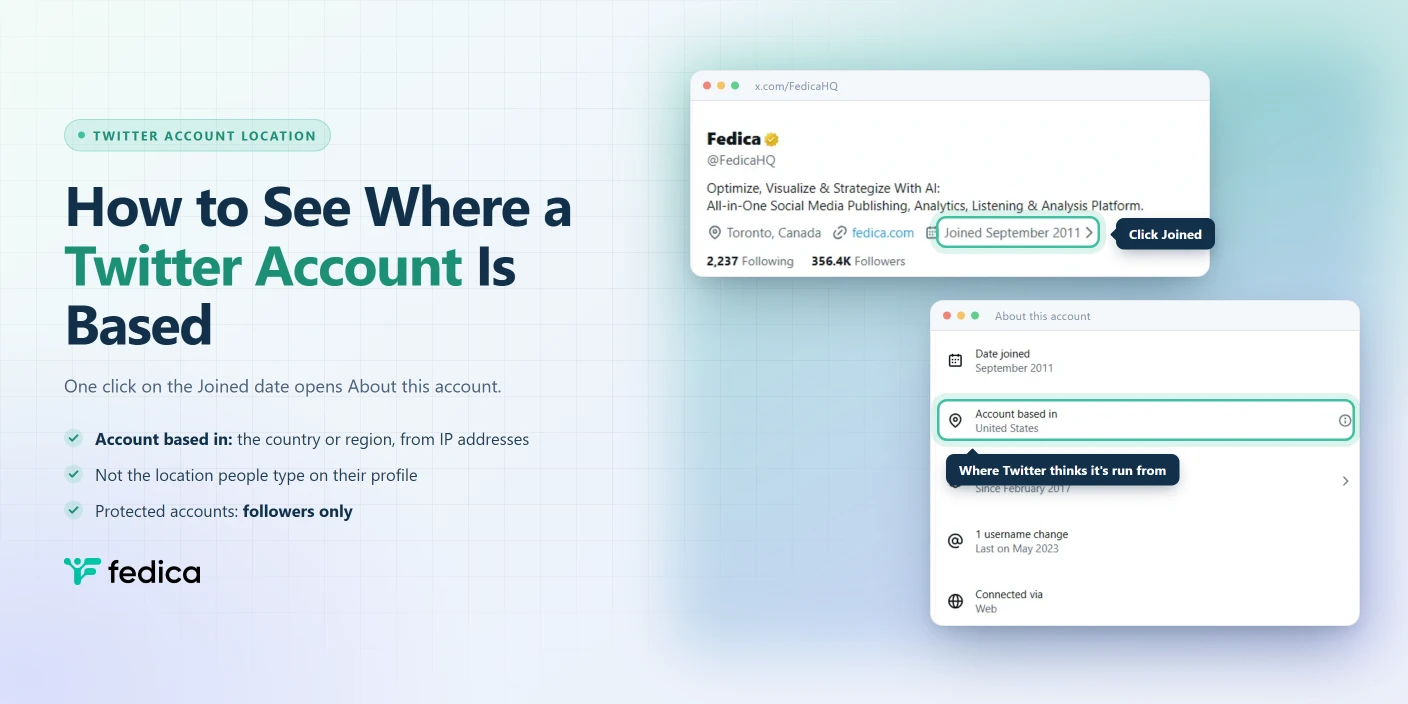
Since November 2025, every public Twitter profile can tell you which country it’s run from. It takes one click, and within days of launch CBS News reported that popular accounts dressed up as American, flags and all, were based outside the United States.
To see where a Twitter account is based, open the profile and click the “Joined” date under the bio. That opens the About this account panel, where Account based in shows the country or region Twitter thinks the account is run from. Twitter works this out from the account’s IP addresses, so it isn’t the location people type on their profile. It’s also wrong more often than you’d think: in Fedica’s check of 10 accounts, 1 still showed the wrong country in November 2026.
How to See Where a Twitter Account Is Based
Here’s how to check any public account on x.com:
- Open the account’s profile.
- Under the bio, find the row with the location, website and join date.
- Click Joined (for example, “Joined September 2011 ›”).
- Read Account based in in the panel that opens.

In the X app, it’s a tap instead of a click. Nikita Bier, head of product at X, announced the feature on November 22, 2025 as “accessible by tapping the signup date on profiles.”

What “About This Account” Shows
About this account is Twitter’s profile transparency panel: a short list of facts Twitter keeps about an account, shown to anyone who clicks its join date. Here’s what Fedica’s own panel showed on November 7, 2026:
| Line | Example | What it means |
|---|---|---|
| Date joined | September 2011 | The month the account was created |
| Account based in | United States | The country or region Twitter infers from the account’s IP addresses |
| Verified | Since February 2017 | How long the account has had its checkmark |
| Username change | 1, last on May 2023 | How many times the @handle changed, and when it last did |
| Connected via | Web | Whether the account uses Twitter on the web or through a specific app store |
Lines only appear when they apply: no checkmark, no Verified line.
How Accurate “Account Based In” Is
Twitter says it outright. Click the ⓘ icon next to Account based in and a “How it works” box reads: “The country or region that an account is based can be impacted by recent travel or temporary relocation. This data may not be accurate and can change periodically.”

The X Help Center explains where the answer comes from: “X infers this information based on your aggregated IP addresses.” So the label follows where an account connects from, not where its owner says they live. Besides travel, two things can push it off:
- A VPN or proxy. Engadget reported in November 2025 that accounts on a VPN can show the note “Country or region may not be accurate.”
- The owner’s choice. Account owners can show a region instead of their country.
Fedica tested it. When About this account launched in November 2025, we checked 10 accounts whose location we know for certain, including where each one accesses Twitter from. Three of the 10 showed the wrong country: a 30% error rate. Since then, two of those switched to the right country, so in November 2026 1 in 10 is still wrong.
Fedica’s own account is a live example. The Fedica team accesses Twitter from Canada, and @FedicaHQ’s panel still says it’s based in the United States.
Nikita Bier, head of product at X, claimed 99.99% accuracy after a post-launch update, a figure CBS News (November 25, 2025) couldn’t verify. Treat Account based in as one clue, not proof.
Accounts That Don’t Show a Location
Not every Twitter account has an Account based in line. In a check on November 7, 2026, two kinds of accounts didn’t show one.
Government accounts with a gray checkmark show only Date joined and Verified. Canada’s foreign policy account, @CanadaFP, had no location and no Connected via line.

Protected accounts show the location only to their followers. The X Help Center says About this account is “publicly available if your account is set to public.” On a protected account you don’t follow, the panel shows Date joined and nothing else. Once you follow it, Account based in and Connected via appear.


Profile Location vs “Account Based In”
Fedica’s own account shows how far apart Twitter’s locations can be. On November 7, 2026, @FedicaHQ’s profile said Toronto, Canada, its country setting said Canada, and About this account said United States.
Only the last one is wrong: the Fedica team accesses Twitter from Canada. Even when all three are right, they won’t always match, because each one measures something different. The profile location is whatever the owner types into Edit profile, and it’s optional.

The country setting is private: “the primary country associated with your account,” used to customize what you see.

Here’s how the five kinds of Twitter location compare:
| Location | Comes from | Who can see it | What it tells you |
|---|---|---|---|
| Profile location | Typed by the account owner (optional) | Everyone | Where the owner says they are |
| Country setting | Chosen by the account owner | Only the owner | Which country Twitter customizes the account for |
| Account based in | Inferred by Twitter from aggregated IP addresses | Everyone for public accounts, followers for protected ones | Where Twitter thinks the account connects from |
near: search | The profile or device location on posts | Anyone who searches | Posts made near a place |
| Fedica’s location filter and followers map | The profile location | Fedica users | Which accounts say they’re in a place |
Finding Twitter Accounts in a Place
About this account checks one profile at a time, and Twitter’s near: search finds posts, not accounts.
That’s where Fedica comes in. Fedica’s Twitter account search filters accounts by country, state or city, with an optional radius in km, and you can combine it with bio keywords, language and last activity. It matches the location people put on their profile, so it finds accounts that say they’re in a place. Open About this account on the ones that matter to see where Twitter thinks they’re run from. Search Accounts is available on Fedica’s Grow plan.
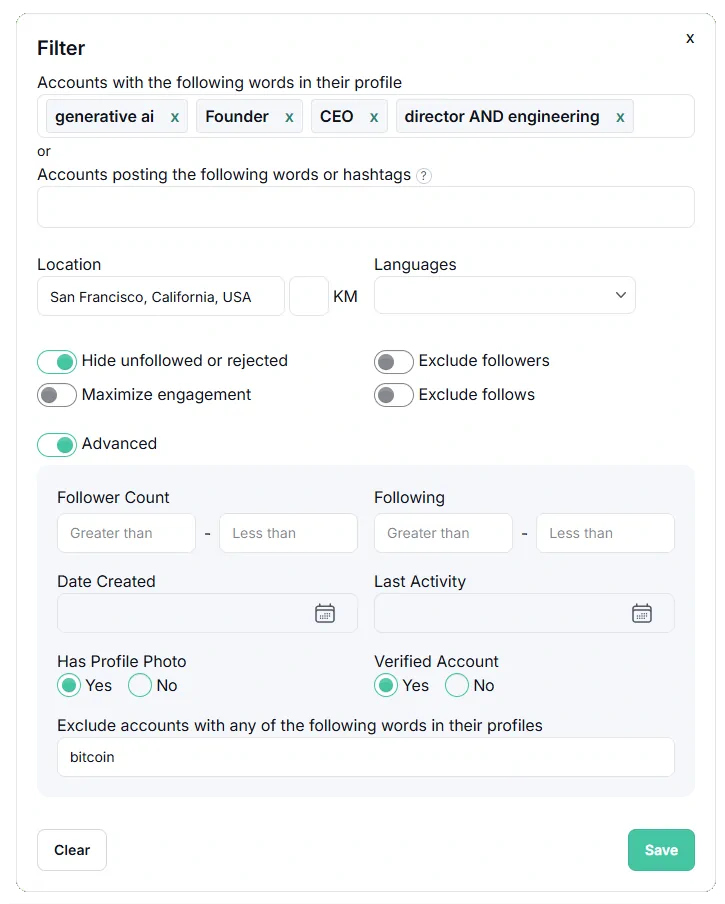
To see where your own followers say they are, Fedica’s Twitter followers map maps their profile locations by country, state and city.
Looking for one person instead? Here’s how to search for people on Twitter.
Checking or Changing Your Own Location
The X Help Center says you choose whether your panel shows your country or your region “by clicking the ‘joined’ date in your profile and selecting the settings gear icon.” Country is the default. Your country setting is a separate, private setting under Settings > Your account > Account information > Country.
If your Account based in is wrong, the X Help Center page on country settings has a link to report it.
Frequently Asked Questions
Is “Account based in” the same as the location in someone’s bio?
No. The profile location is whatever the account owner types, and it’s optional. Account based in is Twitter’s own estimate from the account’s aggregated IP addresses, and the owner can’t type it in.
Can you see where a private Twitter account is based?
Only if you follow it. A protected account shows Account based in to its followers. Anyone else sees only the date it joined.
Does someone know if you check their About this account?
No. Opening another account’s About this account panel doesn’t send them a notification.
How accurate is “Account based in” on Twitter?
Not fully. In Fedica’s check of 10 accounts with a known location, 3 showed the wrong country at launch in November 2025, and 1 was still wrong in November 2026. Twitter’s own “How it works” note says the data “may not be accurate and can change periodically.”
Can you hide your country on Twitter?
Partly. The settings gear in your About this account panel switches it to your region, and a protected account hides it from non-followers. Twitter still works out the location either way.