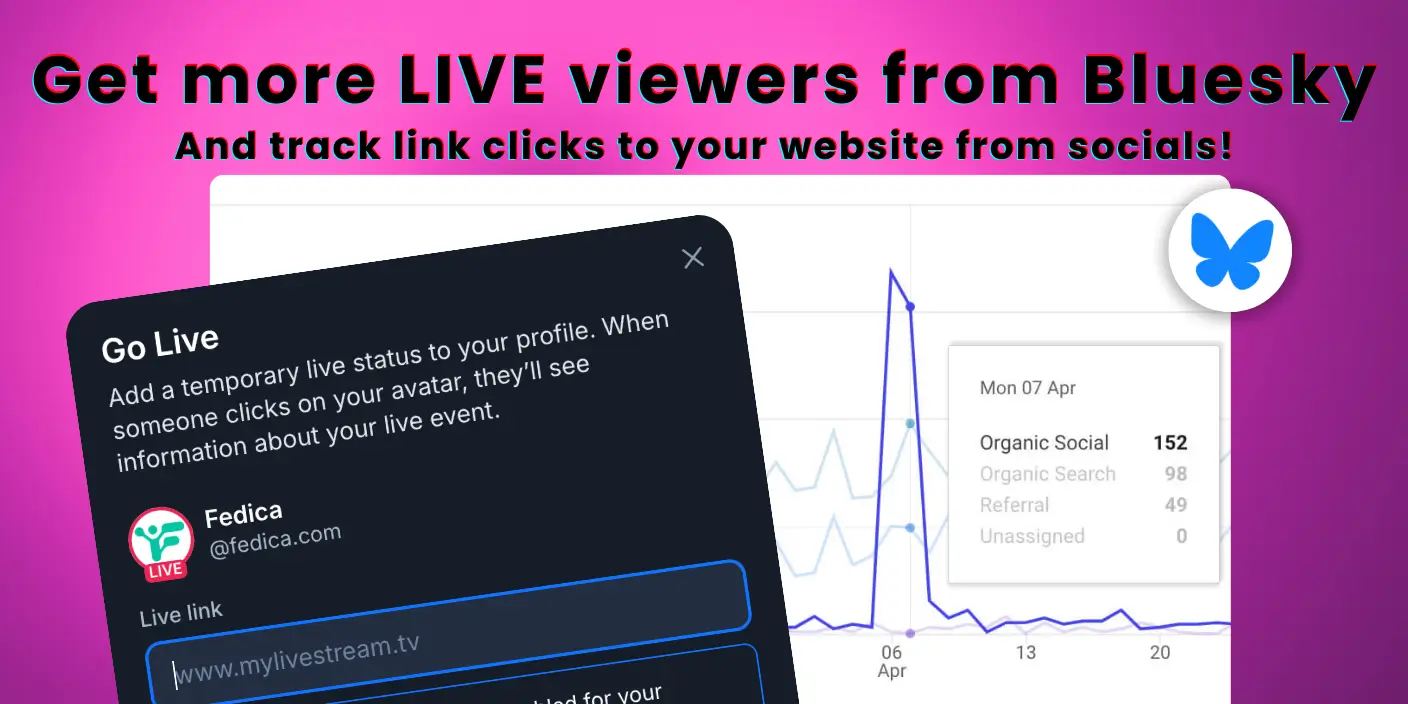
Bluesky live streaming just got easier. The Live Now badge automatically notifies your followers when you’re streaming on Twitch.
Bluesky has 27.44 million registered users as of January 2025. The platform has become a key destination for creators building their audience.
You’ll learn how to set it up and how to track link clicks from your Bluesky posts.
After working with creators managing presence across Bluesky, Mastodon, and other platforms, we’ve seen how fragmented audiences have become. Unified tools are essential.
Fedica helps you track link clicks from your Bluesky posts, schedule content across platforms, and see analytics that show what’s actually working.
Key Takeaways
- Bluesky’s Live Now feature automatically displays a red badge on your profile when you’re streaming on Twitch, notifying your followers without manual activation.
- Fedica tracks link clicks from your Bluesky posts automatically, showing which posts drive the most website traffic.
- Schedule posts across Bluesky, Mastodon, Threads and other platforms from one dashboard, with free unlimited scheduling for Bluesky and Threads.
- View multi-platform analytics showing post performance, engagement metrics, and link clicks from Bluesky, Mastodon, Threads, and other platforms in one dashboard.
- Fedica provides dedicated link click tracking and analytics for all supported platforms, where many alternative tools offer limited support.
Table of Contents
- What Is Bluesky's Live Now Feature? Understanding the Live Streaming Badge
- How to Get More People to Your Live Stream: Schedule Posts That Drive Viewers
- How to Set Up Bluesky's Live Now Feature: Complete Step-by-Step Guide
- Which Platforms Does Bluesky Live Support? Current and Future Options
- How to Track Link Clicks from Your Bluesky Live Posts with Fedica: Complete Analytics Guide
- Managing Your Presence Across Bluesky Live, Mastodon, and Other Platforms: The Unified Solution
- Best Practices for Using Bluesky's Live Feature: Maximize Your Streaming Reach
What Is Bluesky’s Live Now Feature? Understanding the Live Streaming Badge
Bluesky’s Live Now feature is a red badge. It appears on your profile when you’re streaming on platforms like Twitch. It automatically notifies your Bluesky followers that you’re live.
The badge displays a red border around your avatar. It shows a “Live” callout below it. This makes it easy for your audience to discover your live content. They don’t need to check multiple platforms.
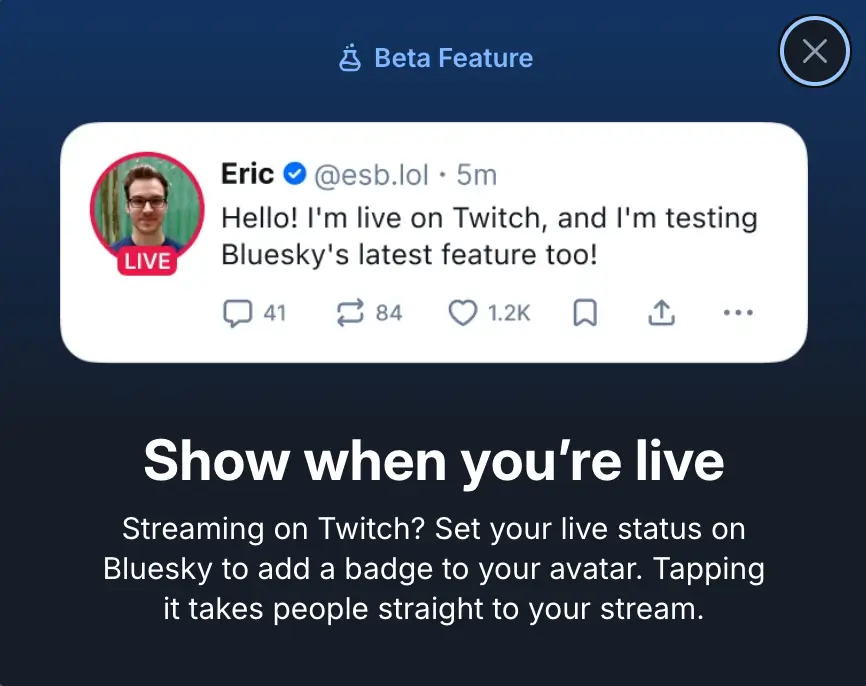
Clicking your profile picture takes followers directly to your livestream on the external platform. They can join your stream with one click.
As of January 2026, this Bluesky live feature is available to all users. It lets you stream on Twitch while still maintaining visibility on Bluesky.
Other social platforms try to keep users within their ecosystem. Bluesky’s approach is different. It gives creators flexibility without platform lock-in, but right now its only available for Twitch. You still notify your Bluesky audience.
How to Get More People to Your Live Stream: Schedule Posts That Drive Viewers
The Bluesky Live badge shows when you’re streaming. But that’s just the start.
To get more people to watch your stream, you need to schedule posts that go out while you’re live. These posts can promote your stream. They can share news. Or they can post memes that show your Live icon is active.
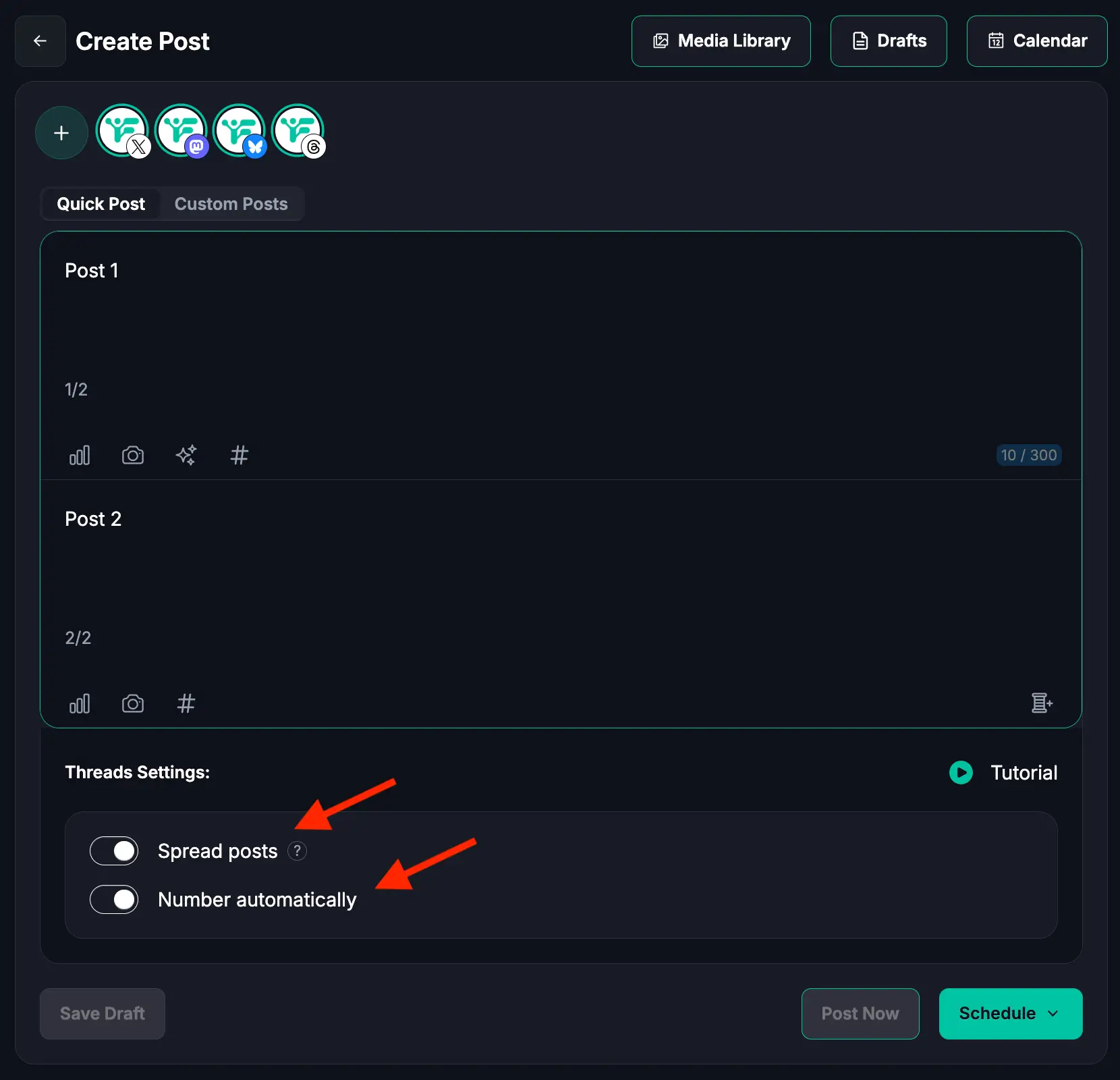
Fedica lets you schedule Bluesky posts for free. You can queue up content before you go live.
Want to see which posts actually drive viewers?
Then you can see what content makes people click through to your stream.
The strategy is simple. Schedule a bunch of posts for when you’re live. Make them highlight your Live badge. Share content your audience cares about. Then watch your viewer count grow.
Schedule Posts Before You Go Live (Free Option)
Fedica offers free scheduling for Bluesky posts. You can plan your promotion strategy without any cost.
Before you start streaming, schedule posts that announce you’re going live. Share what you’ll be talking about. Or post memes and relevant content that will appear while your Live badge is active.
Bluesky’s Live badge appears automatically when you stream. Your scheduled posts will show up alongside your Live icon. This makes it easy for followers to discover you’re streaming and join your content.
Free plan includes:
- Schedule up to 10 posts at any given time
- Unlimited drafts
- Plan weeks of content in advance
That’s more than enough for promoting your streams. You can plan weeks of content in advance and never miss promoting a stream.
Want to cross-post across many platforms for free?
Upgrade to Track Which Posts Drive Viewers (Link Tracking)
Free scheduling gets your posts out there. But upgrading to Fedica’s link tracking shows you which posts drive clicks to your website.
Fedica automatically adds UTM tracking parameters to your links and shortens them.
Note: Bluesky’s Live Now badge links directly to Twitch, which doesn’t support UTM tracking. UTM tracking works for links to your website.
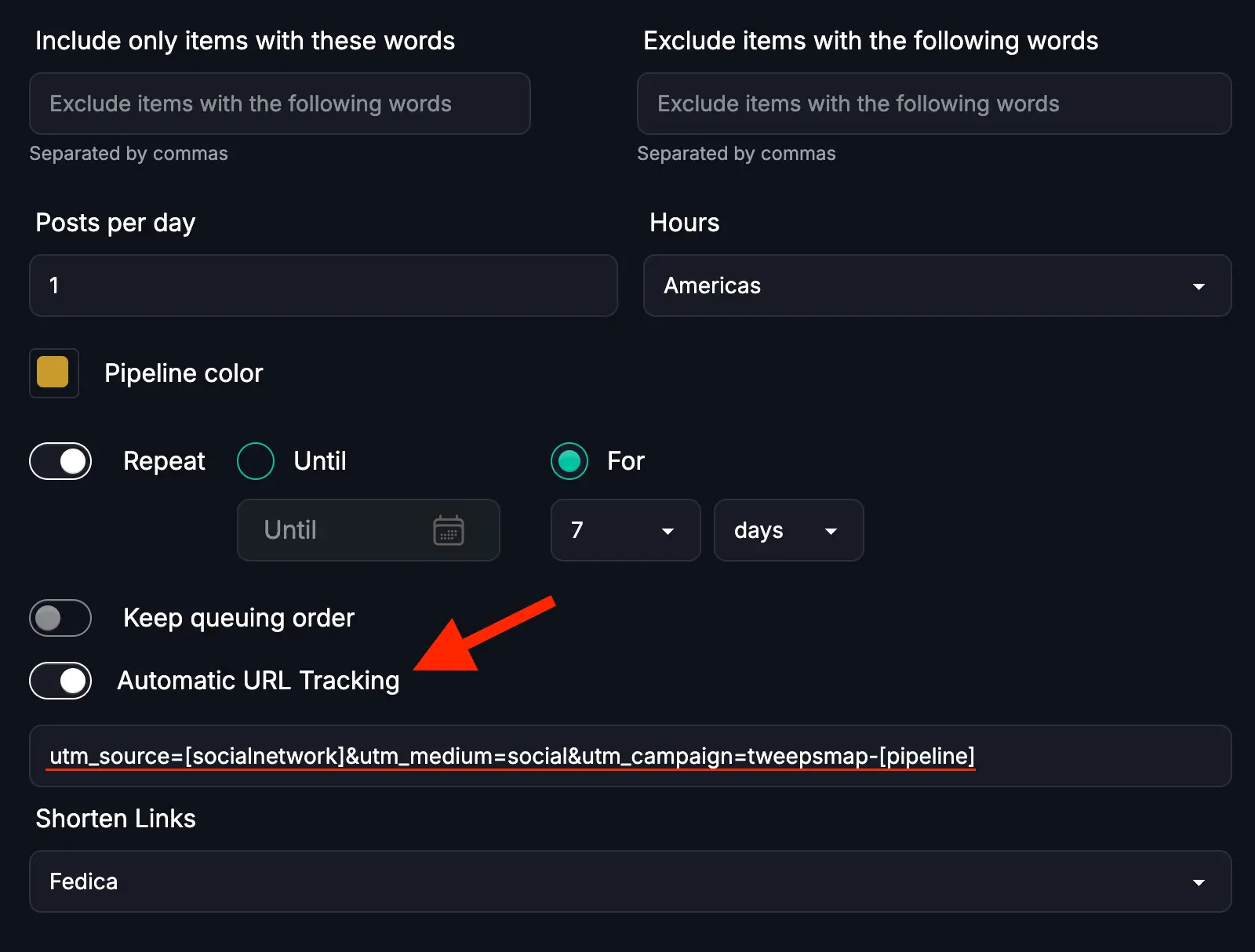
You can track:
- Click counts to your website
- Timing data
- Which content campaigns perform best
- Whether memes, news posts, or announcements drive the most clicks
This data helps you optimize your promotion strategy. Post more of what works. Post less of what doesn’t.
Combined with Google Analytics integration, you can track how those clicks convert into website visits or other actions you’re tracking.
However, UTM tracking works great for:
- Links to your own website (where you could embed a Twitch stream)
- Tracking which Bluesky posts drive website traffic
- Click counts and timing data for links to your site
- Which content campaigns drive the most website visits
- Whether memes, news posts, or announcements drive the most clicks
This data helps you optimize your promotion strategy. Post more of what works. Post less of what doesn’t.
Combined with Google Analytics integration, you can track how those clicks convert into website visits or other actions you’re tracking. This gives you conversion data for your website traffic.
Post Content That Shows Your Live Icon
The key to maximizing your Live badge is posting content while you’re live that highlights your active stream.
Schedule posts that include:
- Announcements that you’re streaming
- Relevant news or topics you’re discussing
- Memes that engage your audience
- Highlights from your current stream
Do all of this while your Live badge is visible. When followers see your posts in their feed, they’ll also see your Live icon. This creates multiple touchpoints that drive them to click through to your stream.
Posting news, relevant content, or memes while live gives people reasons to check out your stream. It’s more than just seeing the badge.
This multi-post strategy during your stream helps you gather more viewers. You stay visible and engaging throughout your live session.
Build a Promotion Strategy That Works
Create a content pipeline in Fedica. It organizes your live stream promotions by topic, campaign, or schedule.
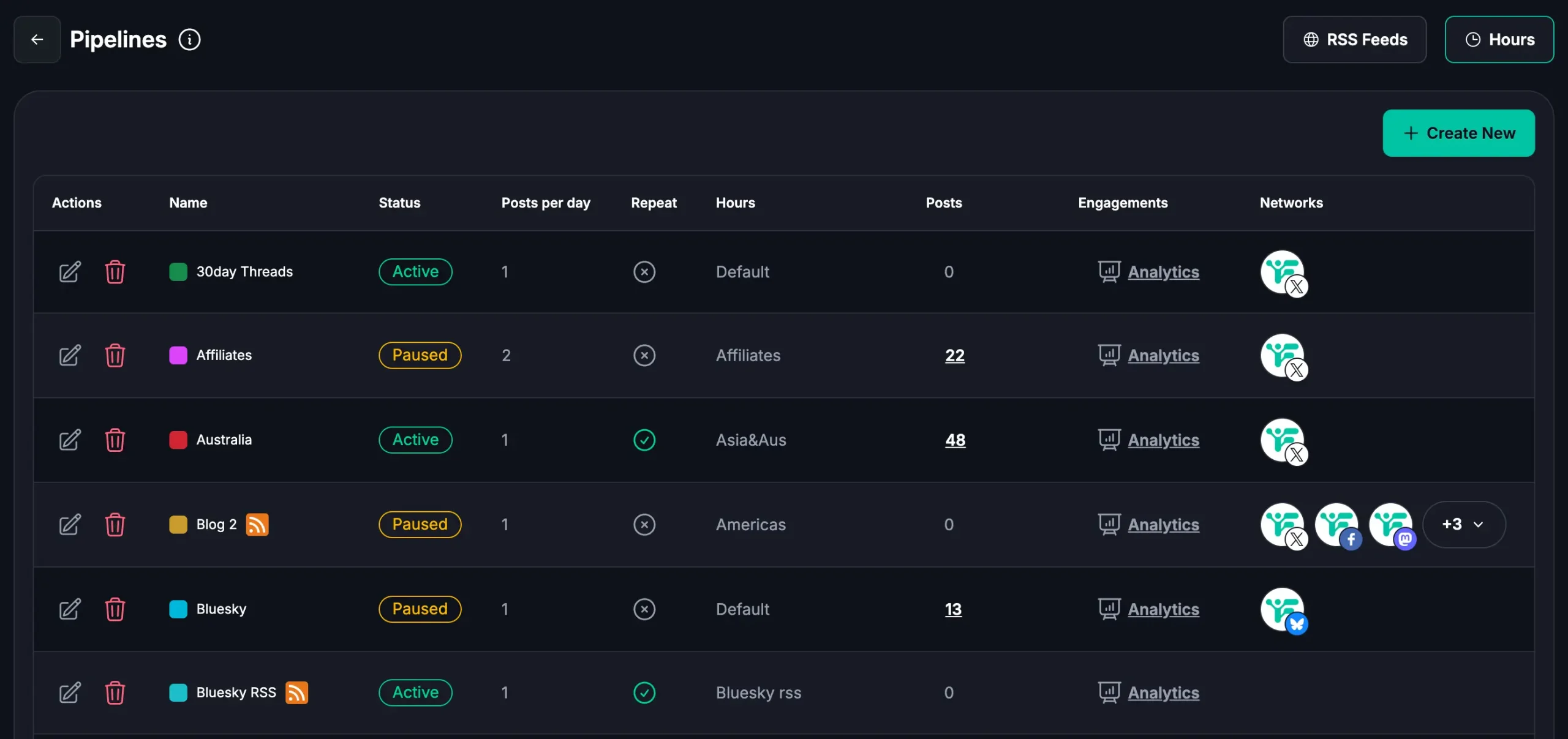
Schedule posts announcing upcoming streams. Share what you’ll be discussing. Engage with your audience before you go live.
Then, while you’re streaming, schedule posts that go out automatically. Share highlights. Ask questions. Post relevant content that keeps your Live badge visible in followers’ feeds.
Fedica’s link tracking (available with upgrade) shows which promotion posts drive the most clicks to your website. You can refine your strategy over time.
The combination of free scheduling and optional link tracking gives you everything you need. You can build a promotion strategy that drives website traffic and engagement.
How to Set Up Bluesky’s Live Now Feature: Complete Step-by-Step Guide
To set up Bluesky’s Live Now feature, follow these steps:
- Open the Bluesky app and go to your profile options icon
- Find the livestream link option
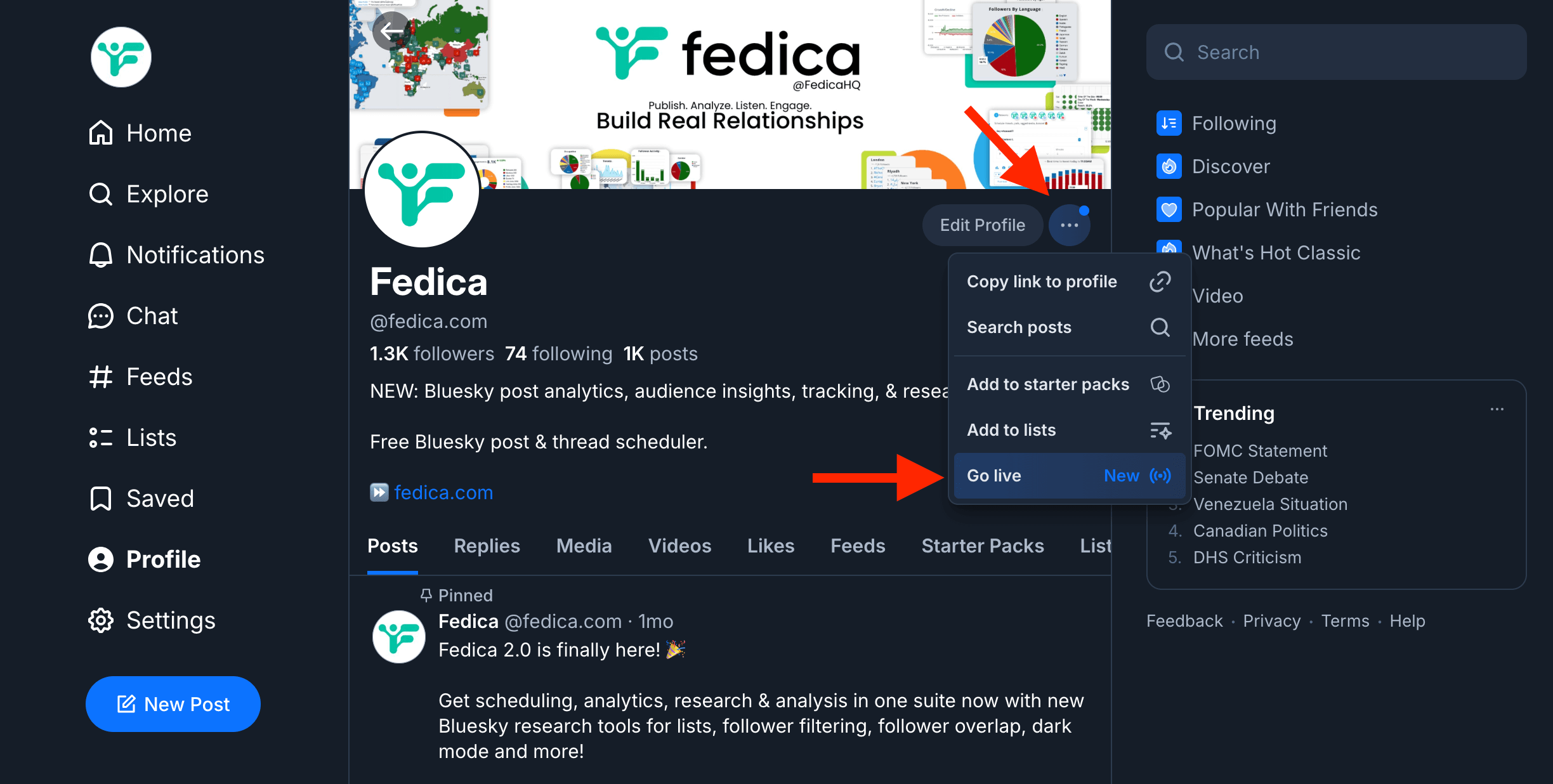
- Enter your full Twitch channel URL (e.g., https://www.twitch.tv/yourchannel)
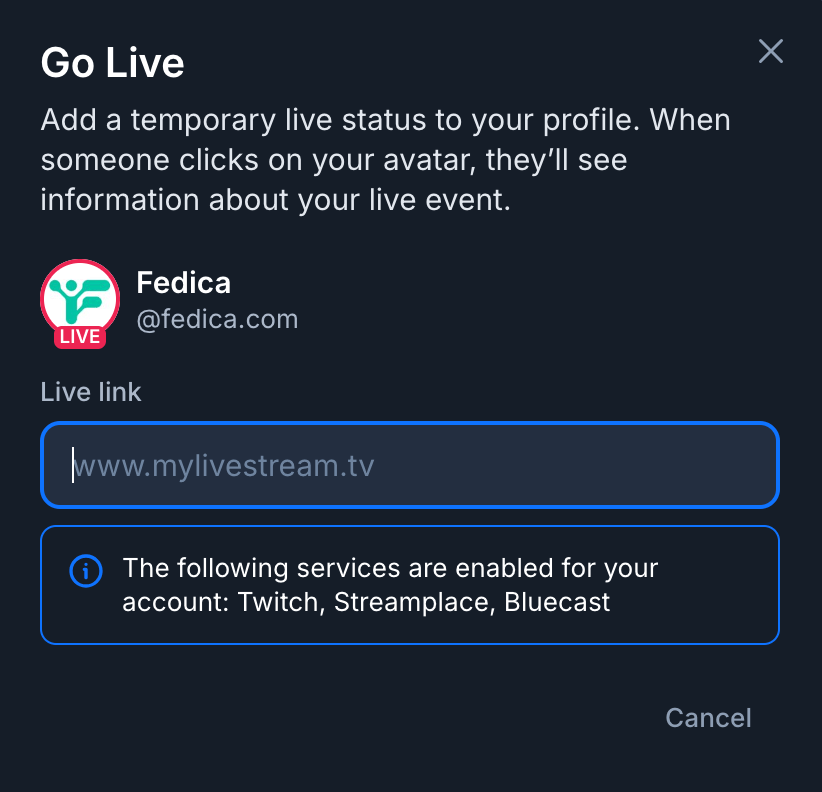
- Save the settings – Bluesky will verify the link automatically
Once connected, the Live badge automatically appears whenever you start streaming on Twitch. You don’t need to manually activate it each time you go live.
Requirements:
- Latest version of the Bluesky app (v1.114 or later)
- A Twitch account with streaming capabilities
Verifying It Works
Start a stream on Twitch and check your Bluesky profile to confirm the Live badge appears. You can also ask a follower to check your profile or view it from another account.
The badge should appear within a few seconds of starting your stream. If it doesn’t appear, verify that your Twitch link is correctly saved in your Bluesky profile settings.
Which Platforms Does Bluesky Live Support? Current and Future Options
| Platform | Status |
|---|---|
| Twitch | Currently supported |
| YouTube | Coming soon |
| Other platforms | Under consideration |
Bluesky Live currently supports Twitch links only. So the Live Now badge appears when you stream on Twitch.
Bluesky has indicated that support for other streaming platforms like YouTube may follow. They’re learning from user feedback during the beta phase.
When you use Bluesky live streaming with Twitch, the badge automatically appears on your profile. You don’t need any additional setup beyond connecting your Twitch URL.
Fedica helps you track link clicks from your Bluesky posts. You can see which posts drive website traffic.
This cross-platform tracking capability makes Fedica valuable. Even as Bluesky expands Live Now support to more platforms, you get consistent analytics. Whether you stream on Twitch, YouTube, or elsewhere.
How to Track Link Clicks from Your Bluesky Live Posts with Fedica: Complete Analytics Guide
Fedica automatically tracks link clicks from your Bluesky posts. It adds UTM tracking parameters and shortens your links.
Connect your Bluesky account to Fedica. Enable automatic link tracking through Pipelines. Pipelines are content queues organized by topic or campaign. Then view click counts, timing data, and campaign performance in your dashboard.
Bluesky’s Live Now feature notifies your audience when you’re streaming. Fedica tracks link clicks from your Bluesky posts to your website, showing which promotion content drives traffic.
Fedica provides dedicated link click tracking for Bluesky and all other supported platforms. Many alternative tools offer limited or no analytics support for platforms like Bluesky. This means you get conversion data that shows what content drives website traffic, not just engagement metrics.
Why Track Link Clicks?
Fedica’s link click tracking shows what content actually drives people to take action. It goes beyond native platform analytics that only show likes and reposts.
Twitch users watched over 19 billion hours of content in 2025. Understanding which Bluesky posts drive clicks to your website becomes critical for maximizing your reach.
For Bluesky posts linking to your website, Fedica’s link tracking shows which posts drive the most website traffic. It shows click counts, timing data, and which pipelines (content campaigns) perform best.
Most social media management platforms don’t offer dedicated link tracking for newer platforms like Bluesky and Mastodon. This makes Fedica’s comprehensive support particularly valuable for creators building presence on decentralized networks. Analytics tools are limited there.
Viewing Your Analytics
Fedica provides comprehensive Bluesky analytics. It shows which links get the most clicks and when your audience is most engaged.
In your Fedica dashboard, you can view link click counts sorted by platform. You can filter by pipeline to see campaign performance. This lets you see which Bluesky posts actually drive website traffic.
To view your stats on Google Analytics, use these default UTM parameters format:
`?utm_source=[socialnetwork]&utm_medium=social&utm_campaign=tweepsmap-[pipeline]`.
Note: You can customize these settings in the brackets “[]” or leave them if you want Fedica to choose for you. You can change medium from ‘social’ as well, to something like ‘Social-Feed’ if you want, too.
Combined with Google Analytics integration, you can track how those clicks convert into website visits or other actions you’re tracking.
Many analytics tools focus on engagement metrics like likes and reposts. Fedica’s link click tracking gives you the conversion data that matters. It shows you which content actually drives traffic and business results. Not just social media engagement.
Understanding Your Audience
Fedica’s Bluesky analytics include:
- Post performance metrics
- Follower segmentation
- Audience demographics
- Top engagers
- Swap between different platform analytics in one dashboard
- Analyze other accounts, compare followers, track unfollowers and more!
See which topics, formats, and posting times drive the most engagement. This works across Bluesky, Mastodon, X, Threads, and other platforms.
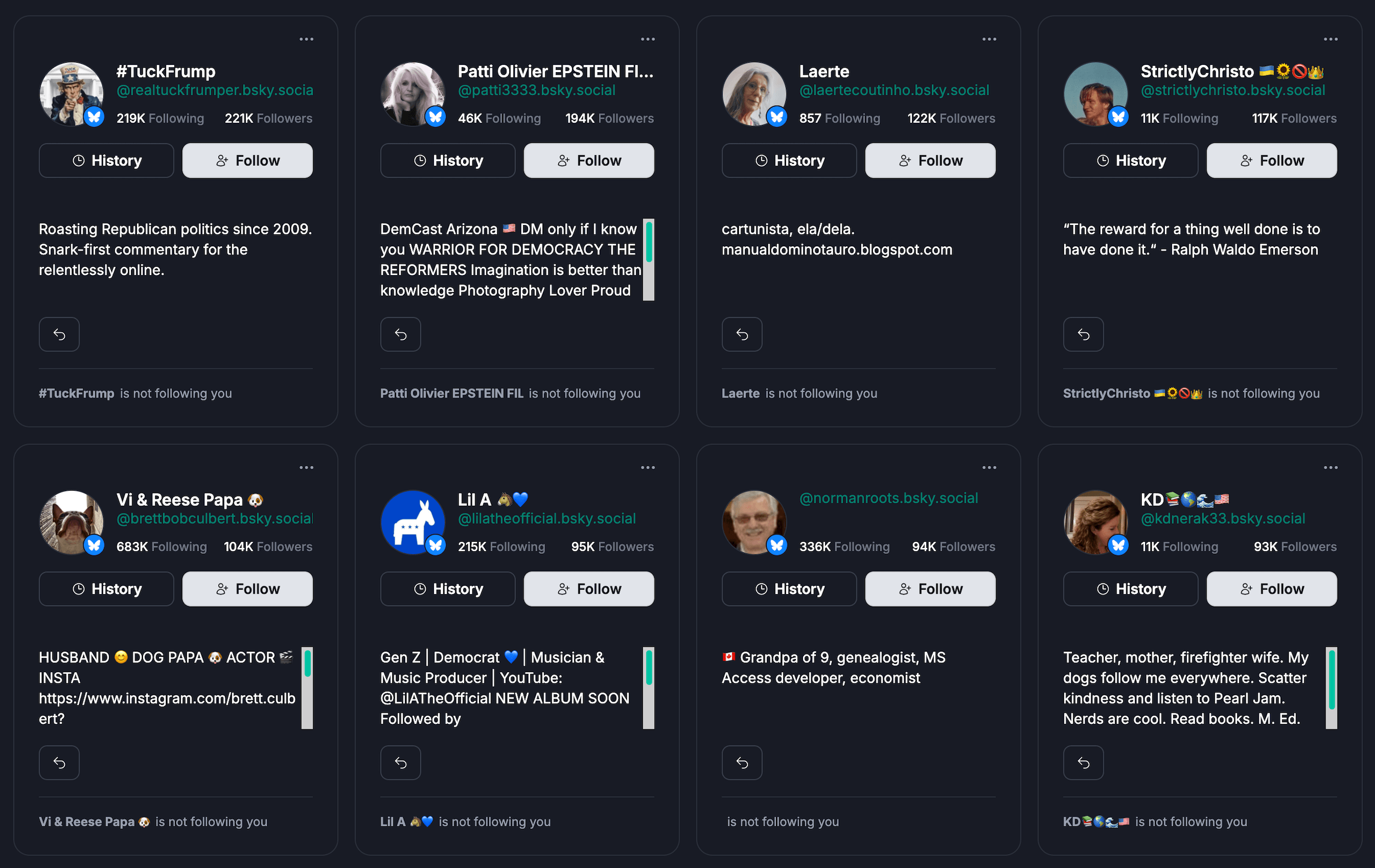
Fedica provides link click tracking, audience demographics, and analytics from each platform. It shows not just what content performs well. It shows why it performs well and how to replicate that success.
This depth of analytics is valuable for Bluesky. Native analytics are limited there. Many alternative tools don’t provide comprehensive audience insights.
Managing Your Presence Across Bluesky Live, Mastodon, and Other Platforms: The Unified Solution
Fedica manages your presence across Bluesky, Mastodon, Threads, X, LinkedIn, Instagram, and other platforms from one dashboard. It has unified scheduling, multi-platform analytics, and link tracking.
Schedule posts to multiple platforms simultaneously. Customize content for each network. And track performance across all platforms in one place.
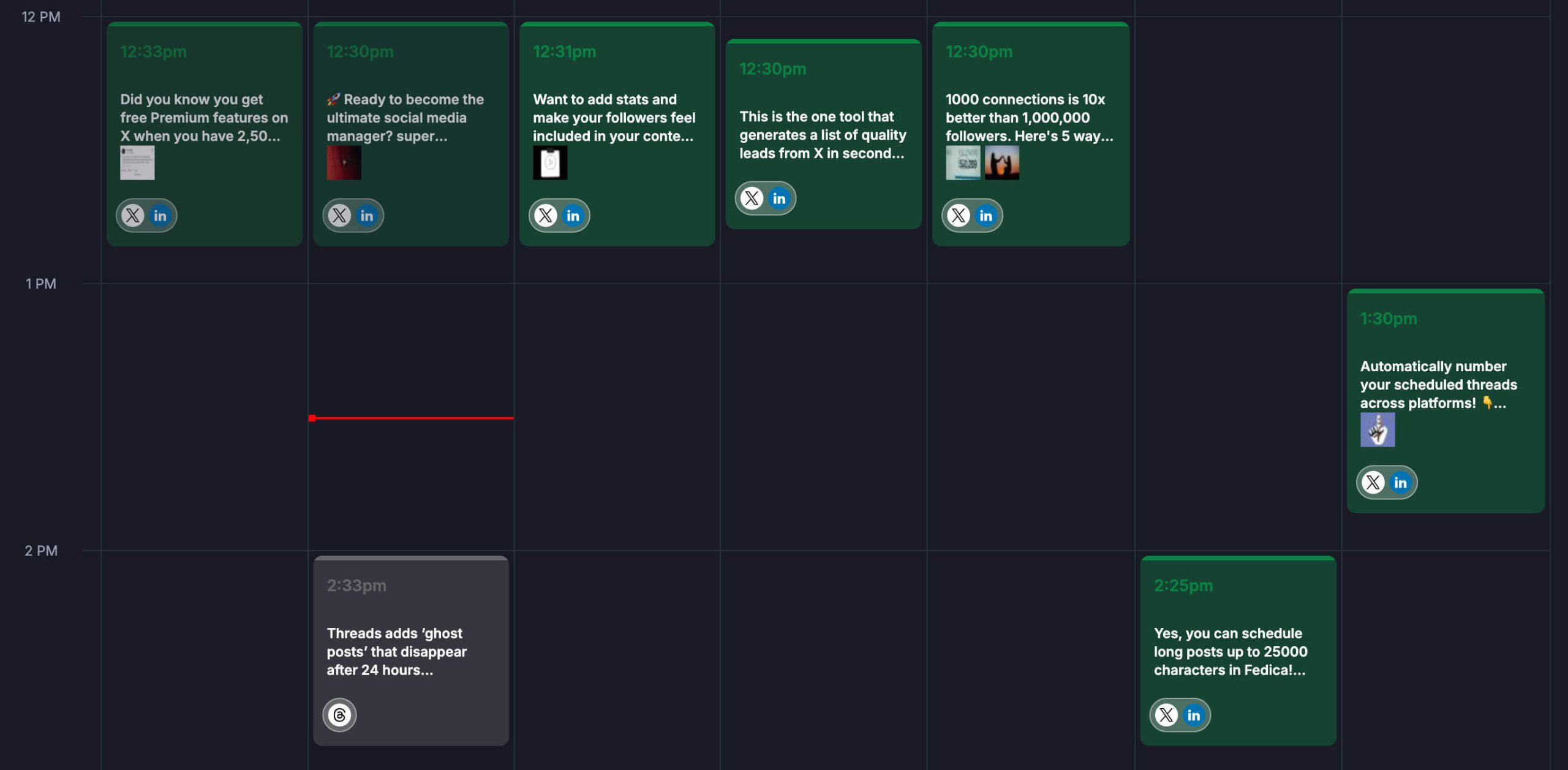
When promoting Bluesky live streams, Fedica lets you schedule posts across Bluesky, Mastodon, and other platforms. Then track which posts drive the most clicks to your website links.
Many social media management tools support major platforms like X and Instagram. Fewer provide comprehensive support for newer decentralized platforms like Bluesky and Mastodon. This makes Fedica’s cross-platform approach particularly valuable for creators building presence across the fragmented social media landscape. Audiences are spread across multiple networks.
We’ve seen firsthand how audiences have fragmented across Bluesky, Mastodon, and other platforms more than ever. Creators who used to focus on one or two platforms now need to maintain presence across five or more networks. They need this to reach their full audience.
U.S. creator ad spend reached $37 billion in 2025. It’s growing four times faster than the broader media industry. Brands are increasingly working with creators across multiple platforms. This makes cross-platform management essential for success.
Unified Management Across Platforms
Fedica unifies your presence across Bluesky, Mastodon, Threads, X, LinkedIn, and Instagram with one dashboard. It handles posting, scheduling, and analytics tracking.
Instead of managing each platform separately, Fedica gives you consistent tools and insights across all platforms. This unified approach helps you maintain consistent presence. It helps you track what’s working. And it helps you understand your overall audience.
This is especially valuable for creators on newer platforms like Bluesky and Mastodon. Many management tools offer limited support there.
Scheduling Posts Across Platforms
Fedica supports scheduling for:
- Bluesky
- Mastodon
- Threads
- X (Twitter)
- Pixelfed
- Tumblr
- TikTok
- YouTube
Write content once and customize it for each platform. Adjust text, hashtags, and media individually before posting simultaneously.
For Bluesky, Threads, X (Twitter) and Mastodon, Fedica’s thread spreading feature schedules multi-post threads. They publish over time rather than all at once. This maintains engagement without overwhelming your audience.
Bluesky and Threads posts can be scheduled for free with unlimited scheduling and drafts.
Multi-Platform Analytics with Fedica
Fedica’s dashboard shows analytics from Bluesky, Mastodon, Threads, and other platforms. You can view post performance, engagement metrics, follower growth, and link clicks from each platform separately.
Compare how your content performs on Bluesky versus Mastodon versus Threads. See which platforms drive the most link clicks. Understand where your audience is most engaged.
Many analytics tools focus on individual platforms. Or they don’t support newer networks. But Fedica’s multi-platform analytics let you view insights from all platforms in one place, showing how your overall strategy works across the fragmented social media landscape.
This is valuable for Bluesky and Mastodon. Native analytics are limited there. Many alternative tools don’t provide comprehensive tracking.
Maintaining Consistent Presence
Fedica’s cross-platform scheduling lets you plan content in advance and post regularly everywhere. Content pipelines organize posts by topic, campaign, or schedule. This makes it easy to maintain themed content across platforms.
RSS feed integration automatically shares blog content to social platforms. Bulk upload features let you schedule multiple posts at once.
Fedica offers free unlimited scheduling for many platforms. It has thread spreading for Bluesky, Threads, X and Mastodon. And comprehensive cross-platform support.
This makes it valuable for creators building presence on newer decentralized platforms. Many alternative tools offer limited or paid-only scheduling options. This makes Fedica’s free unlimited scheduling especially useful for Bluesky Mastodon and Threads.
Best Practices for Using Bluesky’s Live Feature: Maximize Your Streaming Reach
Use Bluesky’s Live Now badge for regular streaming schedules or special events. Combine it with Fedica’s scheduling and analytics tools to maximize reach.
Best practices:
- Schedule Bluesky posts through Fedica before your streams to build anticipation
- Let the Live badge automatically notify followers when you go live
- Track which promotion posts drive the most clicks to your website using Fedica’s link click tracking
- Cross-promote across Bluesky, Mastodon, and other platforms to reach fragmented audiences
These strategies help you get the most value from Bluesky live streaming. You understand what content and platforms drive engagement. Not just which posts get likes or reposts.
When to Use the Bluesky Live Badge
Use the Live badge when you have regular streaming schedules or special events you want to promote. The badge works best when you stream consistently. Your Bluesky audience knows when to check for your live content.
For special events or one-time streams, promote them in advance with Bluesky posts scheduled through Fedica. Then let the Live badge notify followers when you go live.
Regular streamers benefit most from the automatic badge. Occasional streamers should combine it with pre-stream promotion.
Optimizing Your Stream Titles
Create clear, engaging stream titles. They tell your Bluesky audience what to expect. Your Twitch stream title appears when people click your Live badge. So make it compelling and descriptive.
Use Fedica to schedule Bluesky posts before your stream. Include your stream title and what viewers can expect.
This pre-promotion helps build anticipation. It ensures your Bluesky audience knows what you’ll be streaming about.
Track which topics drive the most clicks to your website. Use Fedica’s link tracking for posts linking to your site.
Engaging Your Bluesky Audience
Interact with your Bluesky followers before and after streams to build community.
Before streaming:
- Schedule posts announcing upcoming streams
- Ask what topics viewers want to see
- Share highlights from previous streams
After streaming:
- Post clips and key takeaways
- Thank your viewers for joining
- Share highlights from the stream
This engagement builds a community around your streaming content. It keeps your Bluesky audience connected between streams.
Use Fedica’s analytics to see which engagement posts get the most interaction. Then adjust your strategy accordingly.
Cross-Promoting Your Content
Schedule posts across Bluesky, Mastodon, Threads, and other platforms to maximize reach. Then use Fedica’s link tracking to see which platforms and posts drive the most clicks to your website.
Fedica’s multi-platform analytics let you view analytics from each platform separately to see which promotions convert best for website traffic. This helps you optimize your promotion strategy.
Fedica combines cross-platform scheduling, link click tracking, and multi-platform analytics. It shows not just where you posted. It shows which posts actually drove website traffic and engagement across each platform.
This is particularly valuable for creators. They need to understand which platforms and content types drive the most website traffic and engagement.
Ready to track link clicks from your Bluesky posts?
Frequently Asked Questions
Is there live on Bluesky?
Yes, Bluesky has a Live Now feature that displays a red badge on your profile when you’re streaming on Twitch, but not a live stream feature in the platform. The feature rolled out to all users in January 2026 and automatically notifies your Bluesky followers when you go live.
How do I set up Bluesky’s Live Now feature?
To set up Bluesky’s Live Now feature:
- Open the Bluesky app
- Go to your profile settings
- Find the livestream link option
- Enter your full Twitch channel URL
- Save the settings
Once connected, the Live badge will automatically appear when you start streaming on Twitch.
Which platforms does Bluesky Live support?
Bluesky Live currently supports Twitch links. Bluesky has indicated that support for other streaming platforms like YouTube may follow. They’re learning from user feedback.
How do I track link clicks from my Bluesky posts?
Fedica lets you track link clicks from your Bluesky posts automatically. Link click tracking works for links to your website across all supported platforms, giving you conversion data for your website traffic.
Important limitation: Bluesky’s Live Now badge links directly to Twitch. Since Twitch doesn’t support UTM tracking in its analytics, you cannot track which Bluesky posts drive viewers to your Twitch stream through URL data. UTM tracking only works for links to your own website.
Steps:
- Connect your Bluesky account to Fedica
- Fedica automatically adds UTM tracking parameters and shortens your links (for links to your website)
- View click counts, timing data, and campaign performance in your dashboard
To track livestream viewers: If you want to use UTM tracking, create a page on your website with an embedded Twitch stream, then link to that page from your Bluesky posts instead of using the Live Now badge.
Can I schedule Bluesky posts?
Yes, Fedica lets you schedule Bluesky posts for free. You get unlimited scheduling and drafts.
You can schedule:
- Posts
- Threads
- Media
- Tags
Customize content for Bluesky and other platforms from one dashboard.
Fedica also supports thread spreading for Bluesky. This lets you schedule multi-post threads that publish over time with the Publish plan that also supports video scheduling.
Does Bluesky Live work with YouTube?
Bluesky Live currently only works with Twitch, but Bluesky has indicated that support for other streaming platforms like YouTube may follow. When YouTube support is added, you’ll be able to display the Live Now badge when streaming on YouTube as well.
How do I see analytics for my Bluesky posts?
Fedica provides comprehensive Bluesky analytics including:
- Post performance metrics
- Follower growth
- Audience demographics
- Top engagers
- Link click tracking
Bluesky’s native analytics are limited. Fedica gives you detailed insights into what content resonates with your audience. It shows which posts drive traffic.
Can I manage Bluesky and Mastodon from one tool?
Yes, Fedica lets you manage your presence across Bluesky, Mastodon, Threads, X, LinkedIn, Instagram, and other platforms from one dashboard. You can schedule posts, track analytics, and monitor link clicks across all supported platforms. This gives you a unified view of your social media performance.
Is Bluesky Live free?
Yes, Bluesky’s Live Now feature is free for all Bluesky users. The feature is part of the standard Bluesky app and doesn’t require any additional payment. Fedica also offers free scheduling for Bluesky and Threads posts with unlimited scheduling and drafts.
How does the Live Now badge work?
The Live Now badge automatically appears on your Bluesky profile when you start streaming on Twitch. Your profile picture gets a red border, and a “Live” callout appears below it. When followers click your profile picture, they’re taken directly to your livestream on Twitch. The badge disappears automatically when you stop streaming.
Can I track which Bluesky posts drive traffic?
Yes, Fedica’s link click tracking shows you which Bluesky posts drive the most website traffic.
You can:
- See click counts sorted by platform (for links to your website)
- Filter by content campaign or pipeline
- See which posts perform best for driving website traffic
- Track conversions with Google Analytics integration
How do I promote my live streams on Bluesky?
Promotion strategy:
- Use Fedica to schedule Bluesky posts promoting your upcoming streams
- Let the Live Now badge notify followers when you go live
- Use Fedica’s link tracking to see which promotion posts drive the most clicks to your website
- Cross-promote across Bluesky, Mastodon, and other platforms to maximize reach
This helps you optimize your streaming promotion strategy over time.
What is Bluesky’s Live Now feature?
Bluesky’s Live Now feature is a discovery tool. It displays a red badge on your profile when you’re streaming on Twitch.
Other social platforms are on the way like Youtube but for now it’s just Twitch. Bluesky is different. It directs users to your livestream on their platform.
This gives you flexibility to stream where you prefer. You still notify your Bluesky audience.
How do I know if someone is live on Bluesky?
When someone is live on Bluesky, you’ll see a red border around their profile picture and a “Live” callout below it. The badge appears in your feed, on their profile, and anywhere their avatar is displayed. Clicking their profile picture takes you directly to their livestream on the external platform (currently Twitch).