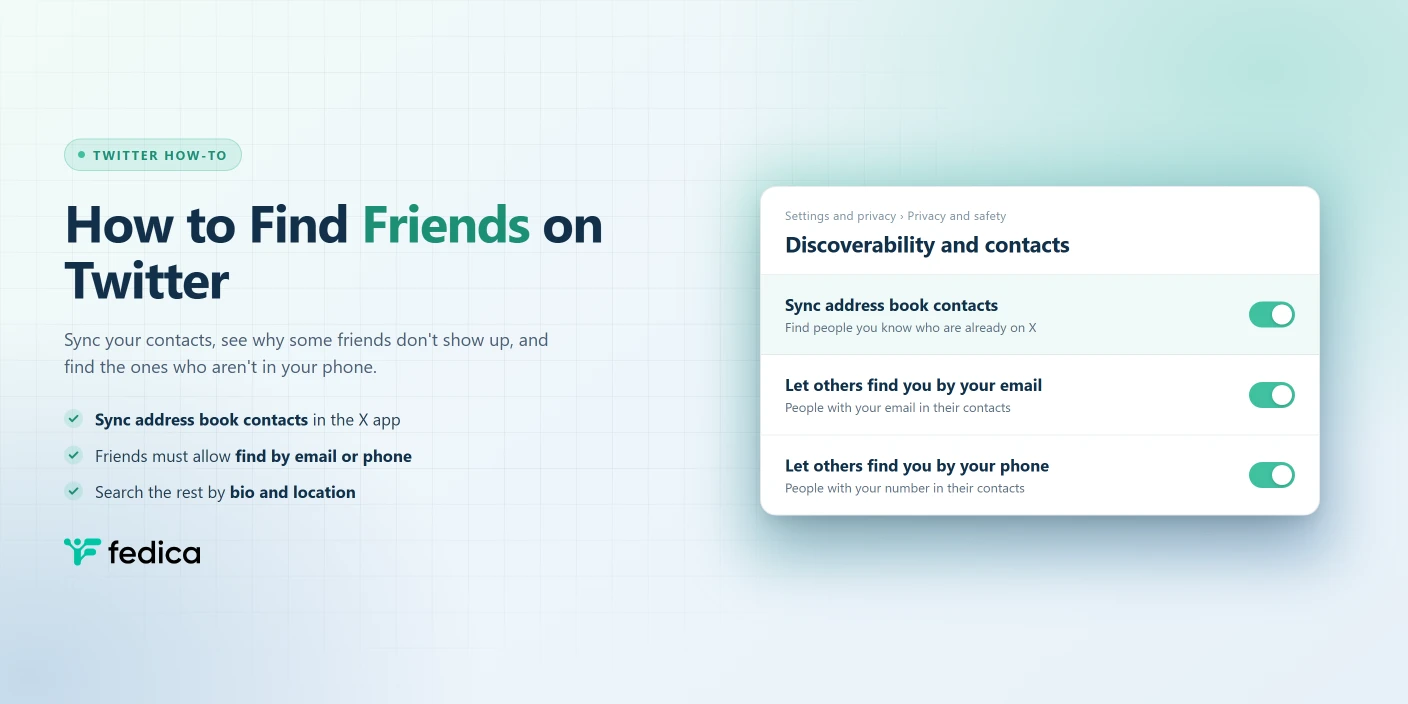
The fastest way to find friends on Twitter is to sync your phone’s contacts with X. Go to Settings and privacy › Privacy and safety › Discoverability and contacts in the X app and turn on Sync address book contacts, and X shows you which of your contacts already have an account. It only finds friends who let others find them by their email address or phone number, so some people won’t show up, and for those you’ll need to search by name or profile instead.
Here’s how each route works, based on X’s own help pages (checked October 2026).
How to Find Friends on Twitter With Your Contacts
X’s contact sync lives in the mobile app. Here’s how to turn it on:
- Tap your profile icon (on some Android phones it’s the navigation menu icon), then Settings and privacy.
- Tap Privacy and safety.
- Under Discoverability and contacts, tap Discoverability and contacts.
- Tap Sync address book contacts.
- X lists the people from your address book who are already on X. Follow the ones you want.
Here’s the Discoverability and contacts screen in the X app for iPhone (October 2026). The contact sync switch sits under Contacts, below the two discoverability switches:

Once it’s on, syncing keeps going. The setting itself says contacts from your address book are uploaded to X “on an ongoing basis,” so new friends you add to your phone can turn up later too.
Running a Professional Account? There’s a second door: Professional Tools › Professional Home › Make more connections does the same thing.
Why Some Friends Don’t Show Up
Contact sync only matches people who allow it. X finds contacts “who have allowed other people to find them by their email address or phone number.” If a friend has those settings off, syncing won’t surface them, even if their number is in your phone.
That’s also the only phone-number route X describes. To find someone on Twitter by phone number, their number has to be in your contacts and they have to allow being found by phone.
The fix for everyone else is a search, which the last section covers.
How to Let Friends Find You on Twitter
The same settings work the other way round. If you want friends to find you from their contacts, turn these on:
- Go to Settings and privacy › Privacy and safety.
- Open Discoverability and contacts.
- Switch on Let others find you by your email and/or Let others find you by your phone.
Keep them off if you’d rather stay unfindable that way. X’s help page also notes that these settings control whether X can use other people’s address books to suggest your account to them.
Finding Friends Who Aren’t in Your Contacts
Plenty of people you know won’t be in your phone, or won’t allow contact matching. Here’s what works instead:
- Search their name in X. X’s search shows people as well as posts. Our guide on how to find someone on Twitter, even without a username covers the tricks for common names.
- Search their bio and location. If you know where someone lives, what they do, or a word they’d use in their bio, Fedica’s Twitter account search finds accounts by bio keywords, location, language, and activity, so you can narrow “Sarah, designer, Toronto” down to a handful of profiles.
- Look through mutual friends. Find one friend first, then check who they follow. Fedica’s common followers report shows the followers two or more accounts have in common, a quick way to spot the rest of a friend group.
A Facebook friends list doesn’t carry over. X’s tools work from your phone’s address book, so a Facebook friend shows up only if their email or number is in your contacts and they allow matching.
How to Stop Syncing or Remove Your Contacts
Changed your mind? Turning sync off and deleting what’s already uploaded are two separate steps.
To stop syncing: open Discoverability and contacts again and turn off Sync address book contacts (a slider on iPhone, a checkbox on Android). This only stops syncing from that one device, so repeat it on any other phone or tablet you use.
To delete uploaded contacts: in the same screen, tap Remove all contacts and confirm. X keeps and uses the contacts you’ve already uploaded until you do this. Removal also turns off syncing on every device, though X says some contact-based suggestions may linger for a little while.
On the web, you can view or remove imported contacts from X.com at any time.
Frequently Asked Questions
How do I find my contacts on Twitter?
Turn on Sync address book contacts in the X app under Settings and privacy › Privacy and safety › Discoverability and contacts. X then lists the contacts from your phone who are already on X and allow others to find them by email or phone.
Can you find someone on Twitter by their phone number?
Only through contact sync. The person’s number has to be in your phone’s contacts, and they need Let others find you by your phone switched on.
Why can’t I find my friends on Twitter after syncing?
Usually their discoverability settings. Contact sync only matches people who let others find them by email or phone, so a friend with both settings off won’t appear. Search their name, or their bio and location, instead.
Can I sync contacts on the Twitter website?
X’s help pages describe syncing in the iOS and Android apps. On X.com you can view or remove contacts you’ve already imported.
Does X keep my contacts after I stop syncing?
Yes. Turning off sync stops new uploads from that device, but X keeps the contacts you uploaded before until you tap Remove all contacts.