
Yes. If your Twitter account is public, anyone on X can open your Following tab and see who you follow. If you protect your posts, people who don’t follow you can’t see the list at all, and no outside tool can either. Even on a public account, X only shows a visitor part of the list: in our October 2026 checks, the Following tab showed between 52 and 71 accounts, whether the account followed 368 people or 2,239.
So the real question is less “can they see it?” and more “how much of it, and who?”
Who Can See Who You Follow on Twitter
Here’s what each kind of viewer gets, based on our checks on X’s web app on October 15, 2026:
| Who’s looking | Public account | Private (protected) account |
|---|---|---|
| Someone on X who doesn’t follow you | Your Following tab, but only 52 to 71 accounts of it | Nothing. The list is hidden |
| Fedica’s Analyze an Account report | The full list, sorted by each account’s follower count | Not visible |
| Any other outside tool | Depends on the tool | Not visible |
The order isn’t fixed either. X doesn’t list accounts in the order you followed them, and two people looking at the same list can see it start with different accounts.
Public Accounts: Anyone Can Open Your Following Tab
A public Twitter account shows its Following count on the profile, and anyone on X can tap it to open the list. That’s the default for every account that hasn’t turned on Protect your posts.
What a visitor actually sees is a slice. We opened the Following tab of five accounts on X’s web app on October 15, 2026, and the list stopped loading after 52 to 71 accounts every time. @FedicaHQ follows 2,239 accounts and showed 52. @paulg follows 806 and showed 69.
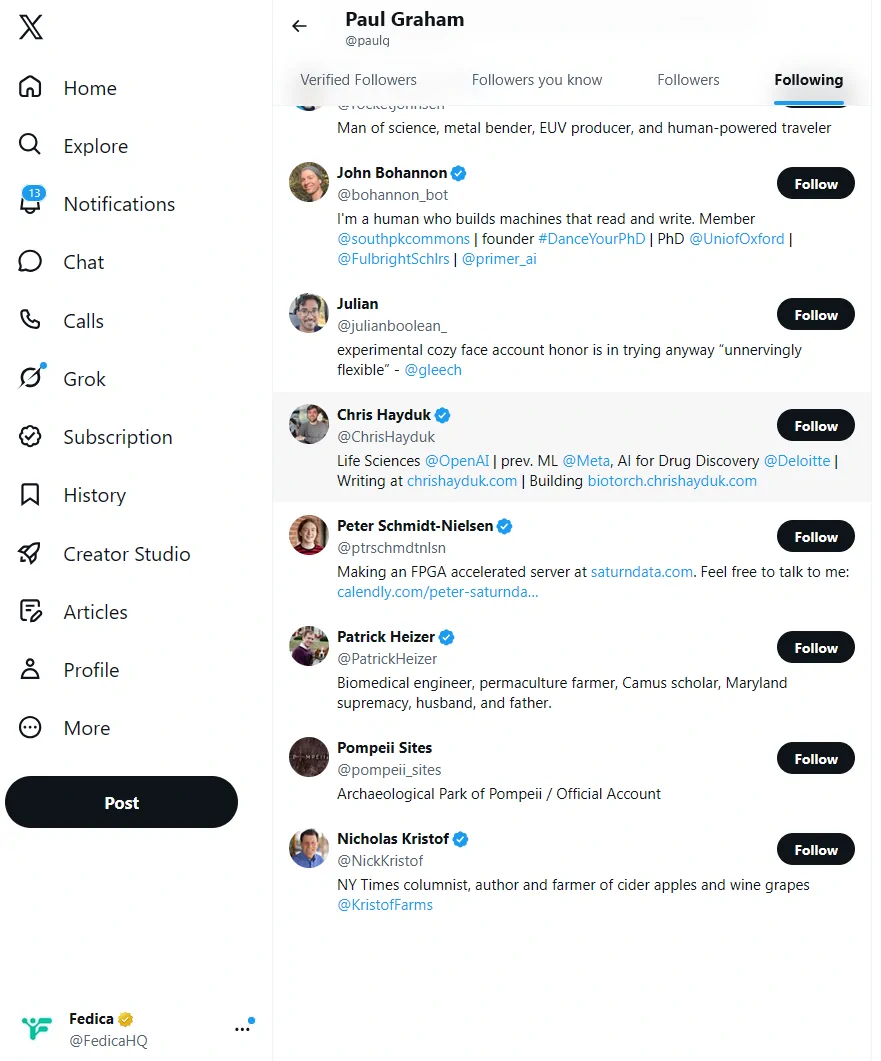
The order changes with the viewer, too. X’s Following tab appears to rank accounts by relevance, so the first accounts you see on someone’s list aren’t necessarily their newest or oldest follows:
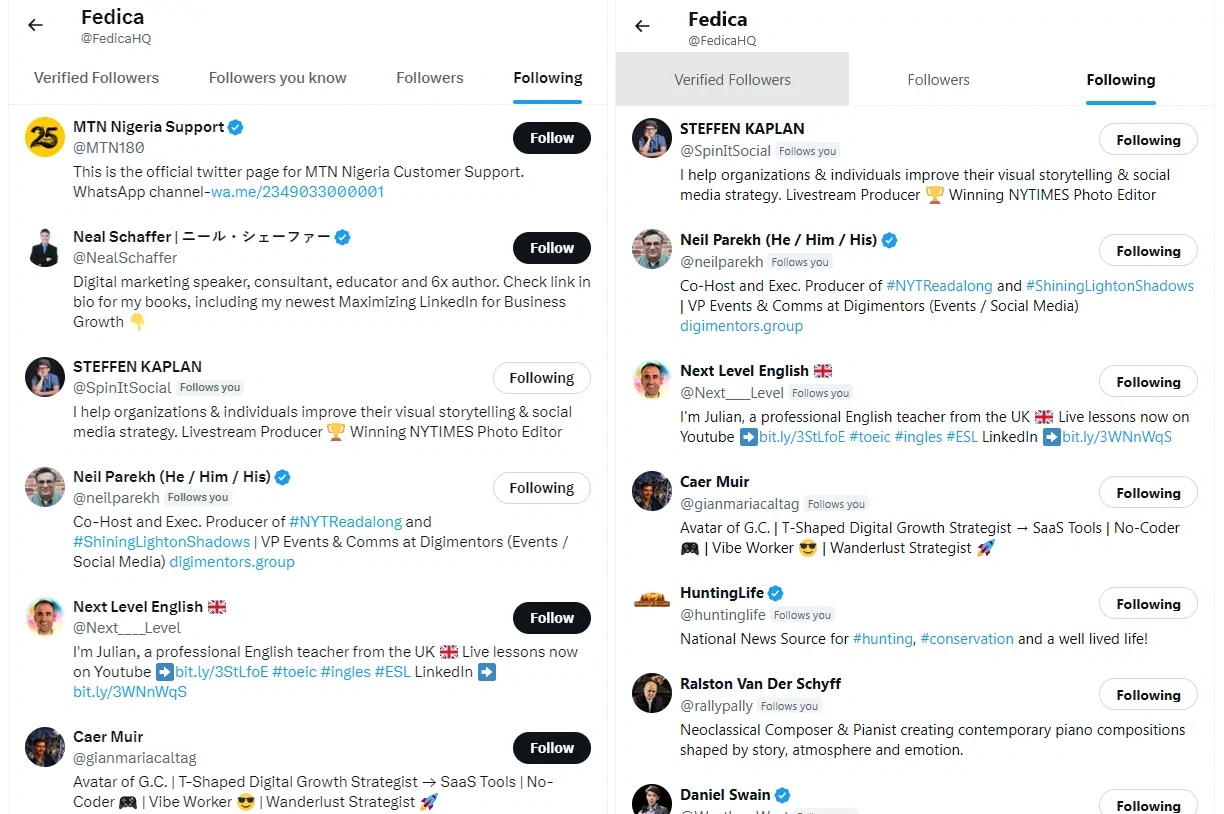
That cuts both ways. Someone scrolling your public list won’t see all of it on X. But a full report of a public account, like Fedica’s followers and following list viewer, lists every account it follows.
Private (Protected) Accounts: Hidden From Non-Followers
Turning on Protect your posts is what makes a Twitter account private. X’s help page on public and protected posts says protected posts are “only visible to your X followers,” and they won’t show up in Google or in X search for anyone else.
The Following list goes behind the same wall. People who don’t follow a protected account can’t see who it follows, and neither Fedica nor any other outside tool can show that list.
A few details from X’s own help page worth knowing before you lock your account: – Existing followers keep access. Accounts that followed you before you protected your posts can still view your protected posts unless you block them. – Apps you’ve authorized may still see them. X notes that a third-party app you’ve given access to your account may be able to see your protected posts. – Unprotecting makes everything public again, including posts you shared while protected.
How to Keep Specific Follows Off Your List
Following an account puts it on your Following list. If you want to keep up with an account without that, use an X List instead and set it to private. X’s Lists help says a private List is “only accessible to you.”
Create a List, drag the slider next to Private to on, and add the accounts you want to keep an eye on. You read them from the List’s own timeline, and they never appear on your Following list unless you follow them.
A private List doesn’t change accounts you already follow. Those stay on your Following list until you unfollow them.
How to See Someone Else’s Following List
For a public account, X’s own Following tab gives you the first 52 to 71 accounts in a relevance order. For the whole thing, Fedica’s Analyze an Account report lists every account a public profile follows, sorted by follower count, so the biggest accounts in their network come first. It’s on Fedica’s Grow plan or higher, and you can download the list or add accounts to your own lists.
Our guide on how to see someone’s full following list walks through the report step by step.
A private account is different. Its list is hidden from everyone who doesn’t follow it, and no tool gets around that.
Frequently Asked Questions
Can people see who I follow on Twitter if my account is private?
No, not unless they follow you. A protected account’s Following list is hidden from everyone who doesn’t follow it, and outside tools like Fedica can’t show it either.
Does X show visitors my whole following list?
No. In our October 2026 checks of five accounts following 368 to 2,239 accounts, X’s web app showed between 52 and 71 of them on the Following tab.
Is my following list shown in the order I followed people?
No. X’s Following tab appears to rank accounts by relevance, and the order changes depending on who’s viewing.
Can people see how many accounts I follow?
Yes, on a public account. The Following count sits on your profile next to your Followers count.
Can Fedica see who a private account follows?
No. Fedica’s Analyze an Account report works on public accounts only. Protected accounts’ followers and following lists aren’t visible to Fedica or any other outside tool.