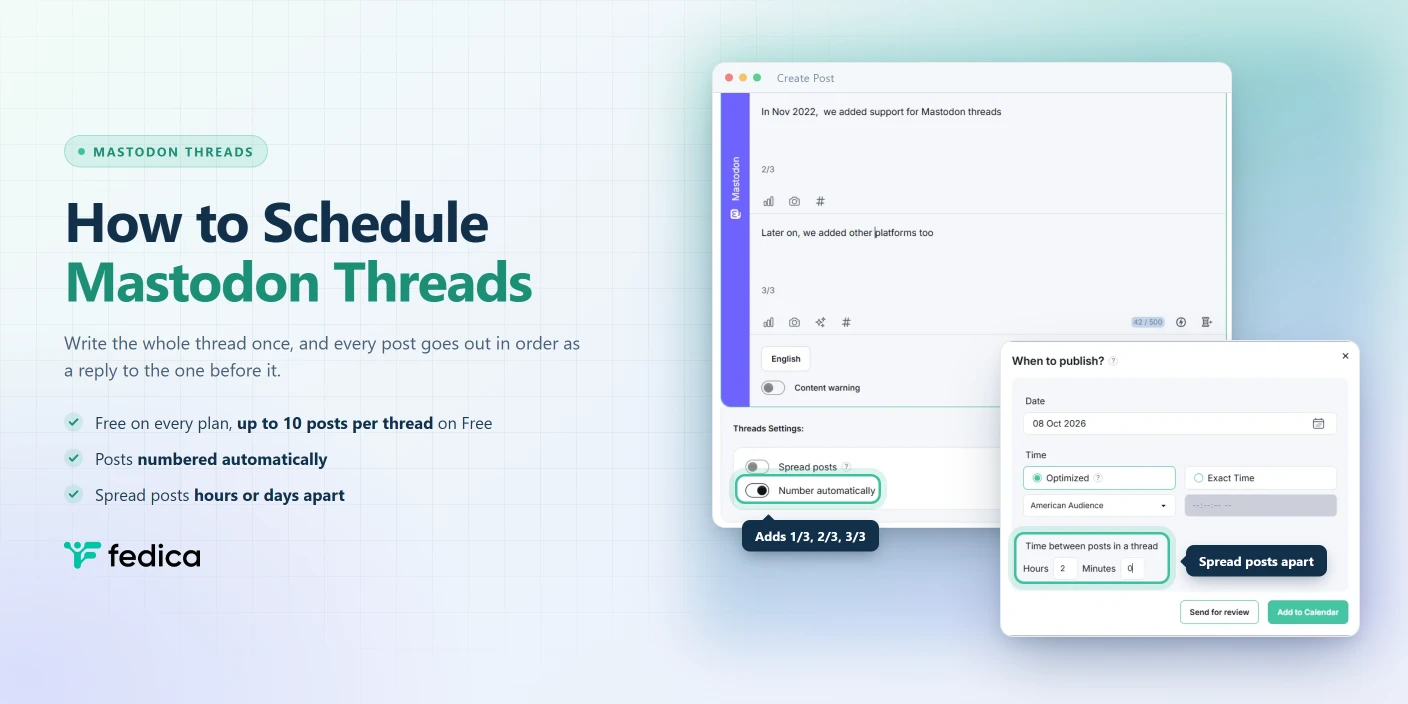
A thread is how you say something long on Mastodon, and Mastodon’s own scheduler can’t post one. You can schedule the first post. The second post has to reply to the first, and the first doesn’t exist yet.
To schedule a Mastodon thread, you need a scheduler that holds the whole thread and publishes each post as a reply to the one before it, the moment that one goes live. Fedica schedules full Mastodon threads on every plan, including Free, with automatic numbering, optional spacing between posts, and each server’s own character limit. Fedica also built the first thread composer for Mastodon, back in November 2022.
What a Mastodon Thread Is
A Mastodon thread is a chain of posts where each post replies to the one before it. There’s no special “thread” post type. You write post one, reply to it with post two, reply to post two with post three, and so on.
The order matters. fedi.tips, the community guide most Mastodon users end up on, recommends replying to the previous post, not the first one, because replying only to the opener hides the other parts when someone clicks into the thread.
Each post in a Mastodon thread has its own character limit. Mastodon’s documentation puts the default at 500 characters, and some servers set it higher. Mastodon posts used to be called toots, and plenty of people still say “toot thread.”
One more thing, since search engines mix them up all the time: a Mastodon thread has nothing to do with Meta’s Threads app. Mastodon users were writing threads before Threads launched.
Why Mastodon’s Built-In Scheduler Can’t Post a Thread
Mastodon has had scheduling built into its API since version 2.7.0, and apps like Tusky use it. When an app sends a post with a scheduled_at time, Mastodon doesn’t create a post. It creates a scheduled post record with its own ID, and the real post, with a real post ID, only appears when the time comes.
That’s the catch for threads. A reply has to name the post it’s replying to, through a field called in_reply_to_id, and Mastodon’s server code looks that ID up among published posts. A scheduled post isn’t published, so it isn’t there.
We tested it on October 8, 2026. We scheduled a post through Mastodon’s API, then tried to schedule a second post replying to the first one’s scheduled ID. Mastodon returned a 404 error. Through Mastodon’s own scheduling, you can queue the first post of a thread, but not the replies.
Mastodon’s built-in scheduling also has fixed limits: 25 scheduled posts per day, 300 in total, and at least 5 minutes ahead. A tool that holds the thread itself works differently:
| Mastodon’s built-in scheduling | Fedica | |
|---|---|---|
| Schedule a full thread | First post only | Every post, in order |
| Daily limit | 25 scheduled posts | Not subject to Mastodon’s limit |
| Total queue | 300 scheduled posts | Set by your Fedica plan |
| Space posts apart | Not available | Yes, with Spread posts (paid) |
| Same thread on Bluesky, Threads, and X | Mastodon only | Yes |
Fedica keeps scheduled posts in its own queue and sends each one to Mastodon at publish time. Each reply goes out only after the post before it is live, so it always has a real ID to reply to.
Fedica Built the First Thread Composer for Mastodon
On November 22, 2022, Fedica sent the first Mastodon thread ever posted from a thread composer. It went out from @dev@fosstodon.org through Fedica’s development app, two weeks before Fedica’s public Mastodon launch on December 6, 2022:
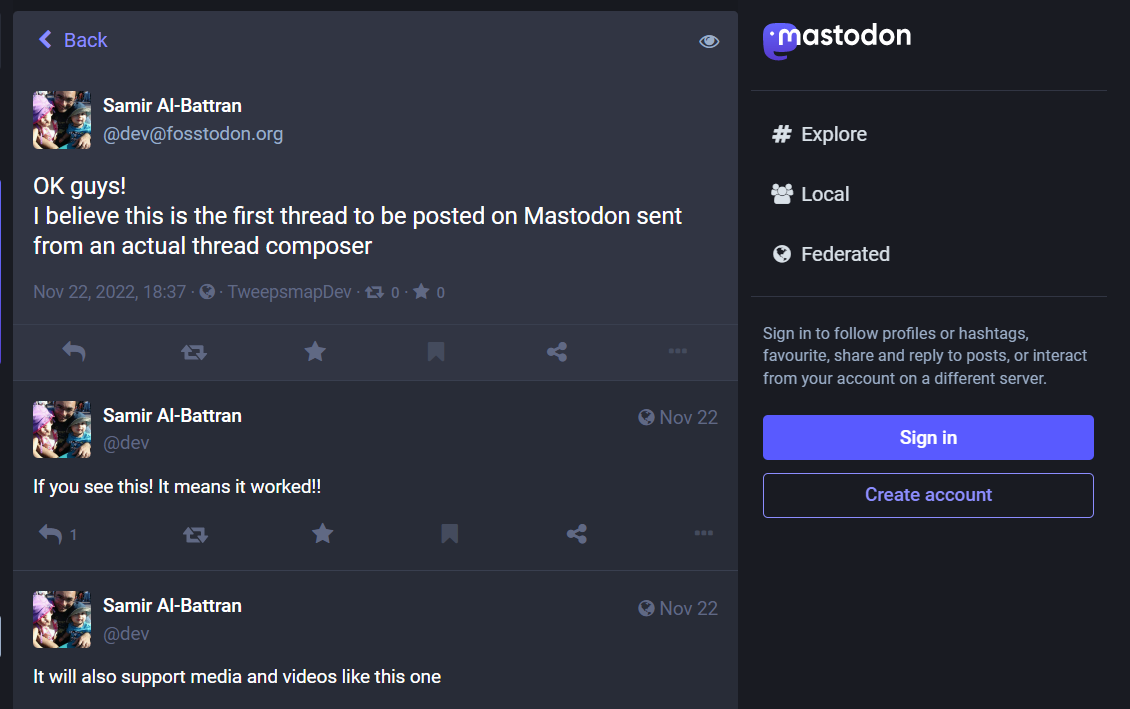
“If you see this! It means it worked!!” and it did. Threads, polls, and media were all part of Mastodon support from launch day.
That composer didn’t come from nowhere. Fedica had been scheduling Twitter threads since August 2019, so the Mastodon composer was built on years of thread scheduling. In January 2024, Fedica added Spread to Mastodon threads, so each post can go out at its own time instead of all at once.
How to Schedule a Mastodon Thread in Fedica
Fedica’s composer works the same for a Mastodon thread as for a single post. Here’s how:
- Open the Fedica composer from Create Post under Publish and select your Mastodon account.
- Write the first post.
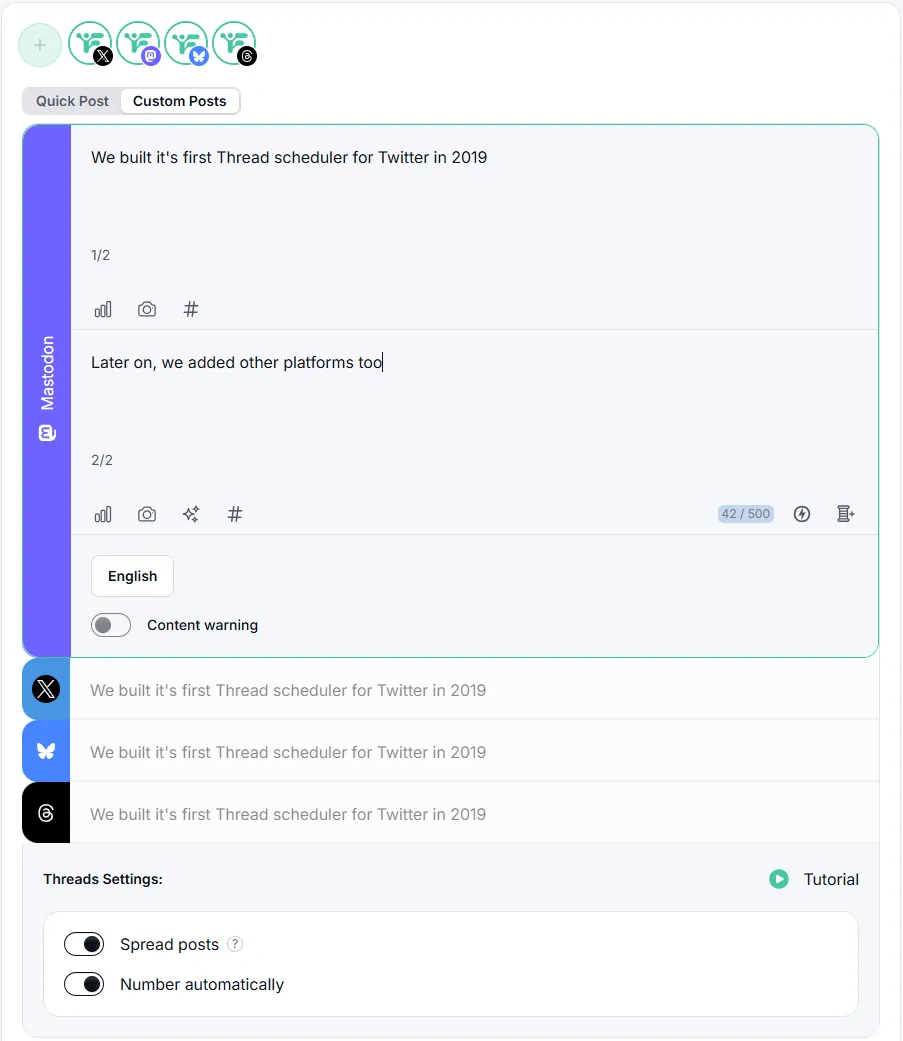
- Click the blue 🧵+ button to add the next post. Repeat until the thread is done. Click the (x) on any post to remove it.
- Turn on automatic numbering if you want each post numbered for you.
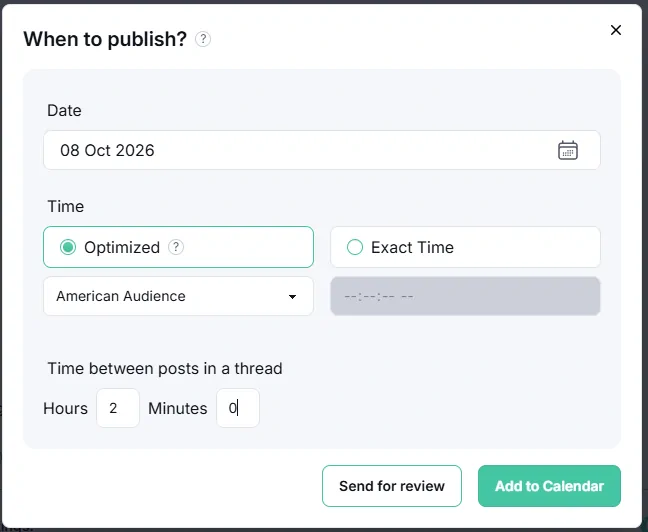
- Optional: choose Spread posts to publish each part seconds, minutes, hours, or days apart.
- Schedule it with Add to Pipeline or Specific Date, or save it as a draft.
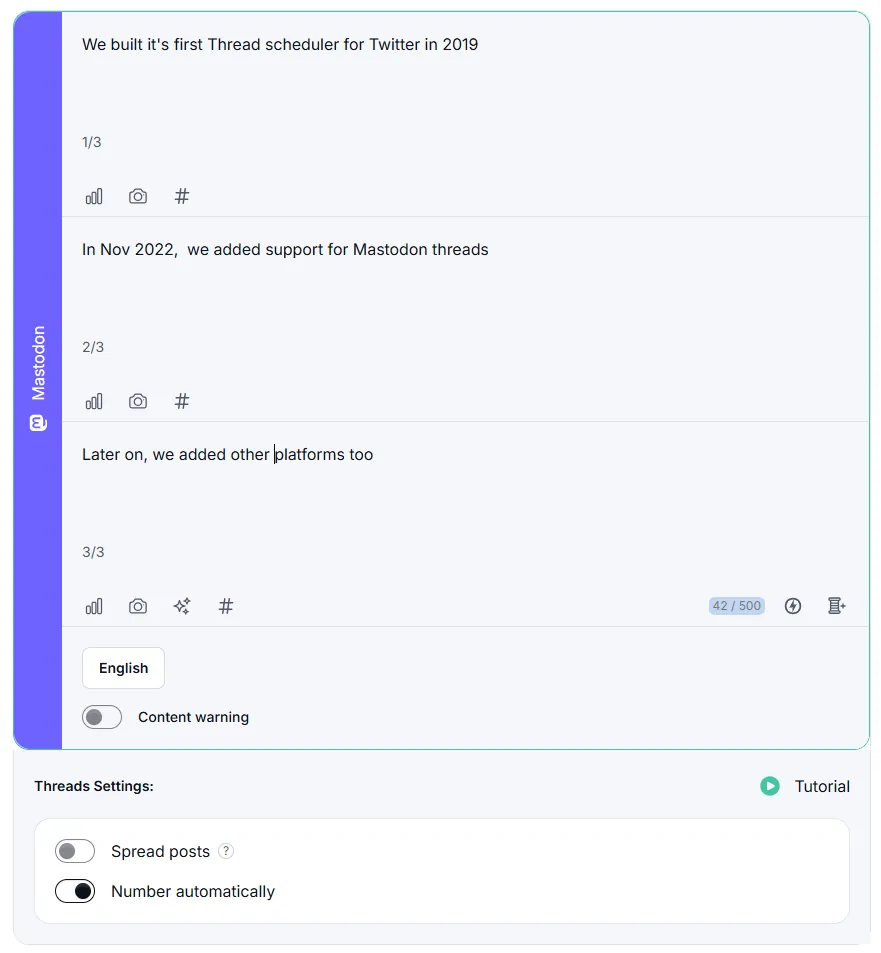
Already have the whole thing written? Paste it in. Fedica’s composer offers to split long text into a thread automatically, using your Mastodon server’s character limit. RSS works the same way: when an RSS item is too long for one Mastodon post, Fedica turns it into a thread instead of cutting it off.
Here’s what each Fedica plan gives you for Mastodon threads:
| Free plan | Paid plans | |
|---|---|---|
| Schedule Mastodon threads | Yes | Yes |
| Posts per thread | Up to 10 | Unlimited |
| Character limit per post | Your server’s limit | Your server’s limit |
| Spread posts over time | No | Yes |
If one post in a scheduled Mastodon thread fails to publish, Fedica retries it. If it keeps failing, Fedica stops the thread, so later posts never go out of order or as replies to nothing.
The full feature list, from polls to boosts, is on Fedica’s Mastodon Scheduler page.
Who Sees Each Post in a Scheduled Mastodon Thread
Fedica publishes every post in a Mastodon thread as Public, the replies included.
Some Mastodon users prefer to post replies as Quiet public (called “Unlisted” in older apps and the API). Quiet public keeps a post out of Mastodon’s live feeds, explore pages, and search. It doesn’t keep it out of your followers’ Home feeds, though. Mastodon’s posting guide says replies reach a follower’s Home feed only “if they follow both you and the person you are replying to.” In a thread you’re replying to yourself, so every follower sees every post in their Home feed either way.
Two habits keep a long thread friendly to everyone else’s timeline:
- Put hashtags on the first post. A hashtag on every post floods that tag with your thread. Tag the opener, plus any later post that really is about a different topic.
- Number the posts. A numbered post makes sense when someone sees it alone, boosted out of context. fedi.tips suggests “1/5” style, or “1/X” with “END” on the last post if you don’t know the count yet. Fedica’s automatic numbering handles it.
Language and Content Warnings on Each Post of a Mastodon Thread
Every post in a Mastodon thread carries its own language tag and its own content warning, so a thread can switch languages or warn about one specific part.
In Fedica, both live in Custom Post for each Mastodon post. If your threads mix languages, Fedica’s guide to setting the language of scheduled Mastodon posts explains why it matters. For warnings, see scheduling content warnings on Mastodon and Bluesky.
Sending the Same Thread to Bluesky, Threads, and X
One Mastodon thread can go out on Bluesky, Threads, and X from the same composer. Each network has its own character limit, so use Custom Posts to adjust the wording per network without rewriting the whole thread.
On networks that don’t have threads, like LinkedIn, Fedica publishes the thread as one long post instead.
Each network has its own guide: Fedica’s Bluesky thread maker and the X thread scheduler.
Frequently Asked Questions
Can you schedule a thread on Mastodon?
Not with Mastodon’s built-in scheduling, which can only queue the first post, because a reply needs the ID of a post that’s already published. A scheduler like Fedica holds the whole thread and publishes each post as a reply once the one before it is live.
How many posts can a Mastodon thread have?
A Mastodon thread is a chain of replies, so Mastodon has no separate thread length limit. In Fedica, the Free plan schedules up to 10 posts per thread, and paid plans have no limit.
Is a Mastodon thread the same as Threads?
No. A Mastodon thread is a chain of replies to your own posts on Mastodon. Threads is Meta’s separate social network.
What visibility should Mastodon thread replies use?
Fedica posts every part as Public. Quiet public replies stay out of Mastodon’s live feeds and search, but your followers still see every post of your thread in their Home feed either way.