
X (Twitter) won’t let you sort your own follower list by follower count. If you open your Followers tab, you get a scrolling, unsorted list with no way to rank anyone by size, activity, or anything else. Fedica’s Filter X Followers tool fixes that.
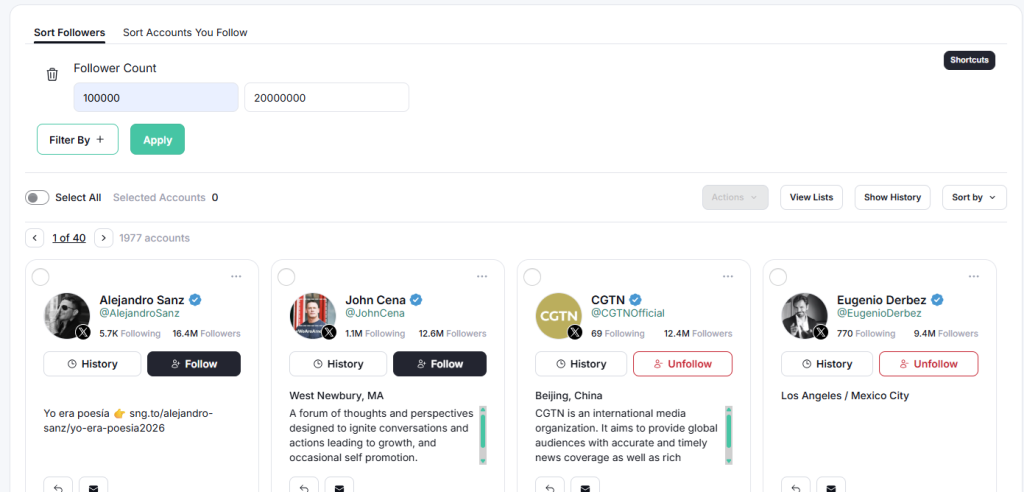
All you need to do is connect your X account to Fedica, open the sort followers tool, and set a minimum or maximum follower count to narrow your full follower list down to the accounts worth your time. Stack that filter with location, bio keywords, or activity, then export the result or send it straight to an X Ads audience.
Why Filter Your X Followers by Follower Count
Filtering your followers by follower count narrows down you follower list by how many people follow each account, instead of scrolling through them in whatever order X happens to show. It’s the fastest way to answer a question your Followers tab can’t: out of everyone who follows you, who actually has the reach to matter?
That question comes up for a few different reasons. If you’re planning an outreach campaign, you want the filter to surface the accounts worth a personal message first, not buried on page 40 of an endless scroll. If you’re trying to find influencers or potential partners who already follow you, sorting by follower count puts them at the top instead of leaving you to guess. And if you just want to understand how much real influence your account has, a quick look at how many high-follower accounts follow you back tells you more than your total follower count ever will.
A small agency managing five client accounts runs into this constantly: a client asks who their “real” followers are, and “a lot of people, I think some of them are big” isn’t an answer you can put in a report.
X Doesn’t Sort Your Followers by Count
You can filter your followers by follower count manually if you’re patient. Open your Followers tab, click into each profile, check their follower count, close the tab, and repeat. It works if you have a few hundred followers and a free afternoon.
It stops working fast past that. X only shows you the first 50 or so followers in the list, unsorted, so anyone with real reach could be sitting at position 4,000 and you’d never scroll that far. There’s no built-in filter, no sort option, and no way to export what you find. Just a list, in whatever order X decides to show it.
X will happily show you every name on the list. Figuring out which of them are actually worth following back is on you.
How to Filter Your X Followers by Follower Count with Fedica
Here’s the actual process in Fedica:
- Log into Fedica and connect your X account. Use the account whose followers you want to filter.
- Open the Filter X Followers tool (aka Sort Followers) from under the “Manage” section in the top menu.
- Set a follower-count filter. Choose a minimum, a maximum, or both, and Fedica narrows your full follower list down to just the accounts in that range.
- Stack more filters if you want, then act on the result: export it to Excel, save it as a list, or send it straight to an X Ads audience.
The whole thing takes a couple of minutes, and it works on your entire follower list, not just whatever X happens to show you on page one.
Start Filtering Your X Followers!
What You Can Stack Follower Count With
Follower count is just one filter. Fedica’s Filter X Followers tool lets you stack it with location, gender, occupation, age, language, bio keywords, last active date, account creation date, verified status, profile photo, and even the date someone followed you. Combine two or three at once, follower count above a threshold plus a bio keyword plus a specific location, and you go from “everyone who follows me” to a short, specific list in one pass. For example, if you are attending a conference you can filter those who have specific follower count and live near the conference location, or perhaps you can filter accounts with the word CEO and have follower count that matches your range
Here’s what that adds over X’s own Followers tab:
| What You Want to Do | X’s Native Followers Tab | Fedica’s Filter X Followers Tool |
|---|---|---|
| Sort by follower count | Not available | Set a minimum, maximum, or range |
| See more than ~50 followers at once | No | Yes, your full list |
| Stack multiple filters together | No | Yes: count, location, bio keywords, activity, and more |
| Export the filtered list | No | Excel export |
| Send the list to X Ads | No | Direct upload |
Other Ways to Filter Your X Followers
Follower count isn’t the only thing worth filtering for. Depending on what you’re trying to fix or find, a few of Fedica’s other follower tools might be the better starting point:
- Inactive followers. If you’re trying to clean up your list rather than find influencers, filtering out inactive followers by last-activity date is a faster starting point than sorting by count.
- Location. Want to see where your followers actually are, not just how many of them there are? Map your followers by country, state, or city to spot where your audience is actually concentrated.
- Bots and fake accounts. A high follower count doesn’t mean much if plenty of those accounts turn out to be fake. Run a follower quality audit to see how many of your followers are bots before you build an outreach list around them.
- Verified followers specifically. If you just want to know how many verified followers you have, that’s a single click in the same Filter X Followers tool.
- Someone else’s followers. Everything above filters your own follower list. If you’re trying to filter or search through another account’s followers instead, that’s a different tool. See how to search someone else’s X followers.
Turn a Filtered List Into an X Ads Audience
Filtering by follower count isn’t just for outreach. Once you’ve narrowed your followers down to the accounts with real reach, you can turn that exact list into a custom X Ads audience without rebuilding it anywhere else. Fedica sends the segment straight to X’s ad platform, so the same filter you used to find high-follower accounts becomes the targeting list for a campaign aimed at people who look like them.
This is useful past just outreach. An agency building a client’s influencer list can filter for follower count plus niche keywords, then hand that same segment to the ads team instead of building a second list from scratch for the campaign.
One thing worth knowing before you build a campaign around it: X can take a while to process the upload, sometimes up to 10 days for large audiences, so send it over before you need the campaign live, not the day of.
Frequently Asked Questions
Can you filter your X followers by follower count?
Not natively. X’s own Followers tab has no sort or filter option. Fedica’s Filter X Followers tool adds one, along with location, bio keywords, activity, and more.
Does X let you sort followers by number of followers?
No. X shows your followers in an unsorted, roughly-50-at-a-time list with no built-in way to rank them by follower count, verification, or anything else.
What follower count should you filter for?
There’s no universal cutoff. It depends on your own account size and niche. A common approach is to filter for a rough floor first, then narrow further with a bio keyword or location so the list stays relevant instead of just large.
Can you export your filtered follower list?
Yes. Once you’ve filtered by follower count, or anything else, you can export the list to Excel or send it directly to an X Ads audience.