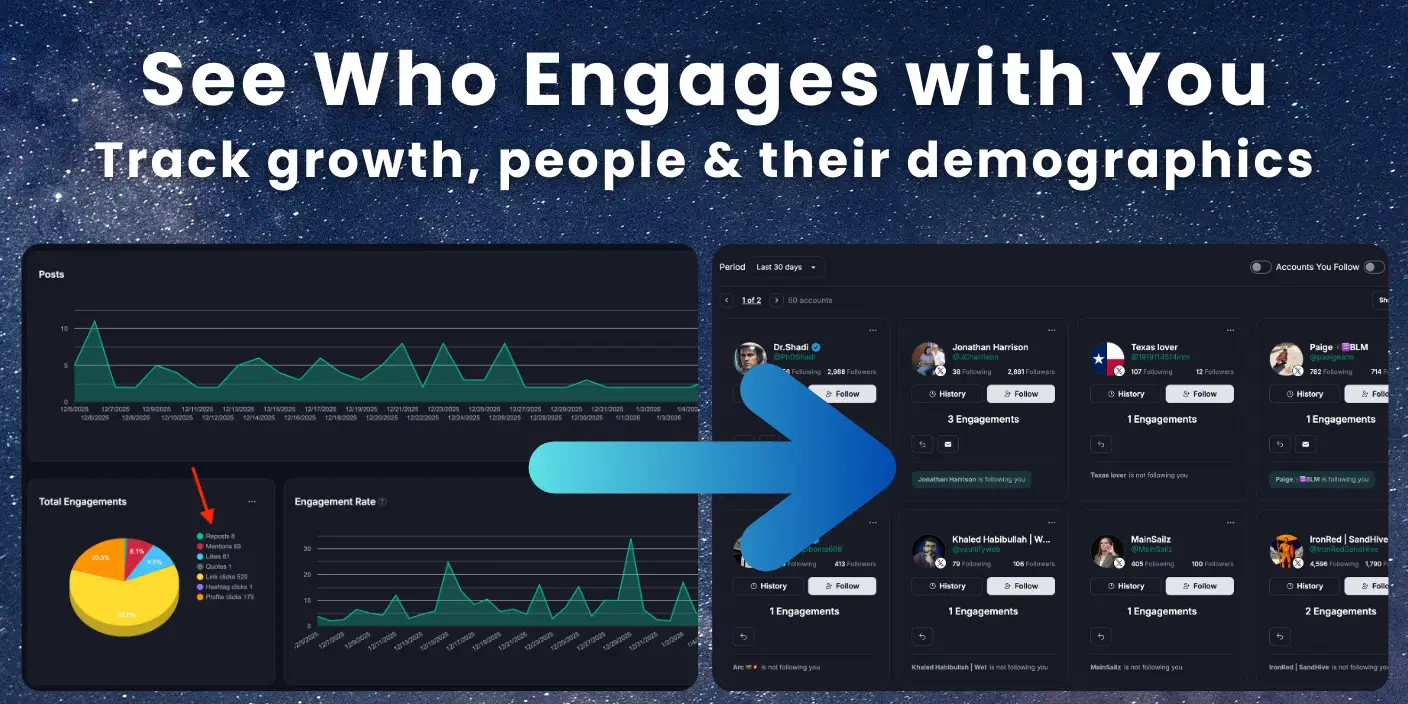
The best way to grow your audience is simple: find the people who already like your posts and interact with them. When someone likes your content, they’re showing you they’re interested. If you engage back, they’ll keep engaging. Your relationship gets stronger. Over time, you get access to their followers too. It’s a cycle that builds on itself.
Fedica’s Top Interactors feature shows you who liked your posts across Bluesky, X, Mastodon, and Pixelfed with actual names, engagement counts per person, follow status, and demographics. You can switch between platforms easily with a click to see analytics reports for each supported platform. You don’t need to check each platform separately. You can export your top interactors to lists and start building relationships with the people driving your growth.
Key Takeaways
- Tracking and engaging with people who like your posts is the best growth strategy because they’ll keep engaging, relationships strengthen over time, and you get access to their followers.
- Fedica shows you who interacted with you across Bluesky, X, Mastodon, and Pixelfed with engagement counts per person, follow status, and demographics. You can switch between platforms easily with a click to see analytics reports for each supported platform instead of checking each platform separately.
- Export your top interactors to Twitter (X) lists and continuously add new interactors to build long-term connections with the people who engage with you most.
- Track relationship changes automatically to see who followed or unfollowed you and when, helping you identify patterns and adjust your engagement strategy.
- View top interactors directly in your post analytics with demographics to understand who your most engaged audience members are and tailor your content strategy accordingly.
Jump to Section:
- How to Track Who Engaged With What Content: See Who Liked Multiple Posts
- How to See Who Liked Your Post: Platform-by-Platform Guide
- How to See Who Liked My Post: Top Interactors Feature
- How to Export Your Top Interactors: Click-Select and Save to List or CSV
- How to Track Who Followed or Unfollowed You: Understanding Relationship Changes
- How to Export Your Top Interactors and Build Long-Term Connections
- How to See Who Liked My Post: Understanding Top Interactors' Demographics
How to Track Who Engaged With What Content: See Who Liked Multiple Posts
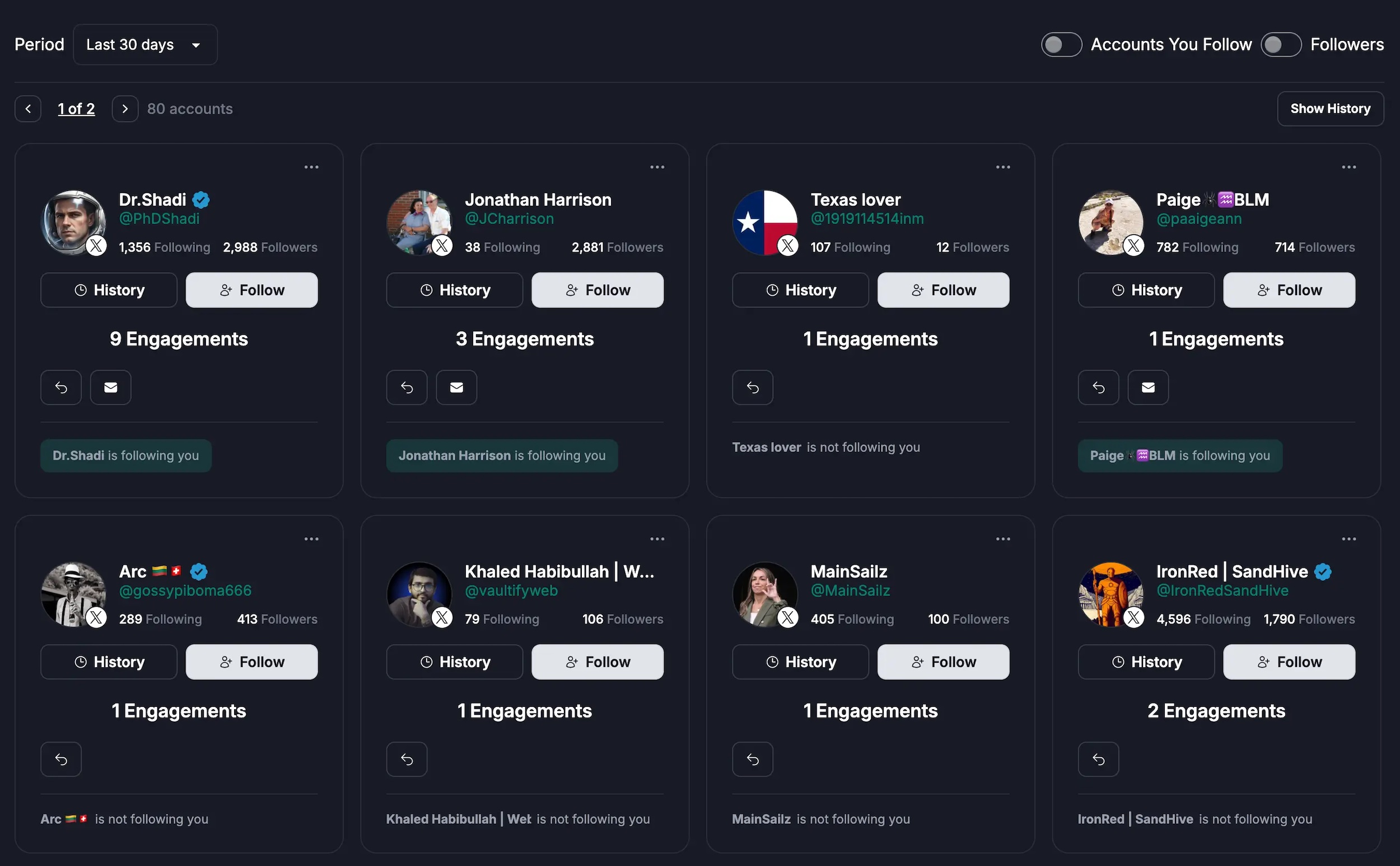
Fedica shows you who engaged with each post. It also shows how many times each person interacted across all your content. Instead of seeing just anonymous names from basic like lists, you see actual people. You get engagement counts per person, cross-post tracking, follow status, demographics, and export capabilities. When you can see who interacted with you through Fedica, you get engagement counts, follow status, and demographics. This helps you identify who’s actually driving your growth. You can see patterns across multiple posts. For example, you might notice someone who liked five different posts last week. You can then build relationships with those top supporters based on actual engagement data rather than guessing.

Here’s what Fedica’s Top Interactors provides:
- See exactly how many times each person engaged across all your content
- Track who engaged with multiple posts without checking each one individually
- Know if they follow you, if you follow them, and when they followed or unfollowed
- View demographic characteristics of your top interactors to inform your content strategy
- Export lists to engage with top supporters systematically
Fedica tracks this data across all supported platforms, currently X, Mastodon, Bluesky, and Pixelfed. You can switch between platforms easily with a click to see analytics reports for each platform showing top interactors. This makes it easy to see who’s driving your growth on each platform. You don’t need to switch between multiple tools. When you combine this with Twitter analytics tools, you get a complete picture of your audience. When you can see who interacted with you and how often, you can identify your top supporters and build meaningful connections with the people driving your growth.
See who engages on which topics
with a complete exportable list.
How to See Who Liked Your Post: Platform-by-Platform Guide
You can see who liked your post by tapping the like count on Instagram.
On Facebook, tap the reaction emoji.
On Bluesky, Mastodon, and X, check your notifications.
On Pixelfed, tap the number next to the heart icon. Each platform has its own method.
They all show basic lists of names. Fedica’s Top Interactors feature tracks this data across all supported platforms, currently X, Mastodon, Bluesky, and Pixelfed. You can switch between platforms easily with a click to see analytics reports for each platform. Each platform has its own analytics report showing engagement counts per person, follow status, and demographics. This lets you see who interacted with you across multiple posts on each platform. You don’t need to manually check each one individually. Instead of seeing separate lists for each post, you get a complete picture of your top supporters. You can see not just who liked one post, but how often they engage with your content overall.
How to See Who Liked My Post on Bluesky
Bluesky shows likes in your notifications. Check the bell icon to see who liked your posts. The native Bluesky interface shows recent likes but doesn’t give you engagement counts per person or help you track top interactors over time. If you’re using Bluesky advanced search to find accounts, you can combine that with Top Interactors to see who’s actually engaging with your content.
Fedica’s Top Interactors feature shows Bluesky likes with engagement counts for each person. You can see how many times someone engaged with your content, whether they follow you, and when they followed or unfollowed you. All of this appears in your analytics dashboard.
How to See Who Liked My Post on Mastodon
Mastodon displays likes (called “favorites”) in your notifications feed. Check your notifications to see who favorited your posts. Like Bluesky, Mastodon shows recent favorites but doesn’t aggregate engagement data or show you top interactors.
Fedica tracks Mastodon favorites and shows you top interactors with engagement counts. You can see who’s driving your growth on Mastodon and build relationships with your most engaged supporters. All of this is available directly from your analytics dashboard.
How to See Who Liked My Post on Pixelfed
On Pixelfed, tap the number next to the heart icon (not the heart itself) to see everyone who liked your post. This opens a list of users who liked it. Pixelfed shows likes but doesn’t provide engagement analytics or help you identify top interactors.
Fedica shows Pixelfed top interactors with engagement counts and follow status. You can see who’s engaging with your Pixelfed content most and track follow/unfollow changes over time. All of this appears in your analytics dashboard.
How to See Who Liked My Post on X/Twitter
X (formerly Twitter) shows likes in your notifications tab. Check your notifications to see who liked your tweets. The native X interface shows recent likes but doesn’t give you engagement counts per person or help you track top interactors across multiple posts. Tools like X advanced search and Twitter account search help you search Twitter accounts, but Top Interactors shows you who’s actually engaging with yours.
Fedica’s Top Interactors feature shows X likes with engagement counts for each person. You can see how many times someone engaged with your content, whether they follow you, and export lists to engage with your top supporters systematically.
Build relationships with the people who interact with you most.
How to See Who Liked My Post: Top Interactors Feature
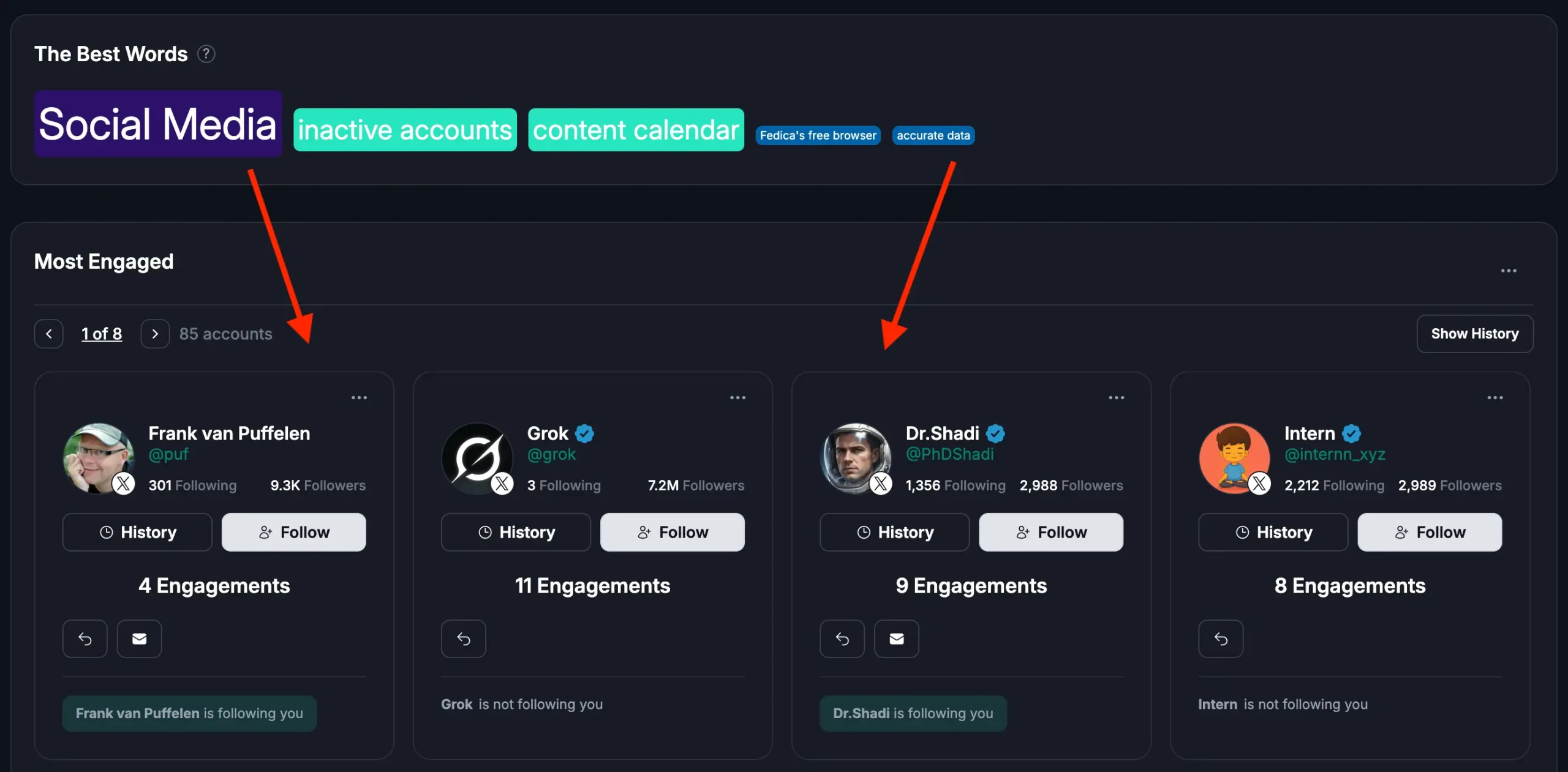
Fedica’s Top Interactors feature shows you the people behind your growth across Bluesky, X, Mastodon, and Pixelfed. It displays actual names, engagement counts per person, follow status, and demographics in your analytics reports. When you can see who liked your post through Fedica, you see how many times each person engaged with your content across all posts. You also see whether they follow you and when they followed or unfollowed you. Studies indicate that the top 20% of your interactors typically generate over 60% of your total engagement. This makes it crucial to identify and nurture these relationships. You can view top interactors directly in your post analytics with demographics. This helps you understand who your most engaged audience members are. When anyone interacts with your content, whether they like, comment, repost, or share, Fedica shows you how many engagements each person has in your analytics report.
You can see exactly who’s driving your growth and how often they engage with your content. This helps you prioritize who to engage with and build relationships with your most active supporters.
Here’s what Fedica’s Top Interactors shows you:
- How many times each person interacted with your content across all posts
- Whether they follow you and whether you follow them back
- When people followed or unfollowed you to understand relationship changes
- Top interactors directly in your post analytics reports
- Demographic characteristics of your top interactors to inform your content strategy
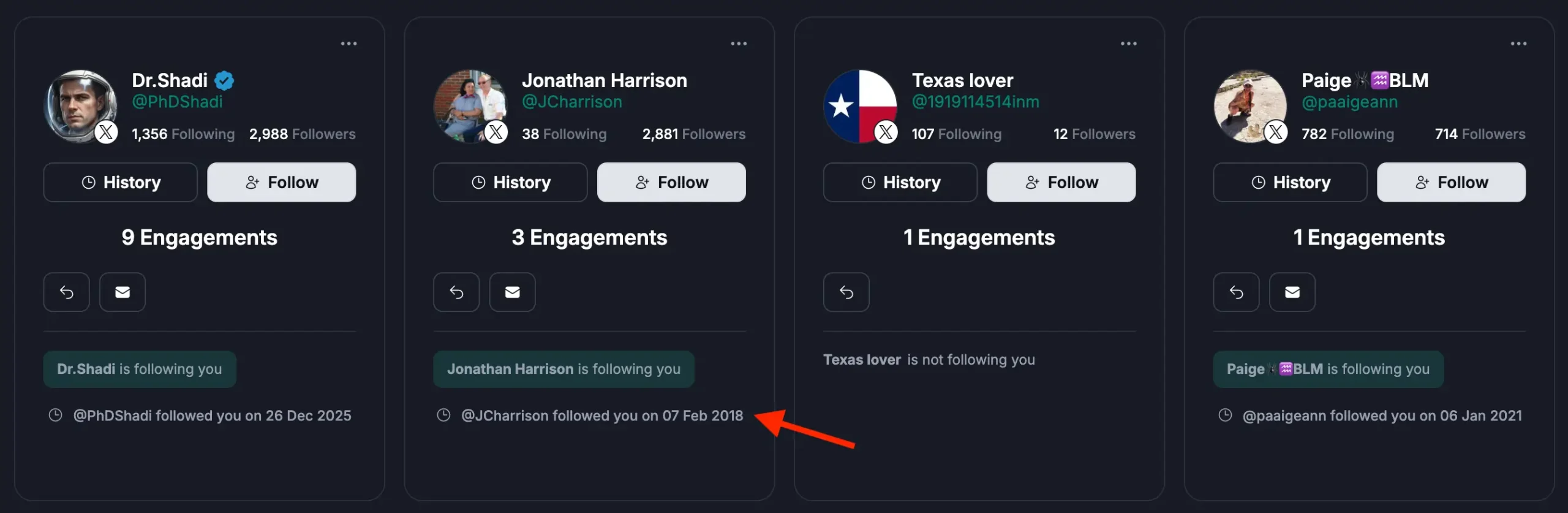
Fedica tracks this data across all supported platforms, currently X, Mastodon, Bluesky, and Pixelfed. You can switch between platforms easily with a click to see analytics reports for each platform showing top interactors. This makes it easy to see who’s driving your growth on each platform. You don’t need to switch between multiple tools. You can view top interactors directly in your post analytics with demographics. This helps you understand who your most engaged audience members are. You can build relationships with the people who interact with you most.
How to Export Your Top Interactors: Click-Select and Save to List or CSV
You can select all your top interactors with a click and save them directly to a list or export as CSV. This export functionality is available in two places: the analytics engagement report and the Top Interactors tool itself.
In the analytics engagement report, you can view your top interactors for any post and export them directly. The Top Interactors tool also lets you export interactors from the tool itself, giving you flexibility in how you access and export your data. Both methods let you select all interactors at once and save them to lists or CSV files for easy management and engagement.
Here’s how the export process works:
- View your top interactors in the analytics engagement report or Top Interactors tool
- Select all interactors with a single click or choose specific ones
- Export directly to a list (like Twitter/X lists) or download as CSV
- Use the exported data to engage with your top supporters systematically
This export capability helps you take action on your insights. Instead of just viewing who interacted with you, you can export those people and build relationships with them. Whether you’re working from the analytics engagement report or the Top Interactors tool, you have the same export options available. This makes it easy to build lists of your top supporters and engage with them regularly.
How to Track Who Followed or Unfollowed You: Understanding Relationship Changes
Fedica tracks follow changes automatically. It shows you who followed you, who unfollowed you, when these changes happened, and mutual follow status for each person. When you can see who interacted with you through Fedica, you also see the follow status and history. This lets you know if someone who was a top interactor unfollowed you. It also shows if a new follower is becoming a top supporter. This helps you identify patterns in your audience growth. You can adjust your engagement strategy accordingly. For example, if someone who consistently liked your posts suddenly unfollows, you’ll see that change. You can then decide whether to re-engage with them. Fedica combines follow tracking with engagement data. This gives you a complete picture of who’s building relationships with you over time.
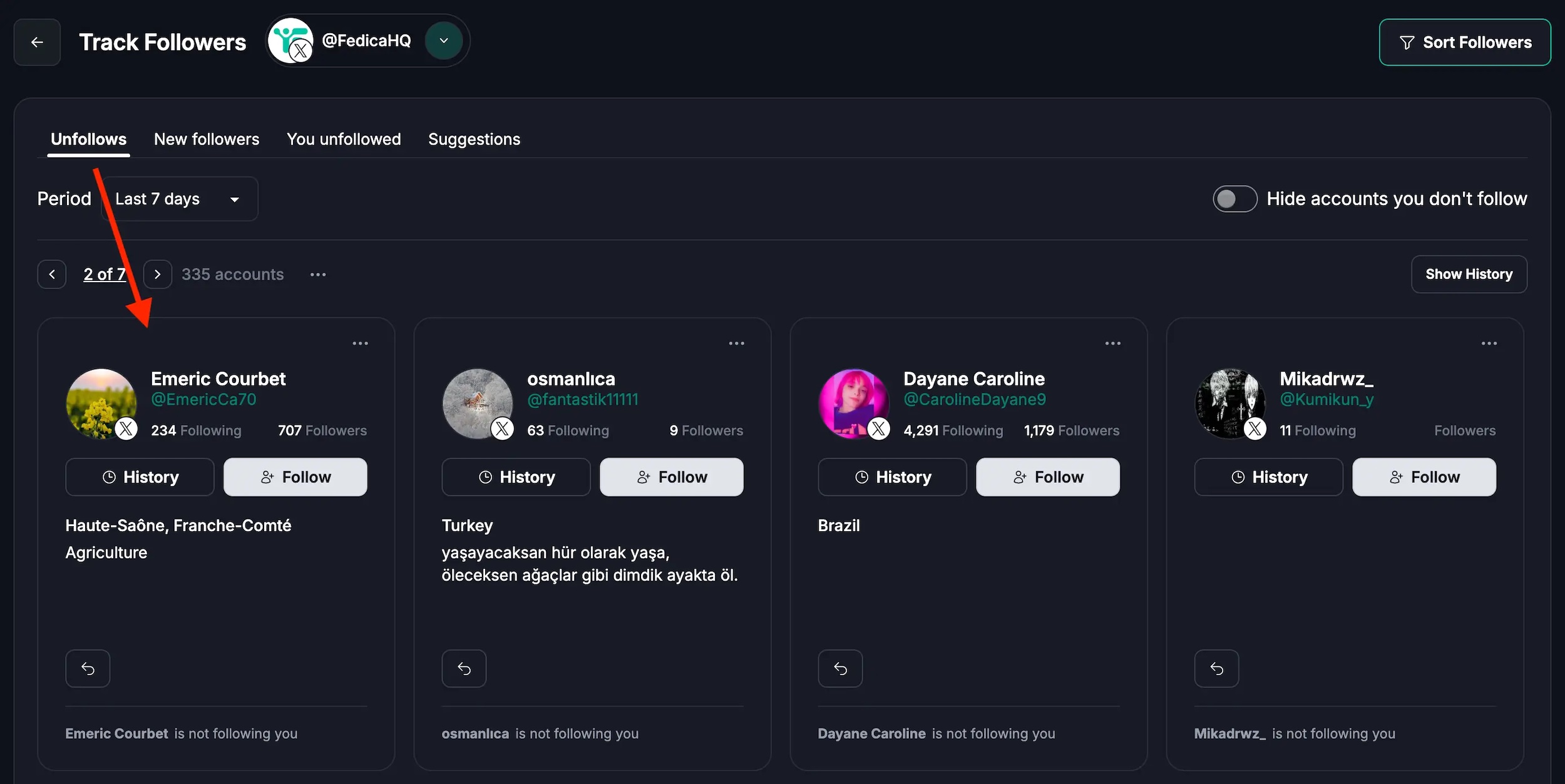
You can see:
- New followers and exactly when they followed you
- People who stopped following and when they unfollowed
- Whether you follow each other or if it’s a one-way relationship
- When relationship changes happened so you can correlate them with your content strategy
When you can see who followed or unfollowed you and when, you can identify patterns. You can adjust your engagement strategy accordingly. If someone who was a top interactor unfollows you, you know to re-engage with them. If someone new follows you and becomes a top interactor, you know to nurture that relationship. Fedica shows this information alongside engagement counts. You can see not just who interacts with you, but also the follow status and history for each person.
Find and remove unfollowers and fake accounts!
How to Export Your Top Interactors and Build Long-Term Connections
Fedica lets you export your top interactors to lists. You can engage with them systematically and build long-term connections with the people who interact with you most. When you can see who liked your post and identify your top interactors, you can export those lists to Twitter (X) lists or CSV. You can continuously add new interactors and nurture relationships over time. This systematic approach helps you build relationships with your top supporters. Instead of hoping engagement happens, you take action. You can export interactor lists directly from your analytics and engage with them regularly. This helps you build a community of supporters who drive your growth. Combine this with Twitter account search to find similar accounts, or use X analytics to understand broader engagement patterns. The key is seeing who interacted with you, exporting those people, and then engaging with them consistently over time.
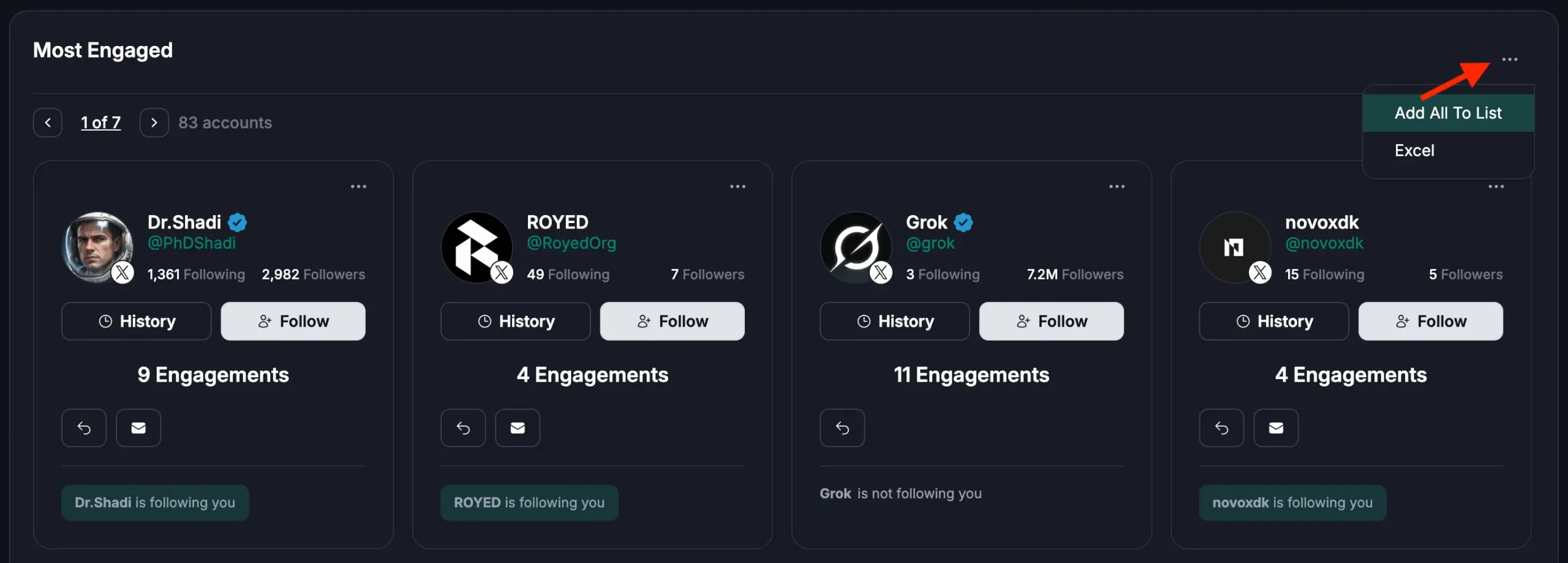
Here’s how it works:
- Export lists of people who engage with your content most in your Analytics (Engagements) page on Fedica
- Add them to a Twitter (X) list or CSV to keep track of your top supporters
- Continuously add new interactors to your lists as they engage with your content
- Engage with your top interactors regularly to build long-term connections
Fedica lets you export interactor lists directly from your analytics. This makes it easy to take action on your insights. For example, add your top interactors to a Twitter (X) list. Continuously add new interactors to the list as they engage with your content. This approach helps you build relationships with the people who interact with you. Instead of hoping engagement happens, you actively nurture relationships with your top supporters. We’ve seen creators and marketers use this approach to build dedicated communities around their content. By engaging with the people who interact with you most, you create a feedback loop. Your top supporters become even more engaged.
Build a more engaged community over time.
How to See Who Liked My Post: Understanding Top Interactors’ Demographics
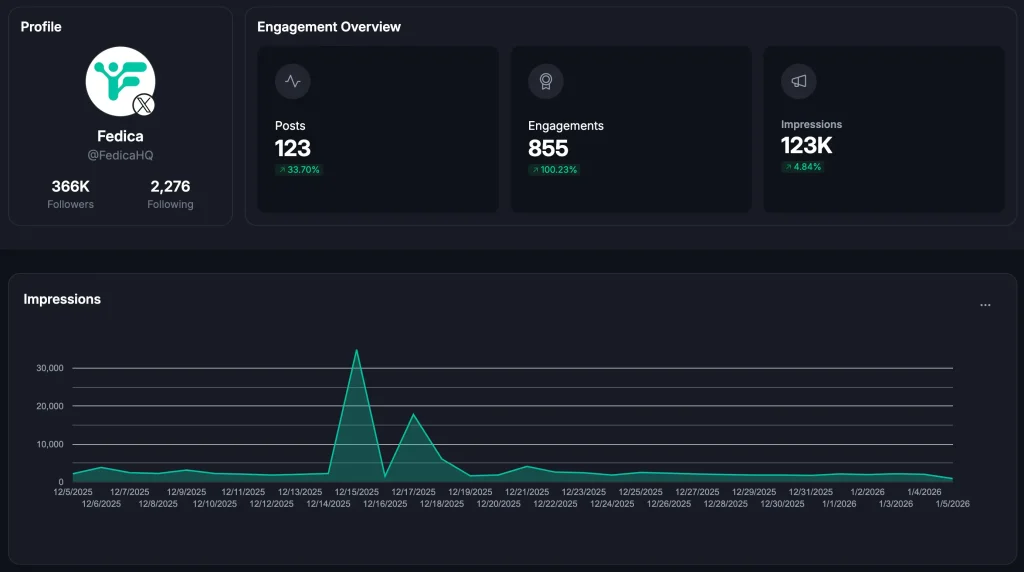
On supported platforms, Fedica shows top interactors in your post analytics with demographics. You can see the actual names, profiles, and characteristics of the people who engage with your content most. When you can see who liked your post through Fedica, you also see demographic insights about those people. This includes engagement patterns and audience composition. You can understand which types of content resonate with which demographics. This helps you tailor your content strategy to better serve your most engaged audience members. You can also attract similar people. For example, if you notice your top interactors are mostly in a specific industry or location, you can create more content that speaks to that audience. Fedica transforms engagement data from numbers into actionable insights. You can see who your audience is and how to serve them better.
You can see:
- Actual names and profiles of your top interactors
- Characteristics of people who engage with your content most
- Which types of content resonate with which demographics
- Who makes up your most engaged audience
Fedica shows demographic insights combined with individual interactor data. You can see which specific people have those characteristics. This helps you understand who your top interactors are. You can tailor your content strategy to better serve them. When you understand the demographics of your top interactors, you can create content that better serves them. You can also attract similar people. If your top interactors are in a specific industry, location, or interest group, you can tailor your content to resonate with that audience. Fedica shows this information directly in your post analytics. You can see the people behind your growth and their demographics in one place.
Frequently Asked Questions
How do I check who liked my post?
On most platforms, tap the number of likes below your post. On Instagram, tap the like count. On Facebook, tap the reaction emoji. On Bluesky, Mastodon, and X, check your notifications. Fedica shows you top interactors across all supported platforms, currently X, Mastodon, Bluesky, and Pixelfed. You can switch between platforms easily with a click to see analytics reports with engagement counts and demographics for each platform.
How do I see who liked my post on Facebook?
Tap the reaction emoji or number below your post. This shows who reacted and what type of reaction they used. You can also go to Profile > Menu > Activity Log > Comments & Reactions > Likes & Reactions for a complete history.
How do I view who liked a post?
The method varies by platform. Instagram: tap the like count. Facebook: tap the reaction emoji. Bluesky/Mastodon/X: check notifications. Pixelfed: tap the number next to the heart icon. Fedica tracks this data across all supported platforms, currently X, Mastodon, Bluesky, and Pixelfed. You can switch between platforms easily with a click to see top interactors in analytics reports for each platform.
Is there a way to see Twitter likes?
Yes, check your notifications tab on X/Twitter to see who liked your tweets. Fedica also tracks Twitter likes and shows you top interactors with engagement counts and follow status in your analytics.
How do I see who liked my post on Bluesky?
Check your notifications in Bluesky to see who liked your posts. Fedica’s Top Interactors feature shows Bluesky likes with engagement counts and follow status in your analytics dashboard.
How do I see who liked my post on Mastodon?
Check your notifications feed on Mastodon to see who favorited your posts. Fedica tracks Mastodon favorites and displays top interactors with engagement data in your analytics.
How do I see who liked my post on Pixelfed?
Tap the number next to the heart icon (not the heart itself) to see everyone who liked your Pixelfed post. Fedica shows Pixelfed top interactors with engagement counts in your analytics.
How do I find top interactors on social media?
Fedica’s Top Interactors feature shows you the people driving your growth across Bluesky, X, Mastodon, and Pixelfed. You can see engagement counts per person, follow status, and demographics. Export lists to engage with your top supporters systematically.
Can I export a list of people who liked my post?
Yes, Fedica lets you export your top interactors to lists. You can add them to Twitter (X) lists or CSV to build long-term connections with the people who interact with you most.
How do I see who shared my post?
Platform methods vary. On most platforms, check your notifications or the share count below your post. Fedica tracks shares and reposts across all supported platforms, currently X, Mastodon, Bluesky, and Pixelfed, and shows top interactors in your analytics when you filter by that metric.
How do I see who commented on my post?
Comments appear below your post on most platforms. Fedica tracks comments and includes commenters in your top interactors analytics, showing engagement counts and follow status.
How do I see who reposted my post?
Check your notifications or the repost count on platforms like Bluesky, Mastodon, and X. Fedica tracks reposts and shows reposters in your top interactors with engagement data.
See engagement counts per person. Track follow status. View demographics. Export your top supporters to lists. You can switch between platforms easily with a click to see analytics reports for each supported platform.
Start building meaningful connections
with the people driving your growth today.